
Power Up - Upskill Yourself...
❌

Normal view

Received before yesterday
  • ✇Arun Potti's Power Platform blog
  • Fixing “Exceeded Retry Count of 10” Build Error in Visual Studio for D365 CE Projects
    Got the below error while building a Dataverse Console application in Visual Studio. Could not copy “obj\Debug\D365CEConsoleApp.exe” to “bin\Debug\D365CEConsoleApp.exe”. Exceeded retry count of 10. Failed. The file is locked by: “D365CEConsoleApp (18684)” I have followed the below steps and resolved this issue, Step 1: Right Click on PC Task bar and Click on Task Manager. Step 2: Search for the console App “D365CEConsoleApplication“. Note: Even though I stopped
     

Fixing “Exceeded Retry Count of 10” Build Error in Visual Studio for D365 CE Projects

10 September 2026 at 11:45

Got the below error while building a Dataverse Console application in Visual Studio.

Could not copy “obj\Debug\D365CEConsoleApp.exe” to “bin\Debug\D365CEConsoleApp.exe”. Exceeded retry count of 10. Failed. The file is locked by: “D365CEConsoleApp (18684)”

I have followed the below steps and resolved this issue,

Step 1: Right Click on PC Task bar and Click on Task Manager.

Step 2: Search for the console App “D365CEConsoleApplication“.

Note: Even though I stopped the debugging, still this exe is running in the background.

Step 3: Right click on the process and click on End task.
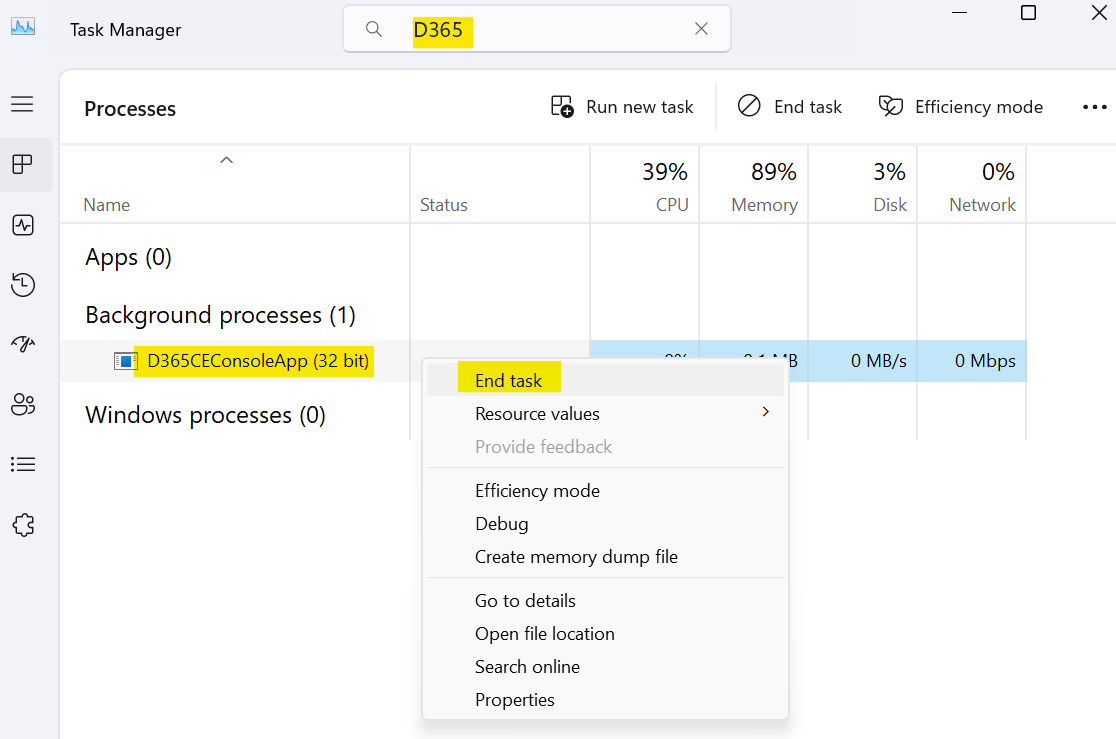
Once the process is closed, process is cleared from Task Manager.
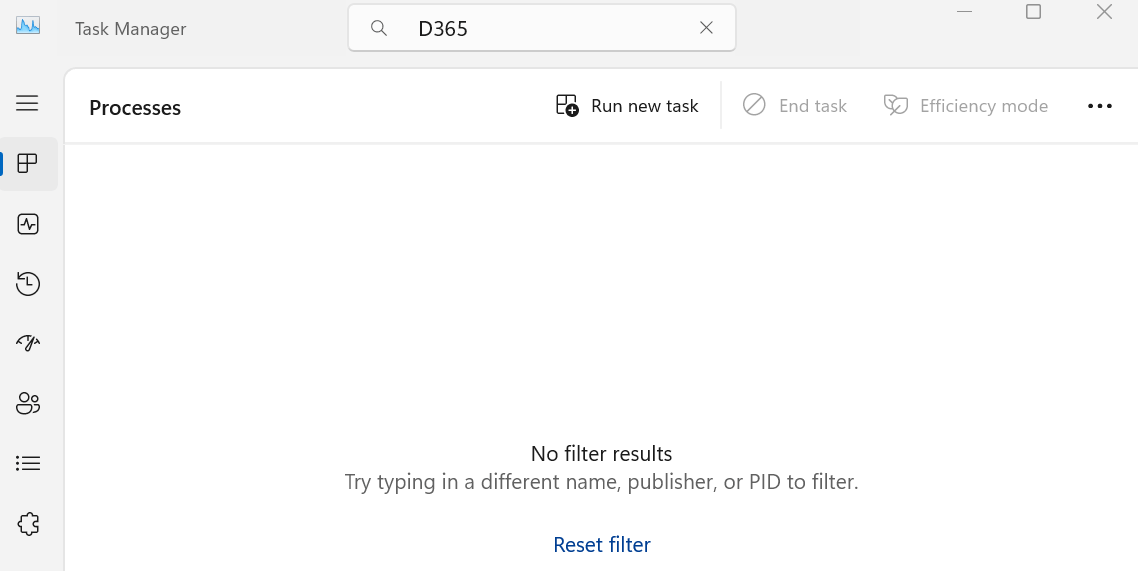
After this, I build and ran the console application, and it started working without any issue.

Hope you had followed the steps and resolved this issue.

Please like and share your valuable feedback on this article. Also, follow my blog to get my articles to your Inbox.

Graphic promoting a YouTube channel with the text 'Has my blog post helped you?' and buttons for 'WATCH', 'LEARN', and 'SUBSCRIBE'.

Below are my earlier articles that you can have a look.

How I Passed Microsoft AI Transformation Leader (AB‑731) Certification?

🚀 Free Microsoft Certification Voucher (AI Skills Fest 2026)

My AB‑730 Certification Experience: Preparation Guide, Exam Insights & Tips

LevelUp Microsoft Exam Vouchers: Eligibility & Rules (May 2026)

Explore Dataverse Tools: FetchXML Formatter Online by Arun Potti – JavaScript (JS) Example

Microsoft’s New AI Certifications for 2026: Full List, Retirements, and Replacement Paths

Boost Your CRM Productivity with Arun Potti’s FetchXML Formatter

Streamline FetchXML with Online Formatter for Dataverse Tools

Fixing Postman Connection Issues: A Step-by-Step Guide

Explore Microsoft AB-Series Certification: Skills for AI Roles

My first XRMToolBox Plugin: Dataverse Users, Security roles, Teams and Teams security roles

My first XRMToolBox Plugin: Dataverse Users, Security roles, Teams and Teams security roles (Usage)

My first XRMToolBox Plugin: Dataverse Users, Security roles, Teams and Teams security roles (Installation)

My first XRMToolBox Plugin: Dataverse Users, Security roles, Teams and Teams security roles (Overview)

Limited Time Offer: 50% Off Microsoft Certification Vouchers

How to send an automated email in Dataverse using Power Automate?

Understanding Activity Party Types in Dynamics 365 CE

How to configure donotreply email using Shared mailboxes in Dynamics 365 CE?

Microsoft Power Pages: The authentication key for your portal will expire

Microsoft Azure: You’re not eligible for an Azure free account

How to create Microsoft Azure 30 days trial?

Edit in Visual Studio Code for the Web in Power Apps Portals

Error: The object cannot be updated because it is read-only in Microsoft Power Apps

Resolved: Fix connections issue in Power Automate Flow

Clear all objects feature in Power Apps Solutions

Power Automate Error: The ‘inputs.parameters’ of workflow operation of type ‘OpenApiConnection’ is not valid.

Power Automate Error: To use FilteringAttributes, your trigger must include an Update event on Dataverse Trigger

Dynamics 365 CE Solution Import Failed in Azure DevOps Pipelines

Power Automate Error: Cannot write more bytes to the buffer than the configured maximum buffer size: 104857600

Error while opening a Tool in XRMToolBox

The Power Automate Cloud Flows Best Practices Whitepaper is now LIVE!

Error in Power Automate: There’s a problem that needs to be fixed to trigger this flow. To see more details, open Flow checker.

How to get the Dataverse Table’s first row from List Rows in Power Automate?

Microsoft Dataverse Accelerator – Part 2 – Installation

Microsoft Dataverse Accelerator – Part 1 – Introduction

How to get the Database Version of the Dataverse?

API playground feature not available in Dataverse Accelerator App?

How to Explore and test Dataverse in the Web API playground (preview)?

Web resource method does not exist in Dynamics 365 CE

How to get Environment Variable Value in Dynamics 365 CE using JavaScript?

Model-driven Apps – openAlertDialog – JavaScript – Code Snippet

Power Automate – Flow is not running on Trigger condition

Power Automate – Input field Delete option is disabled

Recipient of type ‘Contact’ with ID is marked as non-emailable

Preferred Solution | New feature | Microsoft Dataverse

New and Retired Microsoft Dynamics 365 Certifications

Environment settings behavior (Preview) feature in Model-driven Apps

Error while connecting to Dataverse environment in XrmToolBox

Power Fx Formula Columns in Microsoft Power Apps

How to Enable 2024 Release Wave 1 Updates in the Microsoft Dynamics 365 CE Environment?

Delete and Restore records (Preview) feature in Microsoft Dataverse

Microsoft Power App Environments Retention Period

How to Override the Model-driven app header colors?

Timeline Highlights (New feature) in Microsoft Power Apps

Model-driven App – Cannot “See associate records” option in the sub grid (arunpotti.com)

Bookmark the Important Dynamics 365 URLs

How to Enable Tenant-level analytics for Power Automate and Power Apps?

Microsoft Power Automate Copy and Paste Action in New DesignerHow to Setup Multi-Factor Authentication for your Microsoft Power Apps environment?

Microsoft Power Apps | Modern Themes | Preview feature

How to Download and Install the .NET Framework?

How to Create a SharePoint Site Online?

How to add and use Copilot answer control (Preview) in Microsoft Power Apps?

Dark Mode in Microsoft Power Apps

How to create Microsoft 365 E3 Trial for 30 days?

Refreshed look of solution dependencies in Dataverse Solutions

Microsoft Power Automate | Version History | Restore | New Feature

MICROSOFT LEARN – Artificial Intelligence Skills Challenge​ 2024!!!

Resolved – ‘InvokerConnectionOverrideFailed’ Error When a Power App Custom Page call a Power Automate Flow

How to Create Microsoft Power Apps Trial 30 days?

Not able to Create Power Automate Flow in Custom Page in Model-Driven App?

How to Enable Inline Actions feature in Microsoft Canvas Apps?

How to use /mention in Outlook web client for Dataverse records?

Associate Activities Multiple Related Records (Preview) feature in Microsoft Dynamics 365 CE

How to Enable Aggregation (preview) feature in Microsoft Power Apps?

Power Apps – Some components of this app require you to sign in. If you don’t sign in, part of the app may not work.

How to Enable the SQL Server stored procedures (preview) feature in the Power Apps?

How to get the Client Version of the Model Driven Apps?

How to get Microsoft 365 E3 Trial for 30 days?

How to Enable Copilot for Model-Driven apps feature in Dynamics 365 CE Environment?

[Resolved] Web resource method does not exist in Dynamics 365 CE JavaScript Error

How to Enable Blocking unmanaged customizations (Preview) feature in Dynamics 365 CE?

How to create Microsoft Power Apps Developer Plan Environment?

Microsoft Power Apps Developer Plan vs Power Apps Trial 30 days

What is Microsoft Power Apps Developer Plan?

[Resolved] PCF Field Control not showing anything in the PCF Test Environment?

[Issue Resolved] ReferenceError: Web resource method does not exist in Dynamics 365 CE Javascript Error

[Issue Resolved] Subcomponent cannot be added to the solution because the root component Template is missing in Dataverse

How to Turn Off the Modern Look in the Model Driven Apps?

How to Turn on the New modern, refreshed look for the Model-Driven apps?

Microsoft Power Apps – Apps filter feature

How to Create Microsoft Power Apps 30 days Online Trial Version and an Environment?

Microsoft Power Apps – Solutions filter Preview feature

How to Show the Power Automate complete Expressions?

Dataverse Error: Cannot start the requested operation [EntityCustomization] because there is another [PublishAll] running at this moment.

Power Automate Error: You should specify a contact or account.

How to get the Choice Text and Value in the Dataverse using JavaScript?

Microsoft Dataverse Low Code No Code Plugins

How to convert the Number String to Number Array?

How to Integrate Instant Plugins in the Power Automate Flow?

Power Apps – ‘actionname’ is an unknown or unsupported function in namespace ‘Environment’

Dataverse Browser V1.1.0.1 is available for Dataverse Plugin Debugging

How to Integrate Instant Plugins in the Canvas App?

How to Enable Access to Microsoft Dataverse Actions (Preview feature) in the Power Apps?

How to Create an Instant Plugin in the Dataverse Environment?

How to Install the Microsoft Dataverse Accelerator in the Dataverse Environment?

What is Microsoft Dataverse Accelerator?

How to get the Logged in User Information in the Power Apps?

How to Install Power Platform Tools in Visual Studio Code?

How to Install the Apps from the Microsoft AppSource to your Dataverse Environment?

Microsoft Power Apps Maker Portal has a new look

Microsoft Power Apps Emulator (New Feature)

How to Enable the Dataverse Offline (Experimental Feature) in the Canvas Apps?

How to set the Authoring Version in the Canvas App?

New version of Dataverse Browser is available for Dataverse Plugin Debugging

Latest Free Practice Assessments for Microsoft Certifications

Download CRM 365 V9.X Tools using PowerShell

How to set the Refresh cadence for a Power Platform Environment?

Update forms and views (Preview feature) in Dataverse

How to connect to Microsoft Dataverse in Power Automate Flow using Service principal?

How to Enable Copilot (Preview) feature in Canvas Apps?

How to Debug a Dataverse Plugin without Installing the Profiler in the Plugin Registration Tool?

How to Enable the Licenses (Preview) feature for a Power Platform Environment?

How to Enable Maker Welcome Content (preview) in Power Apps Maker Portal?

How to Enable Managed Environments for a Dataverse Environment?

How to Enable the Modern Controls (Preview feature) in the Canvas Apps?

How to Enable 2023 Release Wave 1 updates in the Dataverse Environment?

How to Deploy Enterprise Applications in the new Dataverse Environment?

What is Preview, Experimental and Retired features in Canvas Apps?

How to Enable the New Power Fx Formula Bar in Power Apps Studio?

Writing Power Fx formulas with natural language

Power Fx Formula Columns in Dataverse

Generating Power Fx formulas from examples

How to Create Dynamics 365 Marketing 30 Days Trial Version Online?

How to disable Multi-Factor Authentication (MFA) on Dynamics 365 Login?

How to Create Microsoft Power Apps 30 days Online Trial Version and an Environment?

  • ✇Microsoft Dynamics 365 CRM Tips and Tricks
  • Introducing Backup4Dynamics: Long-Term Backup and Recovery for Microsoft Dynamics 365!
    What happens when an important Microsoft Dynamics 365 CRM record disappears, and you realize it weeks or even months later? For many businesses, recovering historical CRM data isn’t as simple as creating regular backups. Accidental deletions, failed imports, integration issues, and long-term retention requirements can quickly expose gaps in a backup strategy. After years of working with Microsoft Dynamics 365 customers, we saw this challenge come up repeatedly. That’s what inspired us to build
     

Introducing Backup4Dynamics: Long-Term Backup and Recovery for Microsoft Dynamics 365!

Introducing Backup4Dynamics: Long-Term Backup and Recovery for Microsoft Dynamics 365!

What happens when an important Microsoft Dynamics 365 CRM record disappears, and you realize it weeks or even months later?

For many businesses, recovering historical CRM data isn’t as simple as creating regular backups. Accidental deletions, failed imports, integration issues, and long-term retention requirements can quickly expose gaps in a backup strategy.

After years of working with Microsoft Dynamics 365 customers, we saw this challenge come up repeatedly. That’s what inspired us to build Backup4Dynamics, a new Inogic app designed to help businesses protect, retain, and recover CRM data with greater confidence.

Key Takeaways

  • Meet Backup4Dynamics, Inogic’s backup and recovery solution for Microsoft Dynamics 365 CRM and Dataverse.
  • Protect CRM data from accidental deletions, failed imports, data corruption, and other unexpected data loss.
  • Automate backups and recover faster with scheduled, on-demand, incremental backups, and record-level restore.
  • Retain backup data for the long term while maintaining complete ownership with Bring Your Own Storage (BYOS).
  • Join the Backup4Dynamics Insider Program to get exclusive updates, early access opportunities, and product previews before the official launch.

The form can be filled in the actual website url.

Introducing Backup4Dynamics: The Ultimate Dynamics 365 Backup Solution

Backup4Dynamics is Inogic’s upcoming backup and recovery solution for Microsoft Dynamics 365 CRM and Dataverse, built to help businesses protect, retain, monitor, and recover business-critical CRM data.

As businesses continue to rely on Dynamics 365 for sales, customer service, and day-to-day operations, having a dependable backup strategy is no longer optional. Backup4Dynamics is designed to help you prepare for unexpected situations by giving you greater control over how your CRM data is backed up, retained, and recovered.

From automated backups and flexible retention to granular recovery and customer-owned storage, Backup4Dynamics brings together the capabilities businesses need to build a stronger, more reliable data protection strategy.

Let’s take a closer look at what sets Backup4Dynamics apart.

Why Do Businesses Need a Dedicated Dynamics 365 Backup Strategy?

Backup4Dynamics is built to do more than create backups. It’s designed to help businesses protect, retain, monitor, and recover Microsoft Dynamics 365 CRM data with greater flexibility and control. Every capability is built around the way organizations manage and protect business-critical CRM data.

1. Automated, On-Demand, and Incremental Backups

Schedule backups daily, weekly, or monthly based on your business needs, or create an on-demand backup before deployments, system updates, or bulk imports. Incremental backups capture only new and updated data after the initial backup, helping optimize storage and backup time.

2. Granular Recovery with Record-Level Restore

Recover individual records instead of restoring your entire CRM environment. Backup4Dynamics also supports point-in-time recovery, making it easier to recover data after accidental deletions, failed imports, integration issues, or data corruption.

3. Long-Term Backup Retention

Retain backup data for years or even a lifetime based on your organization’s retention requirements. Whether you need historical CRM data for business continuity, audits, or internal policies, your backups remain available when you need them.

4. Bring Your Own Storage (BYOS)

Keep your backup data in your own Azure Storage account. BYOS gives you greater ownership and control over where your backup data is stored while allowing you to manage your own storage environment.

5. Centralized Backup Monitoring

Monitor backup and restore activities from a single dashboard. View backup history, job status, restore activities, and alerts to stay informed about your backup operations.

Together, these capabilities make Backup4Dynamics a reliable backup and recovery solution for Microsoft Dynamics 365 CRM, giving your business greater confidence in how its data is protected and recovered.

How Backup4Dynamics Helps With Common Dynamics 365 Data-Loss Scenarios?

A backup solution should do more than create copies of your CRM data. It should help you protect business-critical information, recover quickly when issues occur, support business continuity, and maintain control over your backup environment. Backup4Dynamics is built with these priorities in mind.

1. Protect CRM Data from Unexpected Data Loss

Protect Microsoft Dynamics 365 CRM and Dataverse data from accidental deletions, failed imports, data corruption, and other unexpected data loss scenarios.

2. Automate Backup Operations

Schedule backups to run automatically or create on-demand backups before deployments, system updates, or bulk imports, reducing manual effort and helping keep your data protected.

3. Recover Data Faster

Recover individual records or restore data from a specific point in time, reducing downtime, avoiding full environment restores, and supporting business continuity.

4. Maintain Control of Your Backup Data

Store backup data securely in your own Azure Storage account with Bring Your Own Storage (BYOS), giving your organization complete ownership and control.

Backup4Dynamics combines automated backups, flexible recovery, long-term retention, and customer-owned storage to help businesses build a stronger Microsoft Dynamics 365 backup strategy.

Get Ready for Backup4Dynamics

Backup4Dynamics was built with one goal in mind: to give businesses greater confidence in how they protect and recover Microsoft Dynamics 365 CRM data.

From automated backups and long-term retention to granular recovery and customer-owned storage, Backup4Dynamics brings together the capabilities organizations need to build a stronger backup strategy.

We’re excited to introduce Backup4Dynamics to the Microsoft Dynamics 365 community and look forward to sharing more as we get closer to launch.

Be the First to Experience Backup4Dynamics

Don’t wait for the official launch. Join our Insider Program to receive exclusive previews, product updates, and early access opportunities before Backup4Dynamics becomes publicly available.

Join Now

Frequently Asked Questions (FAQs)

1. What is a Dynamics 365 backup solution?

A Dynamics 365 backup solution helps protect Microsoft Dynamics 365 CRM and Dataverse data by creating recoverable copies of records, attachments, and notes. Backup4Dynamics extends this with automated scheduled backups, on-demand and incremental backups, record-level restore, point-in-time recovery, long-term retention, and Bring Your Own Storage (BYOS).

2. How do you back up Microsoft Dynamics 365 CRM data?

Backup4Dynamics allows administrators to configure automated scheduled backups or create on-demand backups whenever needed. It also supports incremental backups, capturing only new and updated data after the initial backup.

3. How does Backup4Dynamics support Dynamics 365 backup and restore?

Backup4Dynamics supports automated backups along with record-level restore and point-in-time recovery, allowing businesses to recover specific CRM data without restoring the entire environment. This helps reduce downtime caused by accidental deletions, failed imports, integration issues, or data corruption.

4. What data can Backup4Dynamics protect?

Backup4Dynamics protects Microsoft Dynamics 365 CRM and Dataverse records, attachments, and notes, helping businesses retain and recover business-critical CRM data whenever required.

5. Why is long-term backup important for Dynamics 365 data?

This would work particularly well because long-term retention is one of Backup4Dynamics’s differentiators. You can explain that some organizations need access to historical data for audits, business continuity, internal policies, or other retention requirements.

6. Where does Backup4Dynamics store backup data?

Backup4Dynamics supports Bring Your Own Storage (BYOS), allowing organizations to store backup data securely in their own Azure Storage account. This gives businesses greater ownership and control over where their backup data resides.

The post Introducing Backup4Dynamics: Long-Term Backup and Recovery for Microsoft Dynamics 365! first appeared on Microsoft Dynamics 365 CRM Tips and Tricks.

  • ✇Arun Potti's Power Platform blog
  • My AB‑730 Certification Experience: How I Prepared, What I Learned, and Tips for You
    Clearing the AB‑730: AI Business Professional certification has been one of the most rewarding learning experiences in my AI journey. This exam is designed for professionals who want to understand how to use Microsoft Copilot, Agentic AI, and AI‑driven business workflows to solve real‑world problems. In this post, I’m sharing my preparation path, key takeaways, and practical tips that will help anyone planning to take AB‑730.Why I Chose AB‑730: As someone deeply involved in Mic
     

My AB‑730 Certification Experience: How I Prepared, What I Learned, and Tips for You

Clearing the AB‑730: AI Business Professional certification has been one of the most rewarding learning experiences in my AI journey. This exam is designed for professionals who want to understand how to use Microsoft Copilot, Agentic AI, and AI‑driven business workflows to solve real‑world problems.

In this post, I’m sharing my preparation path, key takeaways, and practical tips that will help anyone planning to take AB‑730.

Why I Chose AB‑730:

As someone deeply involved in Microsoft 365, Power Platform, and AI‑driven productivity, AB‑730 felt like the perfect certification to validate my skills. It focuses on:

  • Applying Copilot in day‑to‑day business scenarios
  • Understanding AI capabilities across Microsoft 365
  • Choosing the right Copilot for the right task
  • Improving workflows using AI reasoning and orchestration

It’s not a technical exam – it’s about practical AI usage, decision‑making, and business impact.

My Preparation Path

I followed the official Microsoft Learn certification path, which is more than enough to prepare you thoroughly. The learning modules are structured, scenario‑based, and aligned directly with the exam.

What I used:

  • Microsoft Learn AB‑730 learning path
  • Microsoft AB 730 free Practice Assessment (which has 50 questions)
  • Hands‑on practice with Microsoft 365 Copilot
  • Real business scenarios from my daily work

The Learn modules helped me understand the concepts, but the real confidence came from using Copilot in real workflows – writing emails, analyzing data, summarizing documents, and automating tasks.

AB 730 and AB 731 Certification Course completed on Technofocus | Skill Up with Level Up with a Test. This helped me a lot to gain more knowledge on the exam.

For revision I followed the below YouTube video,

AB-730 Microsoft AI Business Professional Exam Revision Guide

What the Exam Felt Like

The exam focuses on practical understanding, not memorization. Expect questions around:

  • Choosing the right Copilot (M365 Copilot, Copilot Studio, Copilot Chat, etc.)
  • Identifying the best AI capability for a scenario
  • Understanding how AI reasoning improves business workflows
  • Recognizing governance and responsible AI considerations
  • Applying Copilot to solve business problems

If you’ve used Copilot in real scenarios, the exam feels intuitive.

My Key Takeaways

1. Copilot is more than a chatbot

The exam emphasizes Copilot as a reasoning engine that can analyze, summarize, generate, and orchestrate tasks.

2. Business context matters

Many questions test whether you can choose the right Copilot for the right scenario.

3. Governance and responsible AI are essential

Even though AB‑730 is business‑focused, you still need to understand the basics of data boundaries, safety, and compliance.

4. Real usage beats theory

Using Copilot daily helped me answer scenario questions confidently.

Tips for Anyone Preparing

Here’s what I wish I knew earlier:

  • Complete the Microsoft Learn path end‑to‑end — it covers everything.
  • Practice using Copilot in Word, Excel, Outlook, Teams, and Edge.
  • Focus on scenarios, not definitions.
  • Understand the differences between Copilot types (M365 Copilot, Copilot Studio, Copilot Chat, etc.).
  • Review governance basics – data access, boundaries, and responsible AI.
  • Don’t overthink – the exam is practical and straightforward.

Final Thoughts

AB‑730 is a fantastic certification for anyone who wants to become an AI‑empowered business professional. It validates your ability to use Copilot effectively, make informed decisions, and drive AI adoption in your organization.

If you’re already using Microsoft 365 Copilot or planning to, this certification is absolutely worth it.

Also, if you had not enrolled for the free certification voucher for this exam. Follow the below article and complete the course it before 31st May 2026.

LevelUp Microsoft Exam Vouchers: Eligibility & Rules (May 2026)

Hope you had liked this article about AB 730 Certification.

Please like and share your valuable feedback on this article. Also, follow my blog to get my articles to your Inbox.

Graphic promoting a YouTube channel with the text 'Has my blog post helped you?' and buttons for 'WATCH', 'LEARN', and 'SUBSCRIBE'.

Below are my earlier articles that you can have a look.

LevelUp Microsoft Exam Vouchers: Eligibility & Rules (May 2026)

Explore Dataverse Tools: FetchXML Formatter Online by Arun Potti – JavaScript (JS) Example

Microsoft’s New AI Certifications for 2026: Full List, Retirements, and Replacement Paths

Boost Your CRM Productivity with Arun Potti’s FetchXML Formatter

Streamline FetchXML with Online Formatter for Dataverse Tools

Fixing Postman Connection Issues: A Step-by-Step Guide

Explore Microsoft AB-Series Certification: Skills for AI Roles

My first XRMToolBox Plugin: Dataverse Users, Security roles, Teams and Teams security roles

My first XRMToolBox Plugin: Dataverse Users, Security roles, Teams and Teams security roles (Usage)

My first XRMToolBox Plugin: Dataverse Users, Security roles, Teams and Teams security roles (Installation)

My first XRMToolBox Plugin: Dataverse Users, Security roles, Teams and Teams security roles (Overview)

Limited Time Offer: 50% Off Microsoft Certification Vouchers

How to send an automated email in Dataverse using Power Automate?

Understanding Activity Party Types in Dynamics 365 CE

How to configure donotreply email using Shared mailboxes in Dynamics 365 CE?

Microsoft Power Pages: The authentication key for your portal will expire

Microsoft Azure: You’re not eligible for an Azure free account

How to create Microsoft Azure 30 days trial?

Edit in Visual Studio Code for the Web in Power Apps Portals

Error: The object cannot be updated because it is read-only in Microsoft Power Apps

Resolved: Fix connections issue in Power Automate Flow

Clear all objects feature in Power Apps Solutions

Power Automate Error: The ‘inputs.parameters’ of workflow operation of type ‘OpenApiConnection’ is not valid.

Power Automate Error: To use FilteringAttributes, your trigger must include an Update event on Dataverse Trigger

Dynamics 365 CE Solution Import Failed in Azure DevOps Pipelines

Power Automate Error: Cannot write more bytes to the buffer than the configured maximum buffer size: 104857600

Error while opening a Tool in XRMToolBox

The Power Automate Cloud Flows Best Practices Whitepaper is now LIVE!

Error in Power Automate: There’s a problem that needs to be fixed to trigger this flow. To see more details, open Flow checker.

How to get the Dataverse Table’s first row from List Rows in Power Automate?

Microsoft Dataverse Accelerator – Part 2 – Installation

Microsoft Dataverse Accelerator – Part 1 – Introduction

How to get the Database Version of the Dataverse?

API playground feature not available in Dataverse Accelerator App?

How to Explore and test Dataverse in the Web API playground (preview)?

Web resource method does not exist in Dynamics 365 CE

How to get Environment Variable Value in Dynamics 365 CE using JavaScript?

Model-driven Apps – openAlertDialog – JavaScript – Code Snippet

Power Automate – Flow is not running on Trigger condition

Power Automate – Input field Delete option is disabled

Recipient of type ‘Contact’ with ID is marked as non-emailable

Preferred Solution | New feature | Microsoft Dataverse

New and Retired Microsoft Dynamics 365 Certifications

Environment settings behavior (Preview) feature in Model-driven Apps

Error while connecting to Dataverse environment in XrmToolBox

Power Fx Formula Columns in Microsoft Power Apps

How to Enable 2024 Release Wave 1 Updates in the Microsoft Dynamics 365 CE Environment?

Delete and Restore records (Preview) feature in Microsoft Dataverse

Microsoft Power App Environments Retention Period

How to Override the Model-driven app header colors?

Timeline Highlights (New feature) in Microsoft Power Apps

Model-driven App – Cannot “See associate records” option in the sub grid (arunpotti.com)

Bookmark the Important Dynamics 365 URLs

How to Enable Tenant-level analytics for Power Automate and Power Apps?

Microsoft Power Automate Copy and Paste Action in New DesignerHow to Setup Multi-Factor Authentication for your Microsoft Power Apps environment?

Microsoft Power Apps | Modern Themes | Preview feature

How to Download and Install the .NET Framework?

How to Create a SharePoint Site Online?

How to add and use Copilot answer control (Preview) in Microsoft Power Apps?

Dark Mode in Microsoft Power Apps

How to create Microsoft 365 E3 Trial for 30 days?

Refreshed look of solution dependencies in Dataverse Solutions

Microsoft Power Automate | Version History | Restore | New Feature

MICROSOFT LEARN – Artificial Intelligence Skills Challenge​ 2024!!!

Resolved – ‘InvokerConnectionOverrideFailed’ Error When a Power App Custom Page call a Power Automate Flow

How to Create Microsoft Power Apps Trial 30 days?

Not able to Create Power Automate Flow in Custom Page in Model-Driven App?

How to Enable Inline Actions feature in Microsoft Canvas Apps?

How to use /mention in Outlook web client for Dataverse records?

Associate Activities Multiple Related Records (Preview) feature in Microsoft Dynamics 365 CE

How to Enable Aggregation (preview) feature in Microsoft Power Apps?

Power Apps – Some components of this app require you to sign in. If you don’t sign in, part of the app may not work.

How to Enable the SQL Server stored procedures (preview) feature in the Power Apps?

How to get the Client Version of the Model Driven Apps?

How to get Microsoft 365 E3 Trial for 30 days?

How to Enable Copilot for Model-Driven apps feature in Dynamics 365 CE Environment?

[Resolved] Web resource method does not exist in Dynamics 365 CE JavaScript Error

How to Enable Blocking unmanaged customizations (Preview) feature in Dynamics 365 CE?

How to create Microsoft Power Apps Developer Plan Environment?

Microsoft Power Apps Developer Plan vs Power Apps Trial 30 days

What is Microsoft Power Apps Developer Plan?

[Resolved] PCF Field Control not showing anything in the PCF Test Environment?

[Issue Resolved] ReferenceError: Web resource method does not exist in Dynamics 365 CE Javascript Error

[Issue Resolved] Subcomponent cannot be added to the solution because the root component Template is missing in Dataverse

How to Turn Off the Modern Look in the Model Driven Apps?

How to Turn on the New modern, refreshed look for the Model-Driven apps?

Microsoft Power Apps – Apps filter feature

How to Create Microsoft Power Apps 30 days Online Trial Version and an Environment?

Microsoft Power Apps – Solutions filter Preview feature

How to Show the Power Automate complete Expressions?

Dataverse Error: Cannot start the requested operation [EntityCustomization] because there is another [PublishAll] running at this moment.

Power Automate Error: You should specify a contact or account.

How to get the Choice Text and Value in the Dataverse using JavaScript?

Microsoft Dataverse Low Code No Code Plugins

How to convert the Number String to Number Array?

How to Integrate Instant Plugins in the Power Automate Flow?

Power Apps – ‘actionname’ is an unknown or unsupported function in namespace ‘Environment’

Dataverse Browser V1.1.0.1 is available for Dataverse Plugin Debugging

How to Integrate Instant Plugins in the Canvas App?

How to Enable Access to Microsoft Dataverse Actions (Preview feature) in the Power Apps?

How to Create an Instant Plugin in the Dataverse Environment?

How to Install the Microsoft Dataverse Accelerator in the Dataverse Environment?

What is Microsoft Dataverse Accelerator?

How to get the Logged in User Information in the Power Apps?

How to Install Power Platform Tools in Visual Studio Code?

How to Install the Apps from the Microsoft AppSource to your Dataverse Environment?

Microsoft Power Apps Maker Portal has a new look

Microsoft Power Apps Emulator (New Feature)

How to Enable the Dataverse Offline (Experimental Feature) in the Canvas Apps?

How to set the Authoring Version in the Canvas App?

New version of Dataverse Browser is available for Dataverse Plugin Debugging

Latest Free Practice Assessments for Microsoft Certifications

Download CRM 365 V9.X Tools using PowerShell

How to set the Refresh cadence for a Power Platform Environment?

Update forms and views (Preview feature) in Dataverse

How to connect to Microsoft Dataverse in Power Automate Flow using Service principal?

How to Enable Copilot (Preview) feature in Canvas Apps?

How to Debug a Dataverse Plugin without Installing the Profiler in the Plugin Registration Tool?

How to Enable the Licenses (Preview) feature for a Power Platform Environment?

How to Enable Maker Welcome Content (preview) in Power Apps Maker Portal?

How to Enable Managed Environments for a Dataverse Environment?

How to Enable the Modern Controls (Preview feature) in the Canvas Apps?

How to Enable 2023 Release Wave 1 updates in the Dataverse Environment?

How to Deploy Enterprise Applications in the new Dataverse Environment?

What is Preview, Experimental and Retired features in Canvas Apps?

How to Enable the New Power Fx Formula Bar in Power Apps Studio?

Writing Power Fx formulas with natural language

Power Fx Formula Columns in Dataverse

Generating Power Fx formulas from examples

How to Create Dynamics 365 Marketing 30 Days Trial Version Online?

How to disable Multi-Factor Authentication (MFA) on Dynamics 365 Login?

How to Create Microsoft Power Apps 30 days Online Trial Version and an Environment?

Explore Dataverse Tools: FetchXML Formatter Online by Arun Potti – JavaScript (JS) Example

In my earlier articles, I had explained about,

What is Arun Potti’s FetchXML Formatter – Tool

How to use Arun Potti’s FetchXML Formatter Tool

and now in this article, I explain about how to retrieve the data using JS and FetchXML using Arun Potti’s FetchXML Formatter Tool.

Requirement: Retrieve all the Active Contacts created in last 1 hour.

Solution: Follow the below steps.

Step 1: Below is the JavaScript code (Without FetchXML), to fetch all the Active contacts created in last 1 hour.

Step 2: Copy and Paste the JS code into the fetchXML variable (FetchXML sample is from my previous article Step 5 in Explore Dataverse Tools: FetchXML Formatter Online by Arun Potti – Usage).

After updating it, the final JavaScript looks like the below.

async function getContacts() {
try {
// Use with Xrm.WebApi.retrieveMultipleRecords or equivalent.
const fetchXml = "<fetch version='1.0' output-format='xml-platform' mapping='logical' distinct='false'>" +
" <entity name='contact'>" +
" <attribute name='fullname'/>" +
" <attribute name='address1_composite'/>" +
" <attribute name='mobilephone'/>" +
" <attribute name='birthdate'/>" +
" <attribute name='contactid'/>" +
" <order attribute='fullname' descending='false'/>" +
" <filter type='and'>" +
" <condition attribute='createdon' operator='last-x-hours' value='1'/>" +
" <condition attribute='statecode' operator='eq' value='0'/>" +
" </filter>" +
" </entity>" +
"</fetch>";
const encoded = encodeURIComponent(fetchXml);
const response = await Xrm.WebApi.retrieveMultipleRecords(
"contact",
"?fetchXml=" + encoded
);
console.log("All Active Contacts created in last 1 hour");
response.entities.forEach(cnt => {
console.log(`Contact: ${cnt.fullname} (${cnt.contactid})`);
});
} catch (err) {
console.error("Error while fetching the Contacts in getContacts(): ", err);
}
}

Step 3: Configured the below Script on On Load of Contact Form.

Step 4: Open any Contact record in a Model-driven app. Right Click anywhere on the screen and click on Inspect and Click on Console to check the data.

I hope you had successfully retrieved the data using Arun Potti’s FetchXML Formatter, Fetchxml and JS code.

In the next article, will explain how to use them in real code C# and Web API and get the desired results.

Please like and share your valuable feedback on this article. Also, follow my blog to get my articles to your Inbox.

Graphic promoting a YouTube channel with the text 'Has my blog post helped you?' and buttons for 'WATCH', 'LEARN', and 'SUBSCRIBE'.

Below are my earlier articles that you can have a look.

Microsoft’s New AI Certifications for 2026: Full List, Retirements, and Replacement Paths

Boost Your CRM Productivity with Arun Potti’s FetchXML Formatter

Streamline FetchXML with Online Formatter for Dataverse Tools

Fixing Postman Connection Issues: A Step-by-Step Guide

Explore Microsoft AB-Series Certification: Skills for AI Roles

My first XRMToolBox Plugin: Dataverse Users, Security roles, Teams and Teams security roles

My first XRMToolBox Plugin: Dataverse Users, Security roles, Teams and Teams security roles (Usage)

My first XRMToolBox Plugin: Dataverse Users, Security roles, Teams and Teams security roles (Installation)

My first XRMToolBox Plugin: Dataverse Users, Security roles, Teams and Teams security roles (Overview)

Limited Time Offer: 50% Off Microsoft Certification Vouchers

How to send an automated email in Dataverse using Power Automate?

Understanding Activity Party Types in Dynamics 365 CE

How to configure donotreply email using Shared mailboxes in Dynamics 365 CE?

Microsoft Power Pages: The authentication key for your portal will expire

Microsoft Azure: You’re not eligible for an Azure free account

How to create Microsoft Azure 30 days trial?

Edit in Visual Studio Code for the Web in Power Apps Portals

Error: The object cannot be updated because it is read-only in Microsoft Power Apps

Resolved: Fix connections issue in Power Automate Flow

Clear all objects feature in Power Apps Solutions

Power Automate Error: The ‘inputs.parameters’ of workflow operation of type ‘OpenApiConnection’ is not valid.

Power Automate Error: To use FilteringAttributes, your trigger must include an Update event on Dataverse Trigger

Dynamics 365 CE Solution Import Failed in Azure DevOps Pipelines

Power Automate Error: Cannot write more bytes to the buffer than the configured maximum buffer size: 104857600

Error while opening a Tool in XRMToolBox

The Power Automate Cloud Flows Best Practices Whitepaper is now LIVE!

Error in Power Automate: There’s a problem that needs to be fixed to trigger this flow. To see more details, open Flow checker.

How to get the Dataverse Table’s first row from List Rows in Power Automate?

Microsoft Dataverse Accelerator – Part 2 – Installation

Microsoft Dataverse Accelerator – Part 1 – Introduction

How to get the Database Version of the Dataverse?

API playground feature not available in Dataverse Accelerator App?

How to Explore and test Dataverse in the Web API playground (preview)?

Web resource method does not exist in Dynamics 365 CE

How to get Environment Variable Value in Dynamics 365 CE using JavaScript?

Model-driven Apps – openAlertDialog – JavaScript – Code Snippet

Power Automate – Flow is not running on Trigger condition

Power Automate – Input field Delete option is disabled

Recipient of type ‘Contact’ with ID is marked as non-emailable

Preferred Solution | New feature | Microsoft Dataverse

New and Retired Microsoft Dynamics 365 Certifications

Environment settings behavior (Preview) feature in Model-driven Apps

Error while connecting to Dataverse environment in XrmToolBox

Power Fx Formula Columns in Microsoft Power Apps

How to Enable 2024 Release Wave 1 Updates in the Microsoft Dynamics 365 CE Environment?

Delete and Restore records (Preview) feature in Microsoft Dataverse

Microsoft Power App Environments Retention Period

How to Override the Model-driven app header colors?

Timeline Highlights (New feature) in Microsoft Power Apps

Model-driven App – Cannot “See associate records” option in the sub grid (arunpotti.com)

Bookmark the Important Dynamics 365 URLs

How to Enable Tenant-level analytics for Power Automate and Power Apps?

Microsoft Power Automate Copy and Paste Action in New DesignerHow to Setup Multi-Factor Authentication for your Microsoft Power Apps environment?

Microsoft Power Apps | Modern Themes | Preview feature

How to Download and Install the .NET Framework?

How to Create a SharePoint Site Online?

How to add and use Copilot answer control (Preview) in Microsoft Power Apps?

Dark Mode in Microsoft Power Apps

How to create Microsoft 365 E3 Trial for 30 days?

Refreshed look of solution dependencies in Dataverse Solutions

Microsoft Power Automate | Version History | Restore | New Feature

MICROSOFT LEARN – Artificial Intelligence Skills Challenge​ 2024!!!

Resolved – ‘InvokerConnectionOverrideFailed’ Error When a Power App Custom Page call a Power Automate Flow

How to Create Microsoft Power Apps Trial 30 days?

Not able to Create Power Automate Flow in Custom Page in Model-Driven App?

How to Enable Inline Actions feature in Microsoft Canvas Apps?

How to use /mention in Outlook web client for Dataverse records?

Associate Activities Multiple Related Records (Preview) feature in Microsoft Dynamics 365 CE

How to Enable Aggregation (preview) feature in Microsoft Power Apps?

Power Apps – Some components of this app require you to sign in. If you don’t sign in, part of the app may not work.

How to Enable the SQL Server stored procedures (preview) feature in the Power Apps?

How to get the Client Version of the Model Driven Apps?

How to get Microsoft 365 E3 Trial for 30 days?

How to Enable Copilot for Model-Driven apps feature in Dynamics 365 CE Environment?

[Resolved] Web resource method does not exist in Dynamics 365 CE JavaScript Error

How to Enable Blocking unmanaged customizations (Preview) feature in Dynamics 365 CE?

How to create Microsoft Power Apps Developer Plan Environment?

Microsoft Power Apps Developer Plan vs Power Apps Trial 30 days

What is Microsoft Power Apps Developer Plan?

[Resolved] PCF Field Control not showing anything in the PCF Test Environment?

[Issue Resolved] ReferenceError: Web resource method does not exist in Dynamics 365 CE Javascript Error

[Issue Resolved] Subcomponent cannot be added to the solution because the root component Template is missing in Dataverse

How to Turn Off the Modern Look in the Model Driven Apps?

How to Turn on the New modern, refreshed look for the Model-Driven apps?

Microsoft Power Apps – Apps filter feature

How to Create Microsoft Power Apps 30 days Online Trial Version and an Environment?

Microsoft Power Apps – Solutions filter Preview feature

How to Show the Power Automate complete Expressions?

Dataverse Error: Cannot start the requested operation [EntityCustomization] because there is another [PublishAll] running at this moment.

Power Automate Error: You should specify a contact or account.

How to get the Choice Text and Value in the Dataverse using JavaScript?

Microsoft Dataverse Low Code No Code Plugins

How to convert the Number String to Number Array?

How to Integrate Instant Plugins in the Power Automate Flow?

Power Apps – ‘actionname’ is an unknown or unsupported function in namespace ‘Environment’

Dataverse Browser V1.1.0.1 is available for Dataverse Plugin Debugging

How to Integrate Instant Plugins in the Canvas App?

How to Enable Access to Microsoft Dataverse Actions (Preview feature) in the Power Apps?

How to Create an Instant Plugin in the Dataverse Environment?

How to Install the Microsoft Dataverse Accelerator in the Dataverse Environment?

What is Microsoft Dataverse Accelerator?

How to get the Logged in User Information in the Power Apps?

How to Install Power Platform Tools in Visual Studio Code?

How to Install the Apps from the Microsoft AppSource to your Dataverse Environment?

Microsoft Power Apps Maker Portal has a new look

Microsoft Power Apps Emulator (New Feature)

How to Enable the Dataverse Offline (Experimental Feature) in the Canvas Apps?

How to set the Authoring Version in the Canvas App?

New version of Dataverse Browser is available for Dataverse Plugin Debugging

Latest Free Practice Assessments for Microsoft Certifications

Download CRM 365 V9.X Tools using PowerShell

How to set the Refresh cadence for a Power Platform Environment?

Update forms and views (Preview feature) in Dataverse

How to connect to Microsoft Dataverse in Power Automate Flow using Service principal?

How to Enable Copilot (Preview) feature in Canvas Apps?

How to Debug a Dataverse Plugin without Installing the Profiler in the Plugin Registration Tool?

How to Enable the Licenses (Preview) feature for a Power Platform Environment?

How to Enable Maker Welcome Content (preview) in Power Apps Maker Portal?

How to Enable Managed Environments for a Dataverse Environment?

How to Enable the Modern Controls (Preview feature) in the Canvas Apps?

How to Enable 2023 Release Wave 1 updates in the Dataverse Environment?

How to Deploy Enterprise Applications in the new Dataverse Environment?

What is Preview, Experimental and Retired features in Canvas Apps?

How to Enable the New Power Fx Formula Bar in Power Apps Studio?

Writing Power Fx formulas with natural language

Power Fx Formula Columns in Dataverse

Generating Power Fx formulas from examples

How to Create Dynamics 365 Marketing 30 Days Trial Version Online?

How to disable Multi-Factor Authentication (MFA) on Dynamics 365 Login?

How to Create Microsoft Power Apps 30 days Online Trial Version and an Environment?

  • ✇Arun Potti's Power Platform blog
  • Explore Dataverse Tools: FetchXML Formatter Online by Arun Potti – Usage
    In my previous article, I had explained about Arun Potti’s FetchXML Formatter and in this article, will explain about how to use this Tool. Requirement: Get all the Active Contacts created in the last 1 hour using JS, C# and Web API. Solution: Follow the below steps, Step 1: Click on the below link to open the Arun Potti’s FetchXML formatter. Arun Potti’s FetchXML Formatter Step 2: Open the Advanced Find and Select the conditions as mentioned below. Look for:
     

Explore Dataverse Tools: FetchXML Formatter Online by Arun Potti – Usage

In my previous article, I had explained about Arun Potti’s FetchXML Formatter and in this article, will explain about how to use this Tool.

Requirement: Get all the Active Contacts created in the last 1 hour using JS, C# and Web API.

Solution:

Follow the below steps,

Step 1: Click on the below link to open the Arun Potti’s FetchXML formatter.

Arun Potti’s FetchXML Formatter

Step 2: Open the Advanced Find and Select the conditions as mentioned below.

Look for: Contacts

Conditions:

Created On – Last X Hours – 1
Status Equals Active

Step 3: Click on Download Fetch XML.

Step 4: Click on Open file.

Step 5: Select and copy the downloaded FetchXML.

FetchXML Code:

<fetch version="1.0" output-format="xml-platform" mapping="logical" distinct="false">
<entity name="contact">
<attribute name="fullname"/>
<attribute name="address1_composite"/>
<attribute name="mobilephone"/>
<attribute name="birthdate"/>
<attribute name="contactid"/>
<order attribute="fullname" descending="false"/>
<filter type="and">
<condition attribute="createdon" operator="last-x-hours" value="1"/>
<condition attribute="statecode" operator="eq" value="0"/>
</filter>
</entity>
</fetch>

Step 6: Paste the copied FetchXML in the FetchXML Input in the Arun Potti’s FetchXML formatter mentioned in the Step 1.

After the FetchXML input is provided, the tool automatically produces fully formatted JavaScript, C#, and Web API code snippets in the Generated Code section for the direct implementation.

Hope you have successfully downloaded the required FetchXML, provided the Input and saw all the outputs.

In the next article, will explain how to use them in real code JS, C# and Web API and get the desired results.

Please like and share your valuable feedback on this article. Also, follow my blog to get my articles to your Inbox.

Graphic promoting a YouTube channel with the text 'Has my blog post helped you?' and buttons for 'WATCH', 'LEARN', and 'SUBSCRIBE'.

Below are my earlier articles that you can have a look.

Streamline FetchXML with Online Formatter for Dataverse Tools

Fixing Postman Connection Issues: A Step-by-Step Guide

Explore Microsoft AB-Series Certification: Skills for AI Roles

My first XRMToolBox Plugin: Dataverse Users, Security roles, Teams and Teams security roles

My first XRMToolBox Plugin: Dataverse Users, Security roles, Teams and Teams security roles (Usage)

My first XRMToolBox Plugin: Dataverse Users, Security roles, Teams and Teams security roles (Installation)

My first XRMToolBox Plugin: Dataverse Users, Security roles, Teams and Teams security roles (Overview)

Limited Time Offer: 50% Off Microsoft Certification Vouchers

How to send an automated email in Dataverse using Power Automate?

Understanding Activity Party Types in Dynamics 365 CE

How to configure donotreply email using Shared mailboxes in Dynamics 365 CE?

Microsoft Power Pages: The authentication key for your portal will expire

Microsoft Azure: You’re not eligible for an Azure free account

How to create Microsoft Azure 30 days trial?

Edit in Visual Studio Code for the Web in Power Apps Portals

Error: The object cannot be updated because it is read-only in Microsoft Power Apps

Resolved: Fix connections issue in Power Automate Flow

Clear all objects feature in Power Apps Solutions

Power Automate Error: The ‘inputs.parameters’ of workflow operation of type ‘OpenApiConnection’ is not valid.

Power Automate Error: To use FilteringAttributes, your trigger must include an Update event on Dataverse Trigger

Dynamics 365 CE Solution Import Failed in Azure DevOps Pipelines

Power Automate Error: Cannot write more bytes to the buffer than the configured maximum buffer size: 104857600

Error while opening a Tool in XRMToolBox

The Power Automate Cloud Flows Best Practices Whitepaper is now LIVE!

Error in Power Automate: There’s a problem that needs to be fixed to trigger this flow. To see more details, open Flow checker.

How to get the Dataverse Table’s first row from List Rows in Power Automate?

Microsoft Dataverse Accelerator – Part 2 – Installation

Microsoft Dataverse Accelerator – Part 1 – Introduction

How to get the Database Version of the Dataverse?

API playground feature not available in Dataverse Accelerator App?

How to Explore and test Dataverse in the Web API playground (preview)?

Web resource method does not exist in Dynamics 365 CE

How to get Environment Variable Value in Dynamics 365 CE using JavaScript?

Model-driven Apps – openAlertDialog – JavaScript – Code Snippet

Power Automate – Flow is not running on Trigger condition

Power Automate – Input field Delete option is disabled

Recipient of type ‘Contact’ with ID is marked as non-emailable

Preferred Solution | New feature | Microsoft Dataverse

New and Retired Microsoft Dynamics 365 Certifications

Environment settings behavior (Preview) feature in Model-driven Apps

Error while connecting to Dataverse environment in XrmToolBox

Power Fx Formula Columns in Microsoft Power Apps

How to Enable 2024 Release Wave 1 Updates in the Microsoft Dynamics 365 CE Environment?

Delete and Restore records (Preview) feature in Microsoft Dataverse

Microsoft Power App Environments Retention Period

How to Override the Model-driven app header colors?

Timeline Highlights (New feature) in Microsoft Power Apps

Model-driven App – Cannot “See associate records” option in the sub grid (arunpotti.com)

Bookmark the Important Dynamics 365 URLs

How to Enable Tenant-level analytics for Power Automate and Power Apps?

Microsoft Power Automate Copy and Paste Action in New DesignerHow to Setup Multi-Factor Authentication for your Microsoft Power Apps environment?

Microsoft Power Apps | Modern Themes | Preview feature

How to Download and Install the .NET Framework?

How to Create a SharePoint Site Online?

How to add and use Copilot answer control (Preview) in Microsoft Power Apps?

Dark Mode in Microsoft Power Apps

How to create Microsoft 365 E3 Trial for 30 days?

Refreshed look of solution dependencies in Dataverse Solutions

Microsoft Power Automate | Version History | Restore | New Feature

MICROSOFT LEARN – Artificial Intelligence Skills Challenge​ 2024!!!

Resolved – ‘InvokerConnectionOverrideFailed’ Error When a Power App Custom Page call a Power Automate Flow

How to Create Microsoft Power Apps Trial 30 days?

Not able to Create Power Automate Flow in Custom Page in Model-Driven App?

How to Enable Inline Actions feature in Microsoft Canvas Apps?

How to use /mention in Outlook web client for Dataverse records?

Associate Activities Multiple Related Records (Preview) feature in Microsoft Dynamics 365 CE

How to Enable Aggregation (preview) feature in Microsoft Power Apps?

Power Apps – Some components of this app require you to sign in. If you don’t sign in, part of the app may not work.

How to Enable the SQL Server stored procedures (preview) feature in the Power Apps?

How to get the Client Version of the Model Driven Apps?

How to get Microsoft 365 E3 Trial for 30 days?

How to Enable Copilot for Model-Driven apps feature in Dynamics 365 CE Environment?

[Resolved] Web resource method does not exist in Dynamics 365 CE JavaScript Error

How to Enable Blocking unmanaged customizations (Preview) feature in Dynamics 365 CE?

How to create Microsoft Power Apps Developer Plan Environment?

Microsoft Power Apps Developer Plan vs Power Apps Trial 30 days

What is Microsoft Power Apps Developer Plan?

[Resolved] PCF Field Control not showing anything in the PCF Test Environment?

[Issue Resolved] ReferenceError: Web resource method does not exist in Dynamics 365 CE Javascript Error

[Issue Resolved] Subcomponent cannot be added to the solution because the root component Template is missing in Dataverse

How to Turn Off the Modern Look in the Model Driven Apps?

How to Turn on the New modern, refreshed look for the Model-Driven apps?

Microsoft Power Apps – Apps filter feature

How to Create Microsoft Power Apps 30 days Online Trial Version and an Environment?

Microsoft Power Apps – Solutions filter Preview feature

How to Show the Power Automate complete Expressions?

Dataverse Error: Cannot start the requested operation [EntityCustomization] because there is another [PublishAll] running at this moment.

Power Automate Error: You should specify a contact or account.

How to get the Choice Text and Value in the Dataverse using JavaScript?

Microsoft Dataverse Low Code No Code Plugins

How to convert the Number String to Number Array?

How to Integrate Instant Plugins in the Power Automate Flow?

Power Apps – ‘actionname’ is an unknown or unsupported function in namespace ‘Environment’

Dataverse Browser V1.1.0.1 is available for Dataverse Plugin Debugging

How to Integrate Instant Plugins in the Canvas App?

How to Enable Access to Microsoft Dataverse Actions (Preview feature) in the Power Apps?

How to Create an Instant Plugin in the Dataverse Environment?

How to Install the Microsoft Dataverse Accelerator in the Dataverse Environment?

What is Microsoft Dataverse Accelerator?

How to get the Logged in User Information in the Power Apps?

How to Install Power Platform Tools in Visual Studio Code?

How to Install the Apps from the Microsoft AppSource to your Dataverse Environment?

Microsoft Power Apps Maker Portal has a new look

Microsoft Power Apps Emulator (New Feature)

How to Enable the Dataverse Offline (Experimental Feature) in the Canvas Apps?

How to set the Authoring Version in the Canvas App?

New version of Dataverse Browser is available for Dataverse Plugin Debugging

Latest Free Practice Assessments for Microsoft Certifications

Download CRM 365 V9.X Tools using PowerShell

How to set the Refresh cadence for a Power Platform Environment?

Update forms and views (Preview feature) in Dataverse

How to connect to Microsoft Dataverse in Power Automate Flow using Service principal?

How to Enable Copilot (Preview) feature in Canvas Apps?

How to Debug a Dataverse Plugin without Installing the Profiler in the Plugin Registration Tool?

How to Enable the Licenses (Preview) feature for a Power Platform Environment?

How to Enable Maker Welcome Content (preview) in Power Apps Maker Portal?

How to Enable Managed Environments for a Dataverse Environment?

How to Enable the Modern Controls (Preview feature) in the Canvas Apps?

How to Enable 2023 Release Wave 1 updates in the Dataverse Environment?

How to Deploy Enterprise Applications in the new Dataverse Environment?

What is Preview, Experimental and Retired features in Canvas Apps?

How to Enable the New Power Fx Formula Bar in Power Apps Studio?

Writing Power Fx formulas with natural language

Power Fx Formula Columns in Dataverse

Generating Power Fx formulas from examples

How to Create Dynamics 365 Marketing 30 Days Trial Version Online?

How to disable Multi-Factor Authentication (MFA) on Dynamics 365 Login?

How to Create Microsoft Power Apps 30 days Online Trial Version and an Environment?

  • ✇Arun Potti's Power Platform blog
  • Microsoft’s AB‑Series Certifications: Powering AI‑First Business Transformation
    Microsoft introduced the AB‑Series to validate skills in Copilot, Agentic AI, and AI‑driven business transformation. Below is the certifications list. Certification NameSkills requiredAB-900: Copilot and Agent Administration Fundamentals – CertificationsWho it’s for: IT pros, admins, and anyone managing Copilot in Microsoft 365.Skills required:Identify the core features and objects of Microsoft 365 servicesUnderstand data protection and governance tasks for Microsoft 365 and Copil
     

Microsoft’s AB‑Series Certifications: Powering AI‑First Business Transformation

8 February 2026 at 15:21
Logo of Microsoft with the text 'Microsoft Certification' on a blue ribbon beneath it.

Microsoft introduced the AB‑Series to validate skills in Copilot, Agentic AI, and AI‑driven business transformation.

Below is the certifications list.

Certification NameSkills required
AB-900: Copilot and Agent Administration Fundamentals – CertificationsWho it’s for:

IT pros, admins, and anyone managing Copilot in Microsoft 365.

Skills required:

Identify the core features and objects of Microsoft 365 services

Understand data protection and governance tasks for Microsoft 365 and Copilot

Perform basic administrative tasks for Copilot and agents
AB-730: AI Business Professional – CertificationsWho it’s for:

Business users, analysts, and professionals using Copilot daily.

Skills required:

Understand generative AI fundamentals

Manage prompts and conversations by using AI

Draft and analyse business content by using AI  
AB-731: AI Transformation Leader – CertificationsWho it’s for:

Managers, leaders, decision‑makers.

Skills required:

Identify the business value of generative AI solutions

Identify benefits, capabilities, and opportunities for Microsoft’s AI apps and services

Identify an implementation and adoption strategy for Microsoft’s AI apps and services
AB-100: Agentic AI Business Solutions Architect – CertificationsWho it’s for:

IT Technical/ Functional Consultants

Skills required:

Plan AI-powered business solutions

Design AI-powered business solutions

Deploy AI-powered business solutions

Hope you liked this article.

Please like and share your valuable feedback on this article. Also, follow my blog to get my articles to your Inbox.

Click on the below image to navigate to my YouTube Channel.

Graphic promoting a YouTube channel with the text 'Has my blog post helped you?' and buttons for 'WATCH', 'LEARN', and 'SUBSCRIBE'.

Below are my earlier articles that you can have a look.

My first XRMToolBox Plugin: Dataverse Users, Security roles, Teams and Teams security roles

My first XRMToolBox Plugin: Dataverse Users, Security roles, Teams and Teams security roles (Usage)

My first XRMToolBox Plugin: Dataverse Users, Security roles, Teams and Teams security roles (Installation)

My first XRMToolBox Plugin: Dataverse Users, Security roles, Teams and Teams security roles (Overview)

Limited Time Offer: 50% Off Microsoft Certification Vouchers

How to send an automated email in Dataverse using Power Automate?

Understanding Activity Party Types in Dynamics 365 CE

How to configure donotreply email using Shared mailboxes in Dynamics 365 CE?

Microsoft Power Pages: The authentication key for your portal will expire

Microsoft Azure: You’re not eligible for an Azure free account

How to create Microsoft Azure 30 days trial?

Edit in Visual Studio Code for the Web in Power Apps Portals

Error: The object cannot be updated because it is read-only in Microsoft Power Apps

Resolved: Fix connections issue in Power Automate Flow

Clear all objects feature in Power Apps Solutions

Power Automate Error: The ‘inputs.parameters’ of workflow operation of type ‘OpenApiConnection’ is not valid.

Power Automate Error: To use FilteringAttributes, your trigger must include an Update event on Dataverse Trigger

Dynamics 365 CE Solution Import Failed in Azure DevOps Pipelines

Power Automate Error: Cannot write more bytes to the buffer than the configured maximum buffer size: 104857600

Error while opening a Tool in XRMToolBox

The Power Automate Cloud Flows Best Practices Whitepaper is now LIVE!

Error in Power Automate: There’s a problem that needs to be fixed to trigger this flow. To see more details, open Flow checker.

How to get the Dataverse Table’s first row from List Rows in Power Automate?

Microsoft Dataverse Accelerator – Part 2 – Installation

Microsoft Dataverse Accelerator – Part 1 – Introduction

How to get the Database Version of the Dataverse?

API playground feature not available in Dataverse Accelerator App?

How to Explore and test Dataverse in the Web API playground (preview)?

Web resource method does not exist in Dynamics 365 CE

How to get Environment Variable Value in Dynamics 365 CE using JavaScript?

Model-driven Apps – openAlertDialog – JavaScript – Code Snippet

Power Automate – Flow is not running on Trigger condition

Power Automate – Input field Delete option is disabled

Recipient of type ‘Contact’ with ID is marked as non-emailable

Preferred Solution | New feature | Microsoft Dataverse

New and Retired Microsoft Dynamics 365 Certifications

Environment settings behavior (Preview) feature in Model-driven Apps

Error while connecting to Dataverse environment in XrmToolBox

Power Fx Formula Columns in Microsoft Power Apps

How to Enable 2024 Release Wave 1 Updates in the Microsoft Dynamics 365 CE Environment?

Delete and Restore records (Preview) feature in Microsoft Dataverse

Microsoft Power App Environments Retention Period

How to Override the Model-driven app header colors?

Timeline Highlights (New feature) in Microsoft Power Apps

Model-driven App – Cannot “See associate records” option in the sub grid (arunpotti.com)

Bookmark the Important Dynamics 365 URLs

How to Enable Tenant-level analytics for Power Automate and Power Apps?

Microsoft Power Automate Copy and Paste Action in New DesignerHow to Setup Multi-Factor Authentication for your Microsoft Power Apps environment?

Microsoft Power Apps | Modern Themes | Preview feature

How to Download and Install the .NET Framework?

How to Create a SharePoint Site Online?

How to add and use Copilot answer control (Preview) in Microsoft Power Apps?

Dark Mode in Microsoft Power Apps

How to create Microsoft 365 E3 Trial for 30 days?

Refreshed look of solution dependencies in Dataverse Solutions

Microsoft Power Automate | Version History | Restore | New Feature

MICROSOFT LEARN – Artificial Intelligence Skills Challenge​ 2024!!!

Resolved – ‘InvokerConnectionOverrideFailed’ Error When a Power App Custom Page call a Power Automate Flow

How to Create Microsoft Power Apps Trial 30 days?

Not able to Create Power Automate Flow in Custom Page in Model-Driven App?

How to Enable Inline Actions feature in Microsoft Canvas Apps?

How to use /mention in Outlook web client for Dataverse records?

Associate Activities Multiple Related Records (Preview) feature in Microsoft Dynamics 365 CE

How to Enable Aggregation (preview) feature in Microsoft Power Apps?

Power Apps – Some components of this app require you to sign in. If you don’t sign in, part of the app may not work.

How to Enable the SQL Server stored procedures (preview) feature in the Power Apps?

How to get the Client Version of the Model Driven Apps?

How to get Microsoft 365 E3 Trial for 30 days?

How to Enable Copilot for Model-Driven apps feature in Dynamics 365 CE Environment?

[Resolved] Web resource method does not exist in Dynamics 365 CE JavaScript Error

How to Enable Blocking unmanaged customizations (Preview) feature in Dynamics 365 CE?

How to create Microsoft Power Apps Developer Plan Environment?

Microsoft Power Apps Developer Plan vs Power Apps Trial 30 days

What is Microsoft Power Apps Developer Plan?

[Resolved] PCF Field Control not showing anything in the PCF Test Environment?

[Issue Resolved] ReferenceError: Web resource method does not exist in Dynamics 365 CE Javascript Error

[Issue Resolved] Subcomponent cannot be added to the solution because the root component Template is missing in Dataverse

How to Turn Off the Modern Look in the Model Driven Apps?

How to Turn on the New modern, refreshed look for the Model-Driven apps?

Microsoft Power Apps – Apps filter feature

How to Create Microsoft Power Apps 30 days Online Trial Version and an Environment?

Microsoft Power Apps – Solutions filter Preview feature

How to Show the Power Automate complete Expressions?

Dataverse Error: Cannot start the requested operation [EntityCustomization] because there is another [PublishAll] running at this moment.

Power Automate Error: You should specify a contact or account.

How to get the Choice Text and Value in the Dataverse using JavaScript?

Microsoft Dataverse Low Code No Code Plugins

How to convert the Number String to Number Array?

How to Integrate Instant Plugins in the Power Automate Flow?

Power Apps – ‘actionname’ is an unknown or unsupported function in namespace ‘Environment’

Dataverse Browser V1.1.0.1 is available for Dataverse Plugin Debugging

How to Integrate Instant Plugins in the Canvas App?

How to Enable Access to Microsoft Dataverse Actions (Preview feature) in the Power Apps?

How to Create an Instant Plugin in the Dataverse Environment?

How to Install the Microsoft Dataverse Accelerator in the Dataverse Environment?

What is Microsoft Dataverse Accelerator?

How to get the Logged in User Information in the Power Apps?

How to Install Power Platform Tools in Visual Studio Code?

How to Install the Apps from the Microsoft AppSource to your Dataverse Environment?

Microsoft Power Apps Maker Portal has a new look

Microsoft Power Apps Emulator (New Feature)

How to Enable the Dataverse Offline (Experimental Feature) in the Canvas Apps?

How to set the Authoring Version in the Canvas App?

New version of Dataverse Browser is available for Dataverse Plugin Debugging

Latest Free Practice Assessments for Microsoft Certifications

Download CRM 365 V9.X Tools using PowerShell

How to set the Refresh cadence for a Power Platform Environment?

Update forms and views (Preview feature) in Dataverse

How to connect to Microsoft Dataverse in Power Automate Flow using Service principal?

How to Enable Copilot (Preview) feature in Canvas Apps?

How to Debug a Dataverse Plugin without Installing the Profiler in the Plugin Registration Tool?

How to Enable the Licenses (Preview) feature for a Power Platform Environment?

How to Enable Maker Welcome Content (preview) in Power Apps Maker Portal?

How to Enable Managed Environments for a Dataverse Environment?

How to Enable the Modern Controls (Preview feature) in the Canvas Apps?

How to Enable 2023 Release Wave 1 updates in the Dataverse Environment?

How to Deploy Enterprise Applications in the new Dataverse Environment?

What is Preview, Experimental and Retired features in Canvas Apps?

How to Enable the New Power Fx Formula Bar in Power Apps Studio?

Writing Power Fx formulas with natural language

Power Fx Formula Columns in Dataverse

Generating Power Fx formulas from examples

How to Create Dynamics 365 Marketing 30 Days Trial Version Online?

How to disable Multi-Factor Authentication (MFA) on Dynamics 365 Login?

How to Create Microsoft Power Apps 30 days Online Trial Version and an Environment?

  • ✇Arun Potti's Power Platform blog
  • My first XRMToolBox Plugin: Dataverse Users, Security roles, Teams and Teams security roles
    I recently released my first XRMToolBox plugin, “Dataverse Users, Security Roles, Teams and Teams Security Roles,” designed to help administrators, developers, and auditors easily explore detailed user access data within Microsoft Dataverse environments. You can check the below articles in order for more details. Dataverse Users, Security roles, Teams and Teams security roles (Overview) Dataverse Users, Security roles, Teams and Teams security roles (Installation) Datavers
     

My first XRMToolBox Plugin: Dataverse Users, Security roles, Teams and Teams security roles

10 September 2025 at 00:01
Logos featuring a stylized letter 'D' in blue and a wrench icon next to a blue and red graphic element.

I recently released my first XRMToolBox plugin, “Dataverse Users, Security Roles, Teams and Teams Security Roles,” designed to help administrators, developers, and auditors easily explore detailed user access data within Microsoft Dataverse environments.

You can check the below articles in order for more details.

Hope you liked my new XrmToolBox tool “Dataverse Users, Security roles, Teams and Teams security roles“.

Please like and share your valuable feedback on this article. Also, follow my blog to get my articles to your Inbox.

Click on the below image to navigate to my YouTube Channel.

Graphic promoting a YouTube channel with the text 'Has my blog post helped you?' and buttons for 'WATCH', 'LEARN', and 'SUBSCRIBE'.

Below are my earlier articles that you can have a look.

My first XRMToolBox Plugin: Dataverse Users, Security roles, Teams and Teams security roles (Usage)

My first XRMToolBox Plugin: Dataverse Users, Security roles, Teams and Teams security roles (Installation)

My first XRMToolBox Plugin: Dataverse Users, Security roles, Teams and Teams security roles (Overview)

Limited Time Offer: 50% Off Microsoft Certification Vouchers

How to send an automated email in Dataverse using Power Automate?

Understanding Activity Party Types in Dynamics 365 CE

How to configure donotreply email using Shared mailboxes in Dynamics 365 CE?

Microsoft Power Pages: The authentication key for your portal will expire

Microsoft Azure: You’re not eligible for an Azure free account

How to create Microsoft Azure 30 days trial?

Edit in Visual Studio Code for the Web in Power Apps Portals

Error: The object cannot be updated because it is read-only in Microsoft Power Apps

Resolved: Fix connections issue in Power Automate Flow

Clear all objects feature in Power Apps Solutions

Power Automate Error: The ‘inputs.parameters’ of workflow operation of type ‘OpenApiConnection’ is not valid.

Power Automate Error: To use FilteringAttributes, your trigger must include an Update event on Dataverse Trigger

Dynamics 365 CE Solution Import Failed in Azure DevOps Pipelines

Power Automate Error: Cannot write more bytes to the buffer than the configured maximum buffer size: 104857600

Error while opening a Tool in XRMToolBox

The Power Automate Cloud Flows Best Practices Whitepaper is now LIVE!

Error in Power Automate: There’s a problem that needs to be fixed to trigger this flow. To see more details, open Flow checker.

How to get the Dataverse Table’s first row from List Rows in Power Automate?

Microsoft Dataverse Accelerator – Part 2 – Installation

Microsoft Dataverse Accelerator – Part 1 – Introduction

How to get the Database Version of the Dataverse?

API playground feature not available in Dataverse Accelerator App?

How to Explore and test Dataverse in the Web API playground (preview)?

Web resource method does not exist in Dynamics 365 CE

How to get Environment Variable Value in Dynamics 365 CE using JavaScript?

Model-driven Apps – openAlertDialog – JavaScript – Code Snippet

Power Automate – Flow is not running on Trigger condition

Power Automate – Input field Delete option is disabled

Recipient of type ‘Contact’ with ID is marked as non-emailable

Preferred Solution | New feature | Microsoft Dataverse

New and Retired Microsoft Dynamics 365 Certifications

Environment settings behavior (Preview) feature in Model-driven Apps

Error while connecting to Dataverse environment in XrmToolBox

Power Fx Formula Columns in Microsoft Power Apps

How to Enable 2024 Release Wave 1 Updates in the Microsoft Dynamics 365 CE Environment?

Delete and Restore records (Preview) feature in Microsoft Dataverse

Microsoft Power App Environments Retention Period

How to Override the Model-driven app header colors?

Timeline Highlights (New feature) in Microsoft Power Apps

Model-driven App – Cannot “See associate records” option in the sub grid (arunpotti.com)

Bookmark the Important Dynamics 365 URLs

How to Enable Tenant-level analytics for Power Automate and Power Apps?

Microsoft Power Automate Copy and Paste Action in New DesignerHow to Setup Multi-Factor Authentication for your Microsoft Power Apps environment?

Microsoft Power Apps | Modern Themes | Preview feature

How to Download and Install the .NET Framework?

How to Create a SharePoint Site Online?

How to add and use Copilot answer control (Preview) in Microsoft Power Apps?

Dark Mode in Microsoft Power Apps

How to create Microsoft 365 E3 Trial for 30 days?

Refreshed look of solution dependencies in Dataverse Solutions

Microsoft Power Automate | Version History | Restore | New Feature

MICROSOFT LEARN – Artificial Intelligence Skills Challenge​ 2024!!!

Resolved – ‘InvokerConnectionOverrideFailed’ Error When a Power App Custom Page call a Power Automate Flow

How to Create Microsoft Power Apps Trial 30 days?

Not able to Create Power Automate Flow in Custom Page in Model-Driven App?

How to Enable Inline Actions feature in Microsoft Canvas Apps?

How to use /mention in Outlook web client for Dataverse records?

Associate Activities Multiple Related Records (Preview) feature in Microsoft Dynamics 365 CE

How to Enable Aggregation (preview) feature in Microsoft Power Apps?

Power Apps – Some components of this app require you to sign in. If you don’t sign in, part of the app may not work.

How to Enable the SQL Server stored procedures (preview) feature in the Power Apps?

How to get the Client Version of the Model Driven Apps?

How to get Microsoft 365 E3 Trial for 30 days?

How to Enable Copilot for Model-Driven apps feature in Dynamics 365 CE Environment?

[Resolved] Web resource method does not exist in Dynamics 365 CE JavaScript Error

How to Enable Blocking unmanaged customizations (Preview) feature in Dynamics 365 CE?

How to create Microsoft Power Apps Developer Plan Environment?

Microsoft Power Apps Developer Plan vs Power Apps Trial 30 days

What is Microsoft Power Apps Developer Plan?

[Resolved] PCF Field Control not showing anything in the PCF Test Environment?

[Issue Resolved] ReferenceError: Web resource method does not exist in Dynamics 365 CE Javascript Error

[Issue Resolved] Subcomponent cannot be added to the solution because the root component Template is missing in Dataverse

How to Turn Off the Modern Look in the Model Driven Apps?

How to Turn on the New modern, refreshed look for the Model-Driven apps?

Microsoft Power Apps – Apps filter feature

How to Create Microsoft Power Apps 30 days Online Trial Version and an Environment?

Microsoft Power Apps – Solutions filter Preview feature

How to Show the Power Automate complete Expressions?

Dataverse Error: Cannot start the requested operation [EntityCustomization] because there is another [PublishAll] running at this moment.

Power Automate Error: You should specify a contact or account.

How to get the Choice Text and Value in the Dataverse using JavaScript?

Microsoft Dataverse Low Code No Code Plugins

How to convert the Number String to Number Array?

How to Integrate Instant Plugins in the Power Automate Flow?

Power Apps – ‘actionname’ is an unknown or unsupported function in namespace ‘Environment’

Dataverse Browser V1.1.0.1 is available for Dataverse Plugin Debugging

How to Integrate Instant Plugins in the Canvas App?

How to Enable Access to Microsoft Dataverse Actions (Preview feature) in the Power Apps?

How to Create an Instant Plugin in the Dataverse Environment?

How to Install the Microsoft Dataverse Accelerator in the Dataverse Environment?

What is Microsoft Dataverse Accelerator?

How to get the Logged in User Information in the Power Apps?

How to Install Power Platform Tools in Visual Studio Code?

How to Install the Apps from the Microsoft AppSource to your Dataverse Environment?

Microsoft Power Apps Maker Portal has a new look

Microsoft Power Apps Emulator (New Feature)

How to Enable the Dataverse Offline (Experimental Feature) in the Canvas Apps?

How to set the Authoring Version in the Canvas App?

New version of Dataverse Browser is available for Dataverse Plugin Debugging

Latest Free Practice Assessments for Microsoft Certifications

Download CRM 365 V9.X Tools using PowerShell

How to set the Refresh cadence for a Power Platform Environment?

Update forms and views (Preview feature) in Dataverse

How to connect to Microsoft Dataverse in Power Automate Flow using Service principal?

How to Enable Copilot (Preview) feature in Canvas Apps?

How to Debug a Dataverse Plugin without Installing the Profiler in the Plugin Registration Tool?

How to Enable the Licenses (Preview) feature for a Power Platform Environment?

How to Enable Maker Welcome Content (preview) in Power Apps Maker Portal?

How to Enable Managed Environments for a Dataverse Environment?

How to Enable the Modern Controls (Preview feature) in the Canvas Apps?

How to Enable 2023 Release Wave 1 updates in the Dataverse Environment?

How to Deploy Enterprise Applications in the new Dataverse Environment?

What is Preview, Experimental and Retired features in Canvas Apps?

How to Enable the New Power Fx Formula Bar in Power Apps Studio?

Writing Power Fx formulas with natural language

Power Fx Formula Columns in Dataverse

Generating Power Fx formulas from examples

How to Create Dynamics 365 Marketing 30 Days Trial Version Online?

How to disable Multi-Factor Authentication (MFA) on Dynamics 365 Login?

How to Create Microsoft Power Apps 30 days Online Trial Version and an Environment?

My first XRMToolBox Plugin: Dataverse Users, Security roles, Teams and Teams security roles (Usage)

9 September 2025 at 09:42
Logos of two software tools: a blue and purple graphic featuring a stylized 'D' and a red, white, and blue logo with a wrench symbol.

In my previous articles, I introduced my plugin tool, “Dataverse Users, Security Roles, Teams, and Team Security Roles“ and explained how to install it using XrmToolBox. In this article, I’ll Walk you through how to use the tool effectively.

Follow the below steps.

Step 1: Open XrmToolBox and search for “Dataverse Users, Security roles, Teams and Teams security roles” in Tools tab.

Click on it.

Screenshot of XrmToolBox interface showing the search bar and the plugin tool 'Dataverse Users, Security roles, Teams and Teams security roles'.

Step 2: Click on Yes to connect to an organization.

Screenshot of the XrmToolBox interface displaying the tool 'Dataverse Users, Security roles, Teams and Teams security roles' with an option to connect to an organization.

Step 3: Select the required connection and click on OK.

Screenshot of the XrmToolBox interface showing the 'Dataverse Users, Security roles, Teams and Teams security roles' tool with a dialog box for selecting connections.

Tool has been opened successfully.

Screenshot of XrmToolBox interface showing the 'Dataverse Users, Security roles' tool with a gray background and zero users retrieved.

Step 4: Click on Load Data.

Screenshot of the XrmToolBox interface showcasing the 'Dataverse Users, Security Roles, Teams' tool, with options to close, load data, and search, displaying zero users retrieved.

Tool will start retrieving all the System user details, Security roles (separated by semicolon ;), Teams (separated by semicolon 😉 and Team Security Roles (separated by semicolon ;).

XrmToolBox interface displaying the Dataverse Users, Security Roles tool, with a loading message indicating retrieval of system user details.

Once, the Tool retrieves the data, you can see the data in the grid and also can see the number of users retrieved.

Screenshot of XrmToolBox displaying user details and security roles for a Dataverse connector, showing fields such as Azure AD Object ID, Full Name, User Status, and User Security Roles.

Step 5: Search for some text to filter the data.

As an example, I have entered the text “System Administrator“, and you can see the grid filtered with the entered text and can see the updated count as well.

Screenshot of the XrmToolBox displaying user data, including user details, security roles, and teams, with a total of 85 users retrieved.

If you want to sort, click on any column in the grid to sort ascending or descending.

As an example, I have clicked on Full Name to sort in Ascending order.

Screenshot of the XrmToolBox displaying a grid of user details including User ID, Application ID, Azure AD Object ID, Domain Name, Business Unit Name, Primary Email, User Status, Access Mode, User Security Roles, and User Teams.

Step 6: Click on Export to export the data in CSV format.

Note: Data will be exported to the CSV format only on the filtered data, which you can see on this grid.

Screenshot of XrmToolBox showing a grid with user details, including User ID, Application ID, Full Name, and Security Roles. Option buttons for Load Data and Export are visible at the top.

Step 7: Choose the required path and Provide the File name.

Click on Save.

User interface showing the file save dialog for exporting data to CSV in XrmToolBox.

Step 8: Once the data is exported successfully, you can see the Information message and the alert dialog with the Path, the file is downloaded.

Click on OK.

Screenshot showing a data export success message in XrmToolBox, indicating the export of user data to a specific file path with a grid of user information displayed.

Step 9: Go to the Downloads folder and open the file to see the data.

Screenshot of an Excel spreadsheet showing exported user and security role data, including columns for User ID, Full Name, and User Status.

Hope you liked my new XrmToolBox tool “Dataverse Users, Security roles, Teams and Teams security roles“.

Please like and share your valuable feedback on this article. Also, follow my blog to get my articles to your Inbox.

Click on the below image to navigate to my YouTube Channel.

Graphic promoting a YouTube channel with the text 'Has my blog post helped you?' and buttons for 'WATCH', 'LEARN', and 'SUBSCRIBE'.

Below are my earlier articles that you can have a look.

My first XRMToolBox Plugin: Dataverse Users, Security roles, Teams and Teams security roles (Installation)

My first XRMToolBox Plugin: Dataverse Users, Security roles, Teams and Teams security roles (Overview)

Limited Time Offer: 50% Off Microsoft Certification Vouchers

How to send an automated email in Dataverse using Power Automate?

Understanding Activity Party Types in Dynamics 365 CE

How to configure donotreply email using Shared mailboxes in Dynamics 365 CE?

Microsoft Power Pages: The authentication key for your portal will expire

Microsoft Azure: You’re not eligible for an Azure free account

How to create Microsoft Azure 30 days trial?

Edit in Visual Studio Code for the Web in Power Apps Portals

Error: The object cannot be updated because it is read-only in Microsoft Power Apps

Resolved: Fix connections issue in Power Automate Flow

Clear all objects feature in Power Apps Solutions

Power Automate Error: The ‘inputs.parameters’ of workflow operation of type ‘OpenApiConnection’ is not valid.

Power Automate Error: To use FilteringAttributes, your trigger must include an Update event on Dataverse Trigger

Dynamics 365 CE Solution Import Failed in Azure DevOps Pipelines

Power Automate Error: Cannot write more bytes to the buffer than the configured maximum buffer size: 104857600

Error while opening a Tool in XRMToolBox

The Power Automate Cloud Flows Best Practices Whitepaper is now LIVE!

Error in Power Automate: There’s a problem that needs to be fixed to trigger this flow. To see more details, open Flow checker.

How to get the Dataverse Table’s first row from List Rows in Power Automate?

Microsoft Dataverse Accelerator – Part 2 – Installation

Microsoft Dataverse Accelerator – Part 1 – Introduction

How to get the Database Version of the Dataverse?

API playground feature not available in Dataverse Accelerator App?

How to Explore and test Dataverse in the Web API playground (preview)?

Web resource method does not exist in Dynamics 365 CE

How to get Environment Variable Value in Dynamics 365 CE using JavaScript?

Model-driven Apps – openAlertDialog – JavaScript – Code Snippet

Power Automate – Flow is not running on Trigger condition

Power Automate – Input field Delete option is disabled

Recipient of type ‘Contact’ with ID is marked as non-emailable

Preferred Solution | New feature | Microsoft Dataverse

New and Retired Microsoft Dynamics 365 Certifications

Environment settings behavior (Preview) feature in Model-driven Apps

Error while connecting to Dataverse environment in XrmToolBox

Power Fx Formula Columns in Microsoft Power Apps

How to Enable 2024 Release Wave 1 Updates in the Microsoft Dynamics 365 CE Environment?

Delete and Restore records (Preview) feature in Microsoft Dataverse

Microsoft Power App Environments Retention Period

How to Override the Model-driven app header colors?

Timeline Highlights (New feature) in Microsoft Power Apps

Model-driven App – Cannot “See associate records” option in the sub grid (arunpotti.com)

Bookmark the Important Dynamics 365 URLs

How to Enable Tenant-level analytics for Power Automate and Power Apps?

Microsoft Power Automate Copy and Paste Action in New DesignerHow to Setup Multi-Factor Authentication for your Microsoft Power Apps environment?

Microsoft Power Apps | Modern Themes | Preview feature

How to Download and Install the .NET Framework?

How to Create a SharePoint Site Online?

How to add and use Copilot answer control (Preview) in Microsoft Power Apps?

Dark Mode in Microsoft Power Apps

How to create Microsoft 365 E3 Trial for 30 days?

Refreshed look of solution dependencies in Dataverse Solutions

Microsoft Power Automate | Version History | Restore | New Feature

MICROSOFT LEARN – Artificial Intelligence Skills Challenge​ 2024!!!

Resolved – ‘InvokerConnectionOverrideFailed’ Error When a Power App Custom Page call a Power Automate Flow

How to Create Microsoft Power Apps Trial 30 days?

Not able to Create Power Automate Flow in Custom Page in Model-Driven App?

How to Enable Inline Actions feature in Microsoft Canvas Apps?

How to use /mention in Outlook web client for Dataverse records?

Associate Activities Multiple Related Records (Preview) feature in Microsoft Dynamics 365 CE

How to Enable Aggregation (preview) feature in Microsoft Power Apps?

Power Apps – Some components of this app require you to sign in. If you don’t sign in, part of the app may not work.

How to Enable the SQL Server stored procedures (preview) feature in the Power Apps?

How to get the Client Version of the Model Driven Apps?

How to get Microsoft 365 E3 Trial for 30 days?

How to Enable Copilot for Model-Driven apps feature in Dynamics 365 CE Environment?

[Resolved] Web resource method does not exist in Dynamics 365 CE JavaScript Error

How to Enable Blocking unmanaged customizations (Preview) feature in Dynamics 365 CE?

How to create Microsoft Power Apps Developer Plan Environment?

Microsoft Power Apps Developer Plan vs Power Apps Trial 30 days

What is Microsoft Power Apps Developer Plan?

[Resolved] PCF Field Control not showing anything in the PCF Test Environment?

[Issue Resolved] ReferenceError: Web resource method does not exist in Dynamics 365 CE Javascript Error

[Issue Resolved] Subcomponent cannot be added to the solution because the root component Template is missing in Dataverse

How to Turn Off the Modern Look in the Model Driven Apps?

How to Turn on the New modern, refreshed look for the Model-Driven apps?

Microsoft Power Apps – Apps filter feature

How to Create Microsoft Power Apps 30 days Online Trial Version and an Environment?

Microsoft Power Apps – Solutions filter Preview feature

How to Show the Power Automate complete Expressions?

Dataverse Error: Cannot start the requested operation [EntityCustomization] because there is another [PublishAll] running at this moment.

Power Automate Error: You should specify a contact or account.

How to get the Choice Text and Value in the Dataverse using JavaScript?

Microsoft Dataverse Low Code No Code Plugins

How to convert the Number String to Number Array?

How to Integrate Instant Plugins in the Power Automate Flow?

Power Apps – ‘actionname’ is an unknown or unsupported function in namespace ‘Environment’

Dataverse Browser V1.1.0.1 is available for Dataverse Plugin Debugging

How to Integrate Instant Plugins in the Canvas App?

How to Enable Access to Microsoft Dataverse Actions (Preview feature) in the Power Apps?

How to Create an Instant Plugin in the Dataverse Environment?

How to Install the Microsoft Dataverse Accelerator in the Dataverse Environment?

What is Microsoft Dataverse Accelerator?

How to get the Logged in User Information in the Power Apps?

How to Install Power Platform Tools in Visual Studio Code?

How to Install the Apps from the Microsoft AppSource to your Dataverse Environment?

Microsoft Power Apps Maker Portal has a new look

Microsoft Power Apps Emulator (New Feature)

How to Enable the Dataverse Offline (Experimental Feature) in the Canvas Apps?

How to set the Authoring Version in the Canvas App?

New version of Dataverse Browser is available for Dataverse Plugin Debugging

Latest Free Practice Assessments for Microsoft Certifications

Download CRM 365 V9.X Tools using PowerShell

How to set the Refresh cadence for a Power Platform Environment?

Update forms and views (Preview feature) in Dataverse

How to connect to Microsoft Dataverse in Power Automate Flow using Service principal?

How to Enable Copilot (Preview) feature in Canvas Apps?

How to Debug a Dataverse Plugin without Installing the Profiler in the Plugin Registration Tool?

How to Enable the Licenses (Preview) feature for a Power Platform Environment?

How to Enable Maker Welcome Content (preview) in Power Apps Maker Portal?

How to Enable Managed Environments for a Dataverse Environment?

How to Enable the Modern Controls (Preview feature) in the Canvas Apps?

How to Enable 2023 Release Wave 1 updates in the Dataverse Environment?

How to Deploy Enterprise Applications in the new Dataverse Environment?

What is Preview, Experimental and Retired features in Canvas Apps?

How to Enable the New Power Fx Formula Bar in Power Apps Studio?

Writing Power Fx formulas with natural language

Power Fx Formula Columns in Dataverse

Generating Power Fx formulas from examples

How to Create Dynamics 365 Marketing 30 Days Trial Version Online?

How to disable Multi-Factor Authentication (MFA) on Dynamics 365 Login?

How to Create Microsoft Power Apps 30 days Online Trial Version and an Environment?

My first XRMToolBox Plugin: Dataverse Users, Security roles, Teams and Teams security roles (Installation)

8 September 2025 at 05:00
Logo of a software application with a stylized letter 'D' in blue tones, accompanied by a wrench icon and another logo featuring geometric shapes in blue and red.

In my last article, I had explained about my new Plugin “Dataverse Users, Security roles, Teams and Teams security roles” overview and in this article, will explain about its installation.

Follow the below steps for installing this plugin in XrmToolBox.

Step 1: Click on the link to open XrmToolBox website.

Screenshot of the XrmToolBox website, displaying the header 'XrmToolBox: The Ultimate Set of Tools for Microsoft Dataverse' and a download button for the latest version.

Step 2: Click on the Download latest version.

Screenshot of the XrmToolBox homepage showcasing the download button for the latest version of the software.

Step 3: Click on Folder icon in Downloads.

The XrmToolBox website interface displaying a download notification for 'XrmToolbox.zip' with an arrow indicating the 'Open file' option.

Step 4: Right click on the folder and click on Extract All.

Screenshot of a computer screen showing the Downloads folder with an open context menu displaying options including 'Extract All' for a zip file named 'XrmToolbox.zip'.

Step 5: Click on Extract.

Screenshot of the 'Extract Compressed (Zipped) Folders' window, showing the destination folder path and the 'Extract' button.

Step 6: Once the file is extracted, click on it to open the folder.

Screenshot of the Windows Downloads folder showing the 'XrmToolbox.zip' file and the extracted 'XrmToolbox' folder.

Step 7: Click on the XrmToolBox.exe to open the XrmToolBox executable file.

Screenshot of the XrmToolBox folder in a Windows file explorer, showing various files and their details such as size and date modified.

XrmToolBox is opening…

XrmToolBox loading screen displaying the logo and tagline for Microsoft Dataverse and Microsoft Dynamics 365 tools.

Step 8: Click on Open Tool Library from Quick actions.

Or

Click on Configuration -> Tool Library.

XrmToolBox tool library menu showing options including 'Open Tool Library', 'Manage Connections', 'Settings', and 'Help'.

Step 9: Search for “Dataverse Users, Security roles, Teams and Teams security roles“.

XrmToolBox interface showing the search functionality for 'Dataverse Users, Security roles, Teams and Teams security roles' plugin.

Step 10: Select the Tool and Click on Install.

Screenshot of the XrmToolBox interface displaying the Tool Library, with the Dataverse Users, Security roles, Teams and Teams security roles plugin highlighted.

Step 11: Click on Yes to install this tool.

XrmToolBox interface showing the Dataverse Users, Security roles, Teams and Teams security roles plugin with a confirmation dialog asking if the user is sure they want to install the tool.

Step 12: Once the Installation is done successfully, you can see the below.

Click on Close.

XrmToolBox interface showing the installation process for the Dataverse Users, Security roles, Teams and Teams security roles plugin, with progress indicators for downloading and installing.

Step 13: Click on Tools tab.

Screenshot of the XrmToolBox interface highlighting the 'Tools' tab at the top.

Step 14: Search for “Dataverse Users, Security roles, Teams and Teams security roles“.

You can see my tool, which has been successfully installed.

Screenshot of XrmToolBox showing the tool 'Dataverse Users, Security roles, Teams and Teams security roles' with details including its version number and author.

In the next article, will explain about how to use this tool.

Hope you had successfully Installed “Dataverse Users, Security roles, Teams and Teams security roles” plugin in XrmToolBox.

Please like and share your valuable feedback on this article. Also, follow my blog to get my articles to your Inbox.

Click on the below image to navigate to my YouTube Channel.

Graphic promoting a YouTube channel with the text 'Has my blog post helped you?' and buttons for 'WATCH', 'LEARN', and 'SUBSCRIBE'.

Below are my earlier articles that you can have a look.

My first XRMToolBox Plugin: Dataverse Users, Security roles, Teams and Teams security roles (Overview)

Limited Time Offer: 50% Off Microsoft Certification Vouchers

How to send an automated email in Dataverse using Power Automate?

Understanding Activity Party Types in Dynamics 365 CE

How to configure donotreply email using Shared mailboxes in Dynamics 365 CE?

Microsoft Power Pages: The authentication key for your portal will expire

Microsoft Azure: You’re not eligible for an Azure free account

How to create Microsoft Azure 30 days trial?

Edit in Visual Studio Code for the Web in Power Apps Portals

Error: The object cannot be updated because it is read-only in Microsoft Power Apps

Resolved: Fix connections issue in Power Automate Flow

Clear all objects feature in Power Apps Solutions

Power Automate Error: The ‘inputs.parameters’ of workflow operation of type ‘OpenApiConnection’ is not valid.

Power Automate Error: To use FilteringAttributes, your trigger must include an Update event on Dataverse Trigger

Dynamics 365 CE Solution Import Failed in Azure DevOps Pipelines

Power Automate Error: Cannot write more bytes to the buffer than the configured maximum buffer size: 104857600

Error while opening a Tool in XRMToolBox

The Power Automate Cloud Flows Best Practices Whitepaper is now LIVE!

Error in Power Automate: There’s a problem that needs to be fixed to trigger this flow. To see more details, open Flow checker.

How to get the Dataverse Table’s first row from List Rows in Power Automate?

Microsoft Dataverse Accelerator – Part 2 – Installation

Microsoft Dataverse Accelerator – Part 1 – Introduction

How to get the Database Version of the Dataverse?

API playground feature not available in Dataverse Accelerator App?

How to Explore and test Dataverse in the Web API playground (preview)?

Web resource method does not exist in Dynamics 365 CE

How to get Environment Variable Value in Dynamics 365 CE using JavaScript?

Model-driven Apps – openAlertDialog – JavaScript – Code Snippet

Power Automate – Flow is not running on Trigger condition

Power Automate – Input field Delete option is disabled

Recipient of type ‘Contact’ with ID is marked as non-emailable

Preferred Solution | New feature | Microsoft Dataverse

New and Retired Microsoft Dynamics 365 Certifications

Environment settings behavior (Preview) feature in Model-driven Apps

Error while connecting to Dataverse environment in XrmToolBox

Power Fx Formula Columns in Microsoft Power Apps

How to Enable 2024 Release Wave 1 Updates in the Microsoft Dynamics 365 CE Environment?

Delete and Restore records (Preview) feature in Microsoft Dataverse

Microsoft Power App Environments Retention Period

How to Override the Model-driven app header colors?

Timeline Highlights (New feature) in Microsoft Power Apps

Model-driven App – Cannot “See associate records” option in the sub grid (arunpotti.com)

Bookmark the Important Dynamics 365 URLs

How to Enable Tenant-level analytics for Power Automate and Power Apps?

Microsoft Power Automate Copy and Paste Action in New DesignerHow to Setup Multi-Factor Authentication for your Microsoft Power Apps environment?

Microsoft Power Apps | Modern Themes | Preview feature

How to Download and Install the .NET Framework?

How to Create a SharePoint Site Online?

How to add and use Copilot answer control (Preview) in Microsoft Power Apps?

Dark Mode in Microsoft Power Apps

How to create Microsoft 365 E3 Trial for 30 days?

Refreshed look of solution dependencies in Dataverse Solutions

Microsoft Power Automate | Version History | Restore | New Feature

MICROSOFT LEARN – Artificial Intelligence Skills Challenge​ 2024!!!

Resolved – ‘InvokerConnectionOverrideFailed’ Error When a Power App Custom Page call a Power Automate Flow

How to Create Microsoft Power Apps Trial 30 days?

Not able to Create Power Automate Flow in Custom Page in Model-Driven App?

How to Enable Inline Actions feature in Microsoft Canvas Apps?

How to use /mention in Outlook web client for Dataverse records?

Associate Activities Multiple Related Records (Preview) feature in Microsoft Dynamics 365 CE

How to Enable Aggregation (preview) feature in Microsoft Power Apps?

Power Apps – Some components of this app require you to sign in. If you don’t sign in, part of the app may not work.

How to Enable the SQL Server stored procedures (preview) feature in the Power Apps?

How to get the Client Version of the Model Driven Apps?

How to get Microsoft 365 E3 Trial for 30 days?

How to Enable Copilot for Model-Driven apps feature in Dynamics 365 CE Environment?

[Resolved] Web resource method does not exist in Dynamics 365 CE JavaScript Error

How to Enable Blocking unmanaged customizations (Preview) feature in Dynamics 365 CE?

How to create Microsoft Power Apps Developer Plan Environment?

Microsoft Power Apps Developer Plan vs Power Apps Trial 30 days

What is Microsoft Power Apps Developer Plan?

[Resolved] PCF Field Control not showing anything in the PCF Test Environment?

[Issue Resolved] ReferenceError: Web resource method does not exist in Dynamics 365 CE Javascript Error

[Issue Resolved] Subcomponent cannot be added to the solution because the root component Template is missing in Dataverse

How to Turn Off the Modern Look in the Model Driven Apps?

How to Turn on the New modern, refreshed look for the Model-Driven apps?

Microsoft Power Apps – Apps filter feature

How to Create Microsoft Power Apps 30 days Online Trial Version and an Environment?

Microsoft Power Apps – Solutions filter Preview feature

How to Show the Power Automate complete Expressions?

Dataverse Error: Cannot start the requested operation [EntityCustomization] because there is another [PublishAll] running at this moment.

Power Automate Error: You should specify a contact or account.

How to get the Choice Text and Value in the Dataverse using JavaScript?

Microsoft Dataverse Low Code No Code Plugins

How to convert the Number String to Number Array?

How to Integrate Instant Plugins in the Power Automate Flow?

Power Apps – ‘actionname’ is an unknown or unsupported function in namespace ‘Environment’

Dataverse Browser V1.1.0.1 is available for Dataverse Plugin Debugging

How to Integrate Instant Plugins in the Canvas App?

How to Enable Access to Microsoft Dataverse Actions (Preview feature) in the Power Apps?

How to Create an Instant Plugin in the Dataverse Environment?

How to Install the Microsoft Dataverse Accelerator in the Dataverse Environment?

What is Microsoft Dataverse Accelerator?

How to get the Logged in User Information in the Power Apps?

How to Install Power Platform Tools in Visual Studio Code?

How to Install the Apps from the Microsoft AppSource to your Dataverse Environment?

Microsoft Power Apps Maker Portal has a new look

Microsoft Power Apps Emulator (New Feature)

How to Enable the Dataverse Offline (Experimental Feature) in the Canvas Apps?

How to set the Authoring Version in the Canvas App?

New version of Dataverse Browser is available for Dataverse Plugin Debugging

Latest Free Practice Assessments for Microsoft Certifications

Download CRM 365 V9.X Tools using PowerShell

How to set the Refresh cadence for a Power Platform Environment?

Update forms and views (Preview feature) in Dataverse

How to connect to Microsoft Dataverse in Power Automate Flow using Service principal?

How to Enable Copilot (Preview) feature in Canvas Apps?

How to Debug a Dataverse Plugin without Installing the Profiler in the Plugin Registration Tool?

How to Enable the Licenses (Preview) feature for a Power Platform Environment?

How to Enable Maker Welcome Content (preview) in Power Apps Maker Portal?

How to Enable Managed Environments for a Dataverse Environment?

How to Enable the Modern Controls (Preview feature) in the Canvas Apps?

How to Enable 2023 Release Wave 1 updates in the Dataverse Environment?

How to Deploy Enterprise Applications in the new Dataverse Environment?

What is Preview, Experimental and Retired features in Canvas Apps?

How to Enable the New Power Fx Formula Bar in Power Apps Studio?

Writing Power Fx formulas with natural language

Power Fx Formula Columns in Dataverse

Generating Power Fx formulas from examples

How to Create Dynamics 365 Marketing 30 Days Trial Version Online?

How to disable Multi-Factor Authentication (MFA) on Dynamics 365 Login?

How to Create Microsoft Power Apps 30 days Online Trial Version and an Environment?

My first XRMToolBox Plugin: Dataverse Users, Security roles, Teams and Teams security roles (Overview)

7 September 2025 at 10:07
Logos featuring a stylized letter 'D' in blue and a wrench icon next to a blue and red graphic element.

I have recently published my first XRMToolBox Plugin “Dataverse Users, Security roles, Teams and Teams security roles” related to Dataverse Security, which helps administrators, developers, and auditors retrieve and explore detailed user access information from Microsoft Dataverse environments.

You can check the below for the Overview, Key Features, Use Cases and Data Export of my Plugin.

📦 Overview

This plugin provides a comprehensive view of Dataverse users and their access configurations, including:

  • 👤 User Details: UserId, ApplicationId, Full Name, Email, User Status, Business Unit, Azure AD Object ID etc.
  • 🛡 User Security Roles (Separated by semicolon 😉
  • 👥 User Teams (Separated by semicolon 😉
  • 🛡 Team Security Roles (Separated by semicolon 😉

🧰 Key Features

  • 🔎 Global Search: Use a single search box to find any text across all retrieved user fields
  • ↕ Column Sorting: Sort by any field for easier navigation and analysis
  • 📤 CSV Export: Export all data or filtered search results to a .csv file with a custom filename
  • 📊 Detailed Metadata: View additional fields like domain name, business unit ID, and application ID
  • ⚡ Fast Performance: Optimized for large datasets with responsive UI
  • 🧭 User-Friendly Interface: Intuitive layout with minimal setup required
  • 🔄 Refresh Capability: Reload data without restarting the plugin with a single click
  • 📁 Offline Analysis: Exported data can be used for reporting, auditing, or compliance reviews

📋 Use Cases

  • 🔐 Security Audits: Identify users with elevated or missing roles
  • 🧾 Compliance Reporting: Export user-role mappings for documentation
  • 👥 Team Management: Understand team memberships and inherited roles
  • 🧹 Environment Cleanup: Detect inactive users or redundant access
  • 📈 Access Reviews: Analyze user metadata for governance and policy enforcement

📤 Data Export

  • Click the Export button to download data as a .csv file
  • Choose your own filename
  • Export either full dataset or filtered results based on search

Hope you liked my new plugin in the XrmToolBox.

In the next article, will explain about how to install this plugin in the XrmToolBox.

Please like and share your valuable feedback on this article. Also, follow my blog to get my articles to your Inbox.

Click on the below image to navigate to my YouTube Channel.

Graphic promoting a YouTube channel with the text 'Has my blog post helped you?' and buttons for 'WATCH', 'LEARN', and 'SUBSCRIBE'.

Below are my earlier articles that you can have a look.

Limited Time Offer: 50% Off Microsoft Certification Vouchers

How to send an automated email in Dataverse using Power Automate?

Understanding Activity Party Types in Dynamics 365 CE

How to configure donotreply email using Shared mailboxes in Dynamics 365 CE?

Microsoft Power Pages: The authentication key for your portal will expire

Microsoft Azure: You’re not eligible for an Azure free account

How to create Microsoft Azure 30 days trial?

Edit in Visual Studio Code for the Web in Power Apps Portals

Error: The object cannot be updated because it is read-only in Microsoft Power Apps

Resolved: Fix connections issue in Power Automate Flow

Clear all objects feature in Power Apps Solutions

Power Automate Error: The ‘inputs.parameters’ of workflow operation of type ‘OpenApiConnection’ is not valid.

Power Automate Error: To use FilteringAttributes, your trigger must include an Update event on Dataverse Trigger

Dynamics 365 CE Solution Import Failed in Azure DevOps Pipelines

Power Automate Error: Cannot write more bytes to the buffer than the configured maximum buffer size: 104857600

Error while opening a Tool in XRMToolBox

The Power Automate Cloud Flows Best Practices Whitepaper is now LIVE!

Error in Power Automate: There’s a problem that needs to be fixed to trigger this flow. To see more details, open Flow checker.

How to get the Dataverse Table’s first row from List Rows in Power Automate?

Microsoft Dataverse Accelerator – Part 2 – Installation

Microsoft Dataverse Accelerator – Part 1 – Introduction

How to get the Database Version of the Dataverse?

API playground feature not available in Dataverse Accelerator App?

How to Explore and test Dataverse in the Web API playground (preview)?

Web resource method does not exist in Dynamics 365 CE

How to get Environment Variable Value in Dynamics 365 CE using JavaScript?

Model-driven Apps – openAlertDialog – JavaScript – Code Snippet

Power Automate – Flow is not running on Trigger condition

Power Automate – Input field Delete option is disabled

Recipient of type ‘Contact’ with ID is marked as non-emailable

Preferred Solution | New feature | Microsoft Dataverse

New and Retired Microsoft Dynamics 365 Certifications

Environment settings behavior (Preview) feature in Model-driven Apps

Error while connecting to Dataverse environment in XrmToolBox

Power Fx Formula Columns in Microsoft Power Apps

How to Enable 2024 Release Wave 1 Updates in the Microsoft Dynamics 365 CE Environment?

Delete and Restore records (Preview) feature in Microsoft Dataverse

Microsoft Power App Environments Retention Period

How to Override the Model-driven app header colors?

Timeline Highlights (New feature) in Microsoft Power Apps

Model-driven App – Cannot “See associate records” option in the sub grid (arunpotti.com)

Bookmark the Important Dynamics 365 URLs

How to Enable Tenant-level analytics for Power Automate and Power Apps?

Microsoft Power Automate Copy and Paste Action in New DesignerHow to Setup Multi-Factor Authentication for your Microsoft Power Apps environment?

Microsoft Power Apps | Modern Themes | Preview feature

How to Download and Install the .NET Framework?

How to Create a SharePoint Site Online?

How to add and use Copilot answer control (Preview) in Microsoft Power Apps?

Dark Mode in Microsoft Power Apps

How to create Microsoft 365 E3 Trial for 30 days?

Refreshed look of solution dependencies in Dataverse Solutions

Microsoft Power Automate | Version History | Restore | New Feature

MICROSOFT LEARN – Artificial Intelligence Skills Challenge​ 2024!!!

Resolved – ‘InvokerConnectionOverrideFailed’ Error When a Power App Custom Page call a Power Automate Flow

How to Create Microsoft Power Apps Trial 30 days?

Not able to Create Power Automate Flow in Custom Page in Model-Driven App?

How to Enable Inline Actions feature in Microsoft Canvas Apps?

How to use /mention in Outlook web client for Dataverse records?

Associate Activities Multiple Related Records (Preview) feature in Microsoft Dynamics 365 CE

How to Enable Aggregation (preview) feature in Microsoft Power Apps?

Power Apps – Some components of this app require you to sign in. If you don’t sign in, part of the app may not work.

How to Enable the SQL Server stored procedures (preview) feature in the Power Apps?

How to get the Client Version of the Model Driven Apps?

How to get Microsoft 365 E3 Trial for 30 days?

How to Enable Copilot for Model-Driven apps feature in Dynamics 365 CE Environment?

[Resolved] Web resource method does not exist in Dynamics 365 CE JavaScript Error

How to Enable Blocking unmanaged customizations (Preview) feature in Dynamics 365 CE?

How to create Microsoft Power Apps Developer Plan Environment?

Microsoft Power Apps Developer Plan vs Power Apps Trial 30 days

What is Microsoft Power Apps Developer Plan?

[Resolved] PCF Field Control not showing anything in the PCF Test Environment?

[Issue Resolved] ReferenceError: Web resource method does not exist in Dynamics 365 CE Javascript Error

[Issue Resolved] Subcomponent cannot be added to the solution because the root component Template is missing in Dataverse

How to Turn Off the Modern Look in the Model Driven Apps?

How to Turn on the New modern, refreshed look for the Model-Driven apps?

Microsoft Power Apps – Apps filter feature

How to Create Microsoft Power Apps 30 days Online Trial Version and an Environment?

Microsoft Power Apps – Solutions filter Preview feature

How to Show the Power Automate complete Expressions?

Dataverse Error: Cannot start the requested operation [EntityCustomization] because there is another [PublishAll] running at this moment.

Power Automate Error: You should specify a contact or account.

How to get the Choice Text and Value in the Dataverse using JavaScript?

Microsoft Dataverse Low Code No Code Plugins

How to convert the Number String to Number Array?

How to Integrate Instant Plugins in the Power Automate Flow?

Power Apps – ‘actionname’ is an unknown or unsupported function in namespace ‘Environment’

Dataverse Browser V1.1.0.1 is available for Dataverse Plugin Debugging

How to Integrate Instant Plugins in the Canvas App?

How to Enable Access to Microsoft Dataverse Actions (Preview feature) in the Power Apps?

How to Create an Instant Plugin in the Dataverse Environment?

How to Install the Microsoft Dataverse Accelerator in the Dataverse Environment?

What is Microsoft Dataverse Accelerator?

How to get the Logged in User Information in the Power Apps?

How to Install Power Platform Tools in Visual Studio Code?

How to Install the Apps from the Microsoft AppSource to your Dataverse Environment?

Microsoft Power Apps Maker Portal has a new look

Microsoft Power Apps Emulator (New Feature)

How to Enable the Dataverse Offline (Experimental Feature) in the Canvas Apps?

How to set the Authoring Version in the Canvas App?

New version of Dataverse Browser is available for Dataverse Plugin Debugging

Latest Free Practice Assessments for Microsoft Certifications

Download CRM 365 V9.X Tools using PowerShell

How to set the Refresh cadence for a Power Platform Environment?

Update forms and views (Preview feature) in Dataverse

How to connect to Microsoft Dataverse in Power Automate Flow using Service principal?

How to Enable Copilot (Preview) feature in Canvas Apps?

How to Debug a Dataverse Plugin without Installing the Profiler in the Plugin Registration Tool?

How to Enable the Licenses (Preview) feature for a Power Platform Environment?

How to Enable Maker Welcome Content (preview) in Power Apps Maker Portal?

How to Enable Managed Environments for a Dataverse Environment?

How to Enable the Modern Controls (Preview feature) in the Canvas Apps?

How to Enable 2023 Release Wave 1 updates in the Dataverse Environment?

How to Deploy Enterprise Applications in the new Dataverse Environment?

What is Preview, Experimental and Retired features in Canvas Apps?

How to Enable the New Power Fx Formula Bar in Power Apps Studio?

Writing Power Fx formulas with natural language

Power Fx Formula Columns in Dataverse

Generating Power Fx formulas from examples

How to Create Dynamics 365 Marketing 30 Days Trial Version Online?

How to disable Multi-Factor Authentication (MFA) on Dynamics 365 Login?

How to Create Microsoft Power Apps 30 days Online Trial Version and an Environment?

❌