
Power Up - Upskill Yourself...
❌

Normal view

Received before yesterday
  • ✇Arun Potti's Power Platform blog
  • Fixing “Exceeded Retry Count of 10” Build Error in Visual Studio for D365 CE Projects
    Got the below error while building a Dataverse Console application in Visual Studio. Could not copy “obj\Debug\D365CEConsoleApp.exe” to “bin\Debug\D365CEConsoleApp.exe”. Exceeded retry count of 10. Failed. The file is locked by: “D365CEConsoleApp (18684)” I have followed the below steps and resolved this issue, Step 1: Right Click on PC Task bar and Click on Task Manager. Step 2: Search for the console App “D365CEConsoleApplication“. Note: Even though I stopped
     

Fixing “Exceeded Retry Count of 10” Build Error in Visual Studio for D365 CE Projects

10 September 2026 at 11:45

Got the below error while building a Dataverse Console application in Visual Studio.

Could not copy “obj\Debug\D365CEConsoleApp.exe” to “bin\Debug\D365CEConsoleApp.exe”. Exceeded retry count of 10. Failed. The file is locked by: “D365CEConsoleApp (18684)”

I have followed the below steps and resolved this issue,

Step 1: Right Click on PC Task bar and Click on Task Manager.

Step 2: Search for the console App “D365CEConsoleApplication“.

Note: Even though I stopped the debugging, still this exe is running in the background.

Step 3: Right click on the process and click on End task.
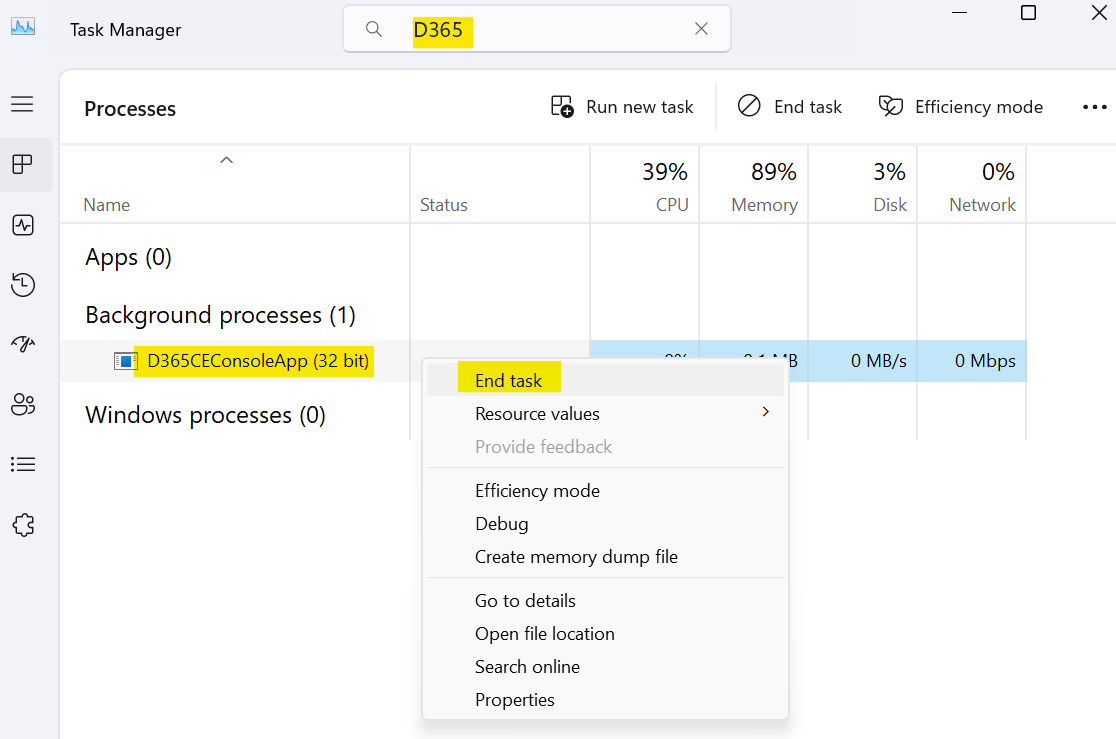
Once the process is closed, process is cleared from Task Manager.
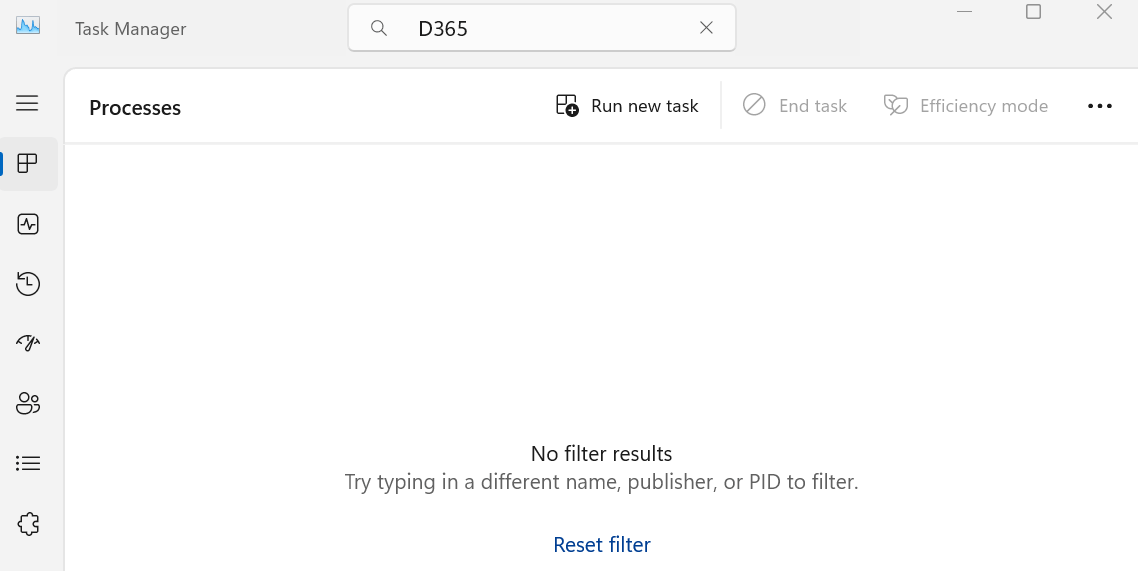
After this, I build and ran the console application, and it started working without any issue.

Hope you had followed the steps and resolved this issue.

Please like and share your valuable feedback on this article. Also, follow my blog to get my articles to your Inbox.

Graphic promoting a YouTube channel with the text 'Has my blog post helped you?' and buttons for 'WATCH', 'LEARN', and 'SUBSCRIBE'.

Below are my earlier articles that you can have a look.

How I Passed Microsoft AI Transformation Leader (AB‑731) Certification?

🚀 Free Microsoft Certification Voucher (AI Skills Fest 2026)

My AB‑730 Certification Experience: Preparation Guide, Exam Insights & Tips

LevelUp Microsoft Exam Vouchers: Eligibility & Rules (May 2026)

Explore Dataverse Tools: FetchXML Formatter Online by Arun Potti – JavaScript (JS) Example

Microsoft’s New AI Certifications for 2026: Full List, Retirements, and Replacement Paths

Boost Your CRM Productivity with Arun Potti’s FetchXML Formatter

Streamline FetchXML with Online Formatter for Dataverse Tools

Fixing Postman Connection Issues: A Step-by-Step Guide

Explore Microsoft AB-Series Certification: Skills for AI Roles

My first XRMToolBox Plugin: Dataverse Users, Security roles, Teams and Teams security roles

My first XRMToolBox Plugin: Dataverse Users, Security roles, Teams and Teams security roles (Usage)

My first XRMToolBox Plugin: Dataverse Users, Security roles, Teams and Teams security roles (Installation)

My first XRMToolBox Plugin: Dataverse Users, Security roles, Teams and Teams security roles (Overview)

Limited Time Offer: 50% Off Microsoft Certification Vouchers

How to send an automated email in Dataverse using Power Automate?

Understanding Activity Party Types in Dynamics 365 CE

How to configure donotreply email using Shared mailboxes in Dynamics 365 CE?

Microsoft Power Pages: The authentication key for your portal will expire

Microsoft Azure: You’re not eligible for an Azure free account

How to create Microsoft Azure 30 days trial?

Edit in Visual Studio Code for the Web in Power Apps Portals

Error: The object cannot be updated because it is read-only in Microsoft Power Apps

Resolved: Fix connections issue in Power Automate Flow

Clear all objects feature in Power Apps Solutions

Power Automate Error: The ‘inputs.parameters’ of workflow operation of type ‘OpenApiConnection’ is not valid.

Power Automate Error: To use FilteringAttributes, your trigger must include an Update event on Dataverse Trigger

Dynamics 365 CE Solution Import Failed in Azure DevOps Pipelines

Power Automate Error: Cannot write more bytes to the buffer than the configured maximum buffer size: 104857600

Error while opening a Tool in XRMToolBox

The Power Automate Cloud Flows Best Practices Whitepaper is now LIVE!

Error in Power Automate: There’s a problem that needs to be fixed to trigger this flow. To see more details, open Flow checker.

How to get the Dataverse Table’s first row from List Rows in Power Automate?

Microsoft Dataverse Accelerator – Part 2 – Installation

Microsoft Dataverse Accelerator – Part 1 – Introduction

How to get the Database Version of the Dataverse?

API playground feature not available in Dataverse Accelerator App?

How to Explore and test Dataverse in the Web API playground (preview)?

Web resource method does not exist in Dynamics 365 CE

How to get Environment Variable Value in Dynamics 365 CE using JavaScript?

Model-driven Apps – openAlertDialog – JavaScript – Code Snippet

Power Automate – Flow is not running on Trigger condition

Power Automate – Input field Delete option is disabled

Recipient of type ‘Contact’ with ID is marked as non-emailable

Preferred Solution | New feature | Microsoft Dataverse

New and Retired Microsoft Dynamics 365 Certifications

Environment settings behavior (Preview) feature in Model-driven Apps

Error while connecting to Dataverse environment in XrmToolBox

Power Fx Formula Columns in Microsoft Power Apps

How to Enable 2024 Release Wave 1 Updates in the Microsoft Dynamics 365 CE Environment?

Delete and Restore records (Preview) feature in Microsoft Dataverse

Microsoft Power App Environments Retention Period

How to Override the Model-driven app header colors?

Timeline Highlights (New feature) in Microsoft Power Apps

Model-driven App – Cannot “See associate records” option in the sub grid (arunpotti.com)

Bookmark the Important Dynamics 365 URLs

How to Enable Tenant-level analytics for Power Automate and Power Apps?

Microsoft Power Automate Copy and Paste Action in New DesignerHow to Setup Multi-Factor Authentication for your Microsoft Power Apps environment?

Microsoft Power Apps | Modern Themes | Preview feature

How to Download and Install the .NET Framework?

How to Create a SharePoint Site Online?

How to add and use Copilot answer control (Preview) in Microsoft Power Apps?

Dark Mode in Microsoft Power Apps

How to create Microsoft 365 E3 Trial for 30 days?

Refreshed look of solution dependencies in Dataverse Solutions

Microsoft Power Automate | Version History | Restore | New Feature

MICROSOFT LEARN – Artificial Intelligence Skills Challenge​ 2024!!!

Resolved – ‘InvokerConnectionOverrideFailed’ Error When a Power App Custom Page call a Power Automate Flow

How to Create Microsoft Power Apps Trial 30 days?

Not able to Create Power Automate Flow in Custom Page in Model-Driven App?

How to Enable Inline Actions feature in Microsoft Canvas Apps?

How to use /mention in Outlook web client for Dataverse records?

Associate Activities Multiple Related Records (Preview) feature in Microsoft Dynamics 365 CE

How to Enable Aggregation (preview) feature in Microsoft Power Apps?

Power Apps – Some components of this app require you to sign in. If you don’t sign in, part of the app may not work.

How to Enable the SQL Server stored procedures (preview) feature in the Power Apps?

How to get the Client Version of the Model Driven Apps?

How to get Microsoft 365 E3 Trial for 30 days?

How to Enable Copilot for Model-Driven apps feature in Dynamics 365 CE Environment?

[Resolved] Web resource method does not exist in Dynamics 365 CE JavaScript Error

How to Enable Blocking unmanaged customizations (Preview) feature in Dynamics 365 CE?

How to create Microsoft Power Apps Developer Plan Environment?

Microsoft Power Apps Developer Plan vs Power Apps Trial 30 days

What is Microsoft Power Apps Developer Plan?

[Resolved] PCF Field Control not showing anything in the PCF Test Environment?

[Issue Resolved] ReferenceError: Web resource method does not exist in Dynamics 365 CE Javascript Error

[Issue Resolved] Subcomponent cannot be added to the solution because the root component Template is missing in Dataverse

How to Turn Off the Modern Look in the Model Driven Apps?

How to Turn on the New modern, refreshed look for the Model-Driven apps?

Microsoft Power Apps – Apps filter feature

How to Create Microsoft Power Apps 30 days Online Trial Version and an Environment?

Microsoft Power Apps – Solutions filter Preview feature

How to Show the Power Automate complete Expressions?

Dataverse Error: Cannot start the requested operation [EntityCustomization] because there is another [PublishAll] running at this moment.

Power Automate Error: You should specify a contact or account.

How to get the Choice Text and Value in the Dataverse using JavaScript?

Microsoft Dataverse Low Code No Code Plugins

How to convert the Number String to Number Array?

How to Integrate Instant Plugins in the Power Automate Flow?

Power Apps – ‘actionname’ is an unknown or unsupported function in namespace ‘Environment’

Dataverse Browser V1.1.0.1 is available for Dataverse Plugin Debugging

How to Integrate Instant Plugins in the Canvas App?

How to Enable Access to Microsoft Dataverse Actions (Preview feature) in the Power Apps?

How to Create an Instant Plugin in the Dataverse Environment?

How to Install the Microsoft Dataverse Accelerator in the Dataverse Environment?

What is Microsoft Dataverse Accelerator?

How to get the Logged in User Information in the Power Apps?

How to Install Power Platform Tools in Visual Studio Code?

How to Install the Apps from the Microsoft AppSource to your Dataverse Environment?

Microsoft Power Apps Maker Portal has a new look

Microsoft Power Apps Emulator (New Feature)

How to Enable the Dataverse Offline (Experimental Feature) in the Canvas Apps?

How to set the Authoring Version in the Canvas App?

New version of Dataverse Browser is available for Dataverse Plugin Debugging

Latest Free Practice Assessments for Microsoft Certifications

Download CRM 365 V9.X Tools using PowerShell

How to set the Refresh cadence for a Power Platform Environment?

Update forms and views (Preview feature) in Dataverse

How to connect to Microsoft Dataverse in Power Automate Flow using Service principal?

How to Enable Copilot (Preview) feature in Canvas Apps?

How to Debug a Dataverse Plugin without Installing the Profiler in the Plugin Registration Tool?

How to Enable the Licenses (Preview) feature for a Power Platform Environment?

How to Enable Maker Welcome Content (preview) in Power Apps Maker Portal?

How to Enable Managed Environments for a Dataverse Environment?

How to Enable the Modern Controls (Preview feature) in the Canvas Apps?

How to Enable 2023 Release Wave 1 updates in the Dataverse Environment?

How to Deploy Enterprise Applications in the new Dataverse Environment?

What is Preview, Experimental and Retired features in Canvas Apps?

How to Enable the New Power Fx Formula Bar in Power Apps Studio?

Writing Power Fx formulas with natural language

Power Fx Formula Columns in Dataverse

Generating Power Fx formulas from examples

How to Create Dynamics 365 Marketing 30 Days Trial Version Online?

How to disable Multi-Factor Authentication (MFA) on Dynamics 365 Login?

How to Create Microsoft Power Apps 30 days Online Trial Version and an Environment?

  • ✇Microsoft Dynamics 365 CRM Tips and Tricks
  • How to Integrate WhatsApp with Dynamics 365 CRM
    How many customer conversations start on WhatsApp but never make it into your CRM? For many businesses, WhatsApp is where customers ask questions, request quotes, book services, and follow up. But when WhatsApp and Dynamics 365 CRM operate separately, useful customer context can quickly get lost. A WhatsApp integration with Dynamics 365 closes that gap by bringing conversations into the CRM, where they can be connected with leads, contacts, opportunities, cases, and follow-up activities. Key Ta
     

How to Integrate WhatsApp with Dynamics 365 CRM

whatsapp integration with dynamics 365

How many customer conversations start on WhatsApp but never make it into your CRM?

For many businesses, WhatsApp is where customers ask questions, request quotes, book services, and follow up. But when WhatsApp and Dynamics 365 CRM operate separately, useful customer context can quickly get lost.

A WhatsApp integration with Dynamics 365 closes that gap by bringing conversations into the CRM, where they can be connected with leads, contacts, opportunities, cases, and follow-up activities.

Key Takeaways

•  Connect WhatsApp Business with Dynamics 365 using Meta or Twilio.

•  Manage WhatsApp conversations without leaving Dynamics 365.

•  Link chats to existing or new CRM records.

•  Automate notifications, reminders, and follow-ups.

•  Use AI for smart replies, summaries, sentiment analysis, and context-based suggestions.

•  Add an AI chatbot to handle common customer questions automatically.

What Does WhatsApp Integration with Dynamics 365 Mean?

A WhatsApp Dynamics 365 integration connects a customer’s WhatsApp conversation with the information already stored in Microsoft Dynamics 365.

For example, a prospect sends, “Can you send me pricing for your maintenance package?” Instead of replying in WhatsApp and manually creating a lead afterward, the conversation can be handled from Dynamics 365 and connected to the appropriate CRM record.

Benefit: Sales and service teams get the customer’s conversation and CRM context in one place.

How Does WhatsApp Connect to Dynamics 365?

The usual architecture is:

Customer → WhatsApp → Meta or Twilio → Integration → Dynamics 365

There are two common API routes: Meta’s WhatsApp Business Platform and Twilio’s WhatsApp API. Meta provides direct access to the WhatsApp Business Platform, while Twilio provides a managed communications layer.

Benefit: You can choose the API route that fits your existing technical environment instead of rebuilding your communication stack.

Where Does WhatsApp4Dynamics Fit?

How to Integrate WhatsApp with Dynamics 365 CRM

Building a WhatsApp integration, yourself means handling APIs, authentication, webhooks, templates, media, CRM mappings, and error handling.

WhatsApp4Dynamics by Inogic provides a ready-made connection between WhatsApp Business and Dynamics 365 CRM using Meta or Twilio. It is a Microsoft Marketplace-certified app and brings WhatsApp conversations directly into the Dynamics 365 interface.

For example, a salesperson can open an Opportunity in Dynamics 365 and continue the customer’s WhatsApp conversation without switching to another application.

Step 1: Choose Your WhatsApp API Route

  • Meta WhatsApp Business Platform

Meta’s API provides direct access to the WhatsApp Business Platform. Businesses typically manage their WhatsApp Business Account, phone number, authentication, webhooks, and message templates.

Example: A larger organization with an existing Meta developer setup may choose the direct Meta route for greater control over its WhatsApp implementation.

  • Twilio WhatsApp API

Twilio provides WhatsApp messaging through its communications platform. This can be attractive when Twilio is already part of the organization’s technology stack.


Example: A business already using Twilio for SMS and voice can add WhatsApp without introducing an entirely separate communications provider.

Benefit: A familiar communications layer can simplify implementation for teams already using Twilio.

WhatsApp4Dynamics supports both Meta and Twilio, so the CRM experience remains consistent regardless of the selected API route. 

Step 2: Connect WhatsApp with Dynamics 365

After the WhatsApp Business setup is ready, the next step is connecting it to Dynamics 365.

With WhatsApp4Dynamics, WhatsApp conversations can be managed directly inside Dynamics 365. The integration supports Dynamics 365 Online with Dataverse.

Step 3: Map WhatsApp Conversations to CRM Records

This is where a WhatsApp CRM integration becomes particularly useful.

WhatsApp4Dynamics can map conversations to CRM records using the customer’s mobile number. Chats can also be initiated from records such as Leads, Contacts, Opportunities, and Cases.

For example, if an existing customer asks about an open service case through WhatsApp, the conversation can be associated with that customer and case.

If the sender is new, the conversation can also be used to create a CRM record.

Step 4: Keep WhatsApp Chat History in CRM

A customer conversation rarely ends after one message.

WhatsApp4Dynamics stores incoming and outgoing conversations as timestamped chat history linked to CRM records.

For example, if a salesperson changes role, the next salesperson can review the previous WhatsApp conversation instead of asking the customer to explain everything again.

Benefit: Better continuity when accounts or conversations move between team members.

Step 5: Automate WhatsApp Messages

Once WhatsApp is connected to Dynamics 365, CRM events can trigger messages.

Think about an appointment confirmation, order update, service notification, or follow-up.

For example:

Appointment created → Dynamics 365 workflow → WhatsApp confirmation

WhatsApp4Dynamics supports automated workflows for confirmations, reminders, alerts, and updates.

Can AI Help with WhatsApp Conversations?

Yes, and this is becoming one of the more useful parts of the integration.

WhatsApp4Dynamics includes InoWiz AI, which can provide smart reply suggestions, chat summaries, sentiment analysis, and context-aware recommendations inside Dynamics 365.

For example, if a customer sends several messages explaining a problem, AI can summarize the conversation so an agent can understand the issue quickly before replying.

Another example is a customer expressing frustration. Sentiment analysis can help the agent recognize the tone and respond appropriately.

Benefit: Agents spend less time reading, rewriting, and composing routine responses.

What Can an AI Chatbot Do on WhatsApp?

A chatbot can take the automation a step further.

Instead of waiting for an employee to answer every basic question, an AI-powered chatbot can handle common customer requests through WhatsApp.

Chatbot can use connected business knowledge sources such as Microsoft Dataverse, SharePoint, websites, and uploaded documents to generate contextual responses.

For example, a customer could ask:

“What documents do I need to renew my service?”

The chatbot can retrieve the relevant information and respond. If the question requires a person, the conversation can be handed over to the appropriate team.

Step 6: Share Files, Templates, and Rich Messages

Customer communication is rarely text-only.

A salesperson may need to send a quotation PDF. A service agent may need to share an image. A customer may need a quick reply option.

WhatsApp4Dynamics supports text, media, documents, buttons, quick replies, and templates from within Dynamics 365.

For example, an agent handling a product inquiry can send a PDF brochure directly from the CRM conversation.

How Does This Help Track Conversions?

This is one of the biggest reasons to connect WhatsApp with Dynamics 365.

Suppose 500 people contact a business through WhatsApp. If those conversations remain in a separate inbox, determining how many became leads, opportunities, or customers can involve manual work.

When conversations are connected to CRM records, the business can follow the journey from the initial inquiry through the sales pipeline.

For example:

WhatsApp inquiry → Lead → Opportunity → Won

The integration does not automatically create a meaningful conversion rate. Your CRM stages and data practices still matter. But the original conversation no longer has to disappear outside the system.

Benefit: Marketing and sales teams get better visibility into what happens after the first WhatsApp message.

Final Thoughts

WhatsApp and Dynamics 365 work better together. With WhatsApp4Dynamics, businesses can connect customer conversations with CRM data, automate communication, and manage interactions without switching between platforms.

Ready to connect WhatsApp with Dynamics 365?

Download WhatsApp4Dynamics from the Inogic website or Microsoft Marketplace and try it free for 15 days.

Have questions? Email us at crm@inogic.com.

Frequently Asked Questions

Can WhatsApp be integrated with CRM?

Yes. WhatsApp Business can be connected with Dynamics 365 using the Meta WhatsApp Business Platform API or Twilio. WhatsApp4Dynamics provides a CRM-based integration supporting both options.

What is WhatsApp4Dynamics?

WhatsApp4Dynamics is a solution for connecting WhatsApp Business communication with Dynamics 365 CRM. It provides features for conversations, CRM record mapping, templates, automation, chat history, media sharing and other WhatsApp-related CRM processes.

Can WhatsApp messages be linked to Dynamics 365 Contacts?

Yes. WhatsApp conversations can be associated with relevant Dynamics 365 CRM records based on the configured mapping and identification process.

Can I use Meta’s WhatsApp API with Dynamics 365?

Yes. WhatsApp4Dynamics supports the Meta WhatsApp Business Platform API.

Can I use Twilio for WhatsApp with Dynamics 365?

Yes. WhatsApp4Dynamics supports Twilio as another WhatsApp API option.

Can WhatsApp messages create Leads in Dynamics 365?

The integration can be configured around CRM record creation and mapping. Organizations can design processes where new WhatsApp inquiries become Leads or other relevant CRM records.

The post How to Integrate WhatsApp with Dynamics 365 CRM first appeared on Microsoft Dynamics 365 CRM Tips and Tricks.

  • ✇Microsoft Dynamics 365 CRM Tips and Tricks
  • Role-Based Access Control for Document Security in Dynamics 365 CRM!
    Storing data is easy, but managing access? That’s the real challenge One of the biggest concerns for businesses using Dynamics 365 CRM is controlling who can view, edit, or delete sensitive documents. Granting excessive access poses challenges like the risk of accidental file deletions or data loss. But you want to ensure the security of your critical data. Manual permission setups are tedious and prone to mistakes. Implementing robust access control and aligning with the principle of least pri
     

Role-Based Access Control for Document Security in Dynamics 365 CRM!

Document Security

Storing data is easy, but managing access? That’s the real challenge

One of the biggest concerns for businesses using Dynamics 365 CRM is controlling who can view, edit, or delete sensitive documents.

Granting excessive access poses challenges like the risk of accidental file deletions or data loss. But you want to ensure the security of your critical data. Manual permission setups are tedious and prone to mistakes.

Implementing robust access control and aligning with the principle of least privilege ensures that only the right users have access to specific data and actions.

This is where Role-Based Access Control (RBAC) can transform your document management game.

In this blog, we’ll show you how to apply end-to-end RBAC, so your users only access what they need and only perform actions they’re allowed to. From document visibility in SharePoint to file operations inside CRM, you’ll get to know all.

What is Role-Based Access Control (RBAC)?

RBAC is a method of restricting system access based on the roles of individual users within an organization. Instead of assigning permissions directly to each user, permissions are assigned to roles, and users are then assigned those roles. This helps:

  • Ensure users only access what’s necessary.
  • Simplify permission management.
  • Support compliance and audit requirements.

Think of it like issuing color-coded access passes: red for basic access, blue for advanced, and so on. Users get the pass that matches their job profile.

Attach2Dynamics: Role-Based Action Control for Cloud Documents

Attach2Dynamics allows Dynamics 365 CRM users to interact with documents stored in cloud storage providers like SharePoint, Azure Blob, and Dropbox, all from within CRM.

Here’s how Attach2Dynamics delivers RBAC:

  • Permissions Management via Profiles: Create profiles that define which actions are allowed (upload, download, delete, rename, email, etc.). These profiles will perform actions that’ll be reflected in the cloud storage connected to CRM through the Attach2Dynamics UI.
  • Role Mapping: Map these profiles to CRM security roles. This reinforces structured access control based on business roles.
  • Entity-Level Control: Configure different access rules for different entities (e.g., Contacts vs. Opportunities).
  • Multiple Storage Providers: Apply RBAC controls across cloud storage platforms, including SharePoint, Azure Blob, and Dropbox.

Document Security in Dynamics 365 CRM

Let’s understand this with an example. A Salesperson is mapped to a profile that allows them to upload and download documents on Opportunity records, but prevents them from deleting or renaming files to avoid accidental loss or mislabeling of important documents.

On the other hand, a Sales Manager has broader permissions, including delete, rename, and move, to manage pipeline documents more freely. Marketing team members can only view or download documents in Contact records, limiting the risk of changes.

The form can be filled in the actual website url.

So, if you want the profile mapping options for your cloud storage inside CRM, Attach2Dynamics is the way to go.

SharePoint Security Sync: Role-Based Access Enforcement on SharePoint Folders

While Attach2Dynamics controls what actions users can perform inside CRM, SharePoint Security Sync enforces who can access which documents at the SharePoint level based on their CRM privileges.

This app levels up the file and record security provided by the Attach2Dynamics UI. It can address data storage as well as security issues related to your CRM.

SharePoint Security Sync bridges the gap left by native Dynamics-SharePoint integration by syncing CRM records and file-level security to SharePoint folder-level permissions. Key features include:

  • Automatic Permission Sync: Users can only access folders in SharePoint if they have access to the related record or files in CRM.
  • Real-time Permission Updates: Changes in CRM access (ownership, team, BU) are immediately reflected in SharePoint.
  • Supports Custom Entities: Works not just with standard entities but also with custom ones.
  • Multiple Access Types: Supports owner, team, business unit, and organization-level access.
  • Sync Security Privileges: Replicate dynamics 365 CRM security model ensuring safe document management.

Document Security in Dynamics 365 CRM

For example, a Customer Service Representative is granted access to only the cases assigned to them in Dynamics 365. SharePoint Security enhances security by enforcing access control that mirrors CRM-level permissions directly onto SharePoint folders. If a case is reassigned to another agent, folder access is automatically revoked from the original agent and granted to the new one.

Combined Value: Full RBAC Coverage from UI to Storage Backend

Together, Attach2Dynamics and SharePoint Security Sync enforce a layered access control strategy and apply the principle of least privilege from CRM UI actions to backend SharePoint access.:

  • Attach2Dynamics: Controls what a user can do with documents (actions like upload/delete).
  • SharePoint Security Sync: Controls whether a user can see the documents at all in SharePoint.

Document Security in Dynamics 365 CRM

This two-tier approach ensures that not only are your CRM users performing permitted actions, but they also don’t have unauthorized access to sensitive SharePoint folders.

Benefits of RBAC with Attach2Dynamics and SSS

  • Secure & Compliant: Get security enhancements ensuring GDPR/HIPAA compliance.
  • Storage Access Management: Role-based setup eliminates manual permission tweaking.
  • Scalable: Supports growing teams and document libraries across business units.
  • Adaptability: Overcome SharePoint’s limit of 5000 items view threshold.

Conclusion

Role-Based Access Control is not just a checkbox for compliance; it’s a foundation for secure and efficient operations. Attach2Dynamics and SharePoint Security Sync empower Dynamics 365 CRM users to manage documents with confidence, knowing that access is controlled, traceable, and aligned with business roles.

Additionally, with Attach2Dynamics, features like drag-and-drop uploads, folder management, document preview, and link sharing make file handling quick and convenient, without ever leaving the CRM. To enhance security, SharePoint Security Sync ensures that document access in SharePoint mirrors the security roles set in Dynamics 365, automatically syncing permissions.

Want to know more about both the apps? Visit our website and install the apps with a 15-day free trial:

Attach2Dynamics    Sharepoint Security Sync

You can install Attach2Dynamics & SharePoint Security Sync from Appsource as well. But if you want any technical knowledge about our apps, read our help docs for Attach2Dynamics and SharePoint Security Sync, or contact us at crm@inogic.com

The post Role-Based Access Control for Document Security in Dynamics 365 CRM! first appeared on Microsoft Dynamics 365 CRM Tips and Tricks.

Extend your customer outreach with WhatsApp marketing within Dynamics 365 Customer Insights

The Power of WhatsApp Marketing for Brands: A Game Changer

Today, brands constantly bombard customers with emails, calls, and social media ads. It can be hard to stand out from the noise and connect with customers in a meaningful way. But what if there was a way to reach customers directly on a platform they already use and love?

Enter WhatsApp marketing. With a staggering 85% of customers preferring to receive brand updates and communications via WhatsApp, it’s no surprise that it’s becoming a game-changer for marketers.


This blog covers how you can leverage the power of WhatsApp marketing with Dynamics 365 Customer Insights using WhatsApp4Dynamics, with a fictional example of a beauty brand called A&B Organics.

A&B Organics Leverages WhatsApp4Dynamics

A&B Organics’ marketing team wanted to leverage the growing popularity of WhatsApp and its potential to reach customers on a more personal level.

However, being a Dynamics 365 CRM user, they did not want fragmented communication channels. They wanted something that could be integrated into their existing system and did not require additional training for their users. This is where Inogic’s WhatsApp4Dynamics came into the picture.

WhatsApp4Dynamics is a WhatsApp Integration app that integrates WhatsApp Business with Dynamics 365 Sales, Customer Insights and Customer Services.

Dynamics 365 Customer Insights

As they were using Customer Insights for marketing, this low-code, no-code ISV app became just the solution they needed.

Here’s how they did it:

  1. Segment-Based Journey for Increased Engagement

Segment-Based Journey for Increased Engagement

Robert, the new marketing lead at A&B Organics, wanted to let his loyal customers know about upcoming discounts and offers. He created a segment-based journey within his CRM campaign, targeting loyal customers. This strategic approach helped boost engagement rates and elevate campaign performance.

The form can be filled in the actual website url.

  1. The Power of Emojis

The Power of Emojis

Robert strategically integrated relevant emojis throughout his bulk messaging. This helped him connect with customers on a more personal and familiar level.

  1. Monitor Campaign Performance with WhatsApp4Dynamics Insights

Monitor Campaign Performance with WhatsApp4Dynamics Insights

WhatsApp4Dynamics provides valuable insights that Robert could access within the journey to monitor the campaign’s success and delivery statistics. This allowed him to track important metrics and adjust as needed.

  1. Trigger-Based Journeys

 Trigger-Based Journeys

Robert also created a new trigger-based journey for WhatsApp contacts. This powerful feature made possible by WhatsApp4Dynamics ensures that whenever a new customer is added to CRM, a welcome message with a campaign update is automatically sent to them on WhatsApp. This is just one approach, there are numerous ways you can benefit from this feature.

A Resounding Success

The WhatsApp marketing campaign proved to be a resounding success for Robert and his marketing team. They achieved a significant 5x increase in product inquiries, demonstrating the power of this innovative marketing strategy.

Ready to Explore WhatsApp Marketing?

This blog post just scratched the surface of the numerous features available in WhatsApp4Dynamics.

And Many more.

To learn more about how you can leverage WhatsApp marketing to take your customer engagement to the next level, watch our video showcasing how A&B Organics sales team efficiently handles incoming inquiries using WhatsApp4Dynamics for Dynamics 365 Sales.

Download WhatsApp4Dynamics today from Microsoft AppSource or the Inogic website. Don’t hesitate to connect with our product experts at crm@inogic.com to discuss your specific needs and explore how WhatsApp marketing can help your brand achieve its goals.

The post Extend your customer outreach with WhatsApp marketing within Dynamics 365 Customer Insights first appeared on Microsoft Dynamics 365 CRM Tips and Tricks.

  • ✇Arun Potti's Power Platform blog
  • My AB‑730 Certification Experience: How I Prepared, What I Learned, and Tips for You
    Clearing the AB‑730: AI Business Professional certification has been one of the most rewarding learning experiences in my AI journey. This exam is designed for professionals who want to understand how to use Microsoft Copilot, Agentic AI, and AI‑driven business workflows to solve real‑world problems. In this post, I’m sharing my preparation path, key takeaways, and practical tips that will help anyone planning to take AB‑730.Why I Chose AB‑730: As someone deeply involved in Mic
     

My AB‑730 Certification Experience: How I Prepared, What I Learned, and Tips for You

Clearing the AB‑730: AI Business Professional certification has been one of the most rewarding learning experiences in my AI journey. This exam is designed for professionals who want to understand how to use Microsoft Copilot, Agentic AI, and AI‑driven business workflows to solve real‑world problems.

In this post, I’m sharing my preparation path, key takeaways, and practical tips that will help anyone planning to take AB‑730.

Why I Chose AB‑730:

As someone deeply involved in Microsoft 365, Power Platform, and AI‑driven productivity, AB‑730 felt like the perfect certification to validate my skills. It focuses on:

  • Applying Copilot in day‑to‑day business scenarios
  • Understanding AI capabilities across Microsoft 365
  • Choosing the right Copilot for the right task
  • Improving workflows using AI reasoning and orchestration

It’s not a technical exam – it’s about practical AI usage, decision‑making, and business impact.

My Preparation Path

I followed the official Microsoft Learn certification path, which is more than enough to prepare you thoroughly. The learning modules are structured, scenario‑based, and aligned directly with the exam.

What I used:

  • Microsoft Learn AB‑730 learning path
  • Microsoft AB 730 free Practice Assessment (which has 50 questions)
  • Hands‑on practice with Microsoft 365 Copilot
  • Real business scenarios from my daily work

The Learn modules helped me understand the concepts, but the real confidence came from using Copilot in real workflows – writing emails, analyzing data, summarizing documents, and automating tasks.

AB 730 and AB 731 Certification Course completed on Technofocus | Skill Up with Level Up with a Test. This helped me a lot to gain more knowledge on the exam.

For revision I followed the below YouTube video,

AB-730 Microsoft AI Business Professional Exam Revision Guide

What the Exam Felt Like

The exam focuses on practical understanding, not memorization. Expect questions around:

  • Choosing the right Copilot (M365 Copilot, Copilot Studio, Copilot Chat, etc.)
  • Identifying the best AI capability for a scenario
  • Understanding how AI reasoning improves business workflows
  • Recognizing governance and responsible AI considerations
  • Applying Copilot to solve business problems

If you’ve used Copilot in real scenarios, the exam feels intuitive.

My Key Takeaways

1. Copilot is more than a chatbot

The exam emphasizes Copilot as a reasoning engine that can analyze, summarize, generate, and orchestrate tasks.

2. Business context matters

Many questions test whether you can choose the right Copilot for the right scenario.

3. Governance and responsible AI are essential

Even though AB‑730 is business‑focused, you still need to understand the basics of data boundaries, safety, and compliance.

4. Real usage beats theory

Using Copilot daily helped me answer scenario questions confidently.

Tips for Anyone Preparing

Here’s what I wish I knew earlier:

  • Complete the Microsoft Learn path end‑to‑end — it covers everything.
  • Practice using Copilot in Word, Excel, Outlook, Teams, and Edge.
  • Focus on scenarios, not definitions.
  • Understand the differences between Copilot types (M365 Copilot, Copilot Studio, Copilot Chat, etc.).
  • Review governance basics – data access, boundaries, and responsible AI.
  • Don’t overthink – the exam is practical and straightforward.

Final Thoughts

AB‑730 is a fantastic certification for anyone who wants to become an AI‑empowered business professional. It validates your ability to use Copilot effectively, make informed decisions, and drive AI adoption in your organization.

If you’re already using Microsoft 365 Copilot or planning to, this certification is absolutely worth it.

Also, if you had not enrolled for the free certification voucher for this exam. Follow the below article and complete the course it before 31st May 2026.

LevelUp Microsoft Exam Vouchers: Eligibility & Rules (May 2026)

Hope you had liked this article about AB 730 Certification.

Please like and share your valuable feedback on this article. Also, follow my blog to get my articles to your Inbox.

Graphic promoting a YouTube channel with the text 'Has my blog post helped you?' and buttons for 'WATCH', 'LEARN', and 'SUBSCRIBE'.

Below are my earlier articles that you can have a look.

LevelUp Microsoft Exam Vouchers: Eligibility & Rules (May 2026)

Explore Dataverse Tools: FetchXML Formatter Online by Arun Potti – JavaScript (JS) Example

Microsoft’s New AI Certifications for 2026: Full List, Retirements, and Replacement Paths

Boost Your CRM Productivity with Arun Potti’s FetchXML Formatter

Streamline FetchXML with Online Formatter for Dataverse Tools

Fixing Postman Connection Issues: A Step-by-Step Guide

Explore Microsoft AB-Series Certification: Skills for AI Roles

My first XRMToolBox Plugin: Dataverse Users, Security roles, Teams and Teams security roles

My first XRMToolBox Plugin: Dataverse Users, Security roles, Teams and Teams security roles (Usage)

My first XRMToolBox Plugin: Dataverse Users, Security roles, Teams and Teams security roles (Installation)

My first XRMToolBox Plugin: Dataverse Users, Security roles, Teams and Teams security roles (Overview)

Limited Time Offer: 50% Off Microsoft Certification Vouchers

How to send an automated email in Dataverse using Power Automate?

Understanding Activity Party Types in Dynamics 365 CE

How to configure donotreply email using Shared mailboxes in Dynamics 365 CE?

Microsoft Power Pages: The authentication key for your portal will expire

Microsoft Azure: You’re not eligible for an Azure free account

How to create Microsoft Azure 30 days trial?

Edit in Visual Studio Code for the Web in Power Apps Portals

Error: The object cannot be updated because it is read-only in Microsoft Power Apps

Resolved: Fix connections issue in Power Automate Flow

Clear all objects feature in Power Apps Solutions

Power Automate Error: The ‘inputs.parameters’ of workflow operation of type ‘OpenApiConnection’ is not valid.

Power Automate Error: To use FilteringAttributes, your trigger must include an Update event on Dataverse Trigger

Dynamics 365 CE Solution Import Failed in Azure DevOps Pipelines

Power Automate Error: Cannot write more bytes to the buffer than the configured maximum buffer size: 104857600

Error while opening a Tool in XRMToolBox

The Power Automate Cloud Flows Best Practices Whitepaper is now LIVE!

Error in Power Automate: There’s a problem that needs to be fixed to trigger this flow. To see more details, open Flow checker.

How to get the Dataverse Table’s first row from List Rows in Power Automate?

Microsoft Dataverse Accelerator – Part 2 – Installation

Microsoft Dataverse Accelerator – Part 1 – Introduction

How to get the Database Version of the Dataverse?

API playground feature not available in Dataverse Accelerator App?

How to Explore and test Dataverse in the Web API playground (preview)?

Web resource method does not exist in Dynamics 365 CE

How to get Environment Variable Value in Dynamics 365 CE using JavaScript?

Model-driven Apps – openAlertDialog – JavaScript – Code Snippet

Power Automate – Flow is not running on Trigger condition

Power Automate – Input field Delete option is disabled

Recipient of type ‘Contact’ with ID is marked as non-emailable

Preferred Solution | New feature | Microsoft Dataverse

New and Retired Microsoft Dynamics 365 Certifications

Environment settings behavior (Preview) feature in Model-driven Apps

Error while connecting to Dataverse environment in XrmToolBox

Power Fx Formula Columns in Microsoft Power Apps

How to Enable 2024 Release Wave 1 Updates in the Microsoft Dynamics 365 CE Environment?

Delete and Restore records (Preview) feature in Microsoft Dataverse

Microsoft Power App Environments Retention Period

How to Override the Model-driven app header colors?

Timeline Highlights (New feature) in Microsoft Power Apps

Model-driven App – Cannot “See associate records” option in the sub grid (arunpotti.com)

Bookmark the Important Dynamics 365 URLs

How to Enable Tenant-level analytics for Power Automate and Power Apps?

Microsoft Power Automate Copy and Paste Action in New DesignerHow to Setup Multi-Factor Authentication for your Microsoft Power Apps environment?

Microsoft Power Apps | Modern Themes | Preview feature

How to Download and Install the .NET Framework?

How to Create a SharePoint Site Online?

How to add and use Copilot answer control (Preview) in Microsoft Power Apps?

Dark Mode in Microsoft Power Apps

How to create Microsoft 365 E3 Trial for 30 days?

Refreshed look of solution dependencies in Dataverse Solutions

Microsoft Power Automate | Version History | Restore | New Feature

MICROSOFT LEARN – Artificial Intelligence Skills Challenge​ 2024!!!

Resolved – ‘InvokerConnectionOverrideFailed’ Error When a Power App Custom Page call a Power Automate Flow

How to Create Microsoft Power Apps Trial 30 days?

Not able to Create Power Automate Flow in Custom Page in Model-Driven App?

How to Enable Inline Actions feature in Microsoft Canvas Apps?

How to use /mention in Outlook web client for Dataverse records?

Associate Activities Multiple Related Records (Preview) feature in Microsoft Dynamics 365 CE

How to Enable Aggregation (preview) feature in Microsoft Power Apps?

Power Apps – Some components of this app require you to sign in. If you don’t sign in, part of the app may not work.

How to Enable the SQL Server stored procedures (preview) feature in the Power Apps?

How to get the Client Version of the Model Driven Apps?

How to get Microsoft 365 E3 Trial for 30 days?

How to Enable Copilot for Model-Driven apps feature in Dynamics 365 CE Environment?

[Resolved] Web resource method does not exist in Dynamics 365 CE JavaScript Error

How to Enable Blocking unmanaged customizations (Preview) feature in Dynamics 365 CE?

How to create Microsoft Power Apps Developer Plan Environment?

Microsoft Power Apps Developer Plan vs Power Apps Trial 30 days

What is Microsoft Power Apps Developer Plan?

[Resolved] PCF Field Control not showing anything in the PCF Test Environment?

[Issue Resolved] ReferenceError: Web resource method does not exist in Dynamics 365 CE Javascript Error

[Issue Resolved] Subcomponent cannot be added to the solution because the root component Template is missing in Dataverse

How to Turn Off the Modern Look in the Model Driven Apps?

How to Turn on the New modern, refreshed look for the Model-Driven apps?

Microsoft Power Apps – Apps filter feature

How to Create Microsoft Power Apps 30 days Online Trial Version and an Environment?

Microsoft Power Apps – Solutions filter Preview feature

How to Show the Power Automate complete Expressions?

Dataverse Error: Cannot start the requested operation [EntityCustomization] because there is another [PublishAll] running at this moment.

Power Automate Error: You should specify a contact or account.

How to get the Choice Text and Value in the Dataverse using JavaScript?

Microsoft Dataverse Low Code No Code Plugins

How to convert the Number String to Number Array?

How to Integrate Instant Plugins in the Power Automate Flow?

Power Apps – ‘actionname’ is an unknown or unsupported function in namespace ‘Environment’

Dataverse Browser V1.1.0.1 is available for Dataverse Plugin Debugging

How to Integrate Instant Plugins in the Canvas App?

How to Enable Access to Microsoft Dataverse Actions (Preview feature) in the Power Apps?

How to Create an Instant Plugin in the Dataverse Environment?

How to Install the Microsoft Dataverse Accelerator in the Dataverse Environment?

What is Microsoft Dataverse Accelerator?

How to get the Logged in User Information in the Power Apps?

How to Install Power Platform Tools in Visual Studio Code?

How to Install the Apps from the Microsoft AppSource to your Dataverse Environment?

Microsoft Power Apps Maker Portal has a new look

Microsoft Power Apps Emulator (New Feature)

How to Enable the Dataverse Offline (Experimental Feature) in the Canvas Apps?

How to set the Authoring Version in the Canvas App?

New version of Dataverse Browser is available for Dataverse Plugin Debugging

Latest Free Practice Assessments for Microsoft Certifications

Download CRM 365 V9.X Tools using PowerShell

How to set the Refresh cadence for a Power Platform Environment?

Update forms and views (Preview feature) in Dataverse

How to connect to Microsoft Dataverse in Power Automate Flow using Service principal?

How to Enable Copilot (Preview) feature in Canvas Apps?

How to Debug a Dataverse Plugin without Installing the Profiler in the Plugin Registration Tool?

How to Enable the Licenses (Preview) feature for a Power Platform Environment?

How to Enable Maker Welcome Content (preview) in Power Apps Maker Portal?

How to Enable Managed Environments for a Dataverse Environment?

How to Enable the Modern Controls (Preview feature) in the Canvas Apps?

How to Enable 2023 Release Wave 1 updates in the Dataverse Environment?

How to Deploy Enterprise Applications in the new Dataverse Environment?

What is Preview, Experimental and Retired features in Canvas Apps?

How to Enable the New Power Fx Formula Bar in Power Apps Studio?

Writing Power Fx formulas with natural language

Power Fx Formula Columns in Dataverse

Generating Power Fx formulas from examples

How to Create Dynamics 365 Marketing 30 Days Trial Version Online?

How to disable Multi-Factor Authentication (MFA) on Dynamics 365 Login?

How to Create Microsoft Power Apps 30 days Online Trial Version and an Environment?

Explore Dataverse Tools: FetchXML Formatter Online by Arun Potti – JavaScript (JS) Example

In my earlier articles, I had explained about,

What is Arun Potti’s FetchXML Formatter – Tool

How to use Arun Potti’s FetchXML Formatter Tool

and now in this article, I explain about how to retrieve the data using JS and FetchXML using Arun Potti’s FetchXML Formatter Tool.

Requirement: Retrieve all the Active Contacts created in last 1 hour.

Solution: Follow the below steps.

Step 1: Below is the JavaScript code (Without FetchXML), to fetch all the Active contacts created in last 1 hour.

Step 2: Copy and Paste the JS code into the fetchXML variable (FetchXML sample is from my previous article Step 5 in Explore Dataverse Tools: FetchXML Formatter Online by Arun Potti – Usage).

After updating it, the final JavaScript looks like the below.

async function getContacts() {
try {
// Use with Xrm.WebApi.retrieveMultipleRecords or equivalent.
const fetchXml = "<fetch version='1.0' output-format='xml-platform' mapping='logical' distinct='false'>" +
" <entity name='contact'>" +
" <attribute name='fullname'/>" +
" <attribute name='address1_composite'/>" +
" <attribute name='mobilephone'/>" +
" <attribute name='birthdate'/>" +
" <attribute name='contactid'/>" +
" <order attribute='fullname' descending='false'/>" +
" <filter type='and'>" +
" <condition attribute='createdon' operator='last-x-hours' value='1'/>" +
" <condition attribute='statecode' operator='eq' value='0'/>" +
" </filter>" +
" </entity>" +
"</fetch>";
const encoded = encodeURIComponent(fetchXml);
const response = await Xrm.WebApi.retrieveMultipleRecords(
"contact",
"?fetchXml=" + encoded
);
console.log("All Active Contacts created in last 1 hour");
response.entities.forEach(cnt => {
console.log(`Contact: ${cnt.fullname} (${cnt.contactid})`);
});
} catch (err) {
console.error("Error while fetching the Contacts in getContacts(): ", err);
}
}

Step 3: Configured the below Script on On Load of Contact Form.

Step 4: Open any Contact record in a Model-driven app. Right Click anywhere on the screen and click on Inspect and Click on Console to check the data.

I hope you had successfully retrieved the data using Arun Potti’s FetchXML Formatter, Fetchxml and JS code.

In the next article, will explain how to use them in real code C# and Web API and get the desired results.

Please like and share your valuable feedback on this article. Also, follow my blog to get my articles to your Inbox.

Graphic promoting a YouTube channel with the text 'Has my blog post helped you?' and buttons for 'WATCH', 'LEARN', and 'SUBSCRIBE'.

Below are my earlier articles that you can have a look.

Microsoft’s New AI Certifications for 2026: Full List, Retirements, and Replacement Paths

Boost Your CRM Productivity with Arun Potti’s FetchXML Formatter

Streamline FetchXML with Online Formatter for Dataverse Tools

Fixing Postman Connection Issues: A Step-by-Step Guide

Explore Microsoft AB-Series Certification: Skills for AI Roles

My first XRMToolBox Plugin: Dataverse Users, Security roles, Teams and Teams security roles

My first XRMToolBox Plugin: Dataverse Users, Security roles, Teams and Teams security roles (Usage)

My first XRMToolBox Plugin: Dataverse Users, Security roles, Teams and Teams security roles (Installation)

My first XRMToolBox Plugin: Dataverse Users, Security roles, Teams and Teams security roles (Overview)

Limited Time Offer: 50% Off Microsoft Certification Vouchers

How to send an automated email in Dataverse using Power Automate?

Understanding Activity Party Types in Dynamics 365 CE

How to configure donotreply email using Shared mailboxes in Dynamics 365 CE?

Microsoft Power Pages: The authentication key for your portal will expire

Microsoft Azure: You’re not eligible for an Azure free account

How to create Microsoft Azure 30 days trial?

Edit in Visual Studio Code for the Web in Power Apps Portals

Error: The object cannot be updated because it is read-only in Microsoft Power Apps

Resolved: Fix connections issue in Power Automate Flow

Clear all objects feature in Power Apps Solutions

Power Automate Error: The ‘inputs.parameters’ of workflow operation of type ‘OpenApiConnection’ is not valid.

Power Automate Error: To use FilteringAttributes, your trigger must include an Update event on Dataverse Trigger

Dynamics 365 CE Solution Import Failed in Azure DevOps Pipelines

Power Automate Error: Cannot write more bytes to the buffer than the configured maximum buffer size: 104857600

Error while opening a Tool in XRMToolBox

The Power Automate Cloud Flows Best Practices Whitepaper is now LIVE!

Error in Power Automate: There’s a problem that needs to be fixed to trigger this flow. To see more details, open Flow checker.

How to get the Dataverse Table’s first row from List Rows in Power Automate?

Microsoft Dataverse Accelerator – Part 2 – Installation

Microsoft Dataverse Accelerator – Part 1 – Introduction

How to get the Database Version of the Dataverse?

API playground feature not available in Dataverse Accelerator App?

How to Explore and test Dataverse in the Web API playground (preview)?

Web resource method does not exist in Dynamics 365 CE

How to get Environment Variable Value in Dynamics 365 CE using JavaScript?

Model-driven Apps – openAlertDialog – JavaScript – Code Snippet

Power Automate – Flow is not running on Trigger condition

Power Automate – Input field Delete option is disabled

Recipient of type ‘Contact’ with ID is marked as non-emailable

Preferred Solution | New feature | Microsoft Dataverse

New and Retired Microsoft Dynamics 365 Certifications

Environment settings behavior (Preview) feature in Model-driven Apps

Error while connecting to Dataverse environment in XrmToolBox

Power Fx Formula Columns in Microsoft Power Apps

How to Enable 2024 Release Wave 1 Updates in the Microsoft Dynamics 365 CE Environment?

Delete and Restore records (Preview) feature in Microsoft Dataverse

Microsoft Power App Environments Retention Period

How to Override the Model-driven app header colors?

Timeline Highlights (New feature) in Microsoft Power Apps

Model-driven App – Cannot “See associate records” option in the sub grid (arunpotti.com)

Bookmark the Important Dynamics 365 URLs

How to Enable Tenant-level analytics for Power Automate and Power Apps?

Microsoft Power Automate Copy and Paste Action in New DesignerHow to Setup Multi-Factor Authentication for your Microsoft Power Apps environment?

Microsoft Power Apps | Modern Themes | Preview feature

How to Download and Install the .NET Framework?

How to Create a SharePoint Site Online?

How to add and use Copilot answer control (Preview) in Microsoft Power Apps?

Dark Mode in Microsoft Power Apps

How to create Microsoft 365 E3 Trial for 30 days?

Refreshed look of solution dependencies in Dataverse Solutions

Microsoft Power Automate | Version History | Restore | New Feature

MICROSOFT LEARN – Artificial Intelligence Skills Challenge​ 2024!!!

Resolved – ‘InvokerConnectionOverrideFailed’ Error When a Power App Custom Page call a Power Automate Flow

How to Create Microsoft Power Apps Trial 30 days?

Not able to Create Power Automate Flow in Custom Page in Model-Driven App?

How to Enable Inline Actions feature in Microsoft Canvas Apps?

How to use /mention in Outlook web client for Dataverse records?

Associate Activities Multiple Related Records (Preview) feature in Microsoft Dynamics 365 CE

How to Enable Aggregation (preview) feature in Microsoft Power Apps?

Power Apps – Some components of this app require you to sign in. If you don’t sign in, part of the app may not work.

How to Enable the SQL Server stored procedures (preview) feature in the Power Apps?

How to get the Client Version of the Model Driven Apps?

How to get Microsoft 365 E3 Trial for 30 days?

How to Enable Copilot for Model-Driven apps feature in Dynamics 365 CE Environment?

[Resolved] Web resource method does not exist in Dynamics 365 CE JavaScript Error

How to Enable Blocking unmanaged customizations (Preview) feature in Dynamics 365 CE?

How to create Microsoft Power Apps Developer Plan Environment?

Microsoft Power Apps Developer Plan vs Power Apps Trial 30 days

What is Microsoft Power Apps Developer Plan?

[Resolved] PCF Field Control not showing anything in the PCF Test Environment?

[Issue Resolved] ReferenceError: Web resource method does not exist in Dynamics 365 CE Javascript Error

[Issue Resolved] Subcomponent cannot be added to the solution because the root component Template is missing in Dataverse

How to Turn Off the Modern Look in the Model Driven Apps?

How to Turn on the New modern, refreshed look for the Model-Driven apps?

Microsoft Power Apps – Apps filter feature

How to Create Microsoft Power Apps 30 days Online Trial Version and an Environment?

Microsoft Power Apps – Solutions filter Preview feature

How to Show the Power Automate complete Expressions?

Dataverse Error: Cannot start the requested operation [EntityCustomization] because there is another [PublishAll] running at this moment.

Power Automate Error: You should specify a contact or account.

How to get the Choice Text and Value in the Dataverse using JavaScript?

Microsoft Dataverse Low Code No Code Plugins

How to convert the Number String to Number Array?

How to Integrate Instant Plugins in the Power Automate Flow?

Power Apps – ‘actionname’ is an unknown or unsupported function in namespace ‘Environment’

Dataverse Browser V1.1.0.1 is available for Dataverse Plugin Debugging

How to Integrate Instant Plugins in the Canvas App?

How to Enable Access to Microsoft Dataverse Actions (Preview feature) in the Power Apps?

How to Create an Instant Plugin in the Dataverse Environment?

How to Install the Microsoft Dataverse Accelerator in the Dataverse Environment?

What is Microsoft Dataverse Accelerator?

How to get the Logged in User Information in the Power Apps?

How to Install Power Platform Tools in Visual Studio Code?

How to Install the Apps from the Microsoft AppSource to your Dataverse Environment?

Microsoft Power Apps Maker Portal has a new look

Microsoft Power Apps Emulator (New Feature)

How to Enable the Dataverse Offline (Experimental Feature) in the Canvas Apps?

How to set the Authoring Version in the Canvas App?

New version of Dataverse Browser is available for Dataverse Plugin Debugging

Latest Free Practice Assessments for Microsoft Certifications

Download CRM 365 V9.X Tools using PowerShell

How to set the Refresh cadence for a Power Platform Environment?

Update forms and views (Preview feature) in Dataverse

How to connect to Microsoft Dataverse in Power Automate Flow using Service principal?

How to Enable Copilot (Preview) feature in Canvas Apps?

How to Debug a Dataverse Plugin without Installing the Profiler in the Plugin Registration Tool?

How to Enable the Licenses (Preview) feature for a Power Platform Environment?

How to Enable Maker Welcome Content (preview) in Power Apps Maker Portal?

How to Enable Managed Environments for a Dataverse Environment?

How to Enable the Modern Controls (Preview feature) in the Canvas Apps?

How to Enable 2023 Release Wave 1 updates in the Dataverse Environment?

How to Deploy Enterprise Applications in the new Dataverse Environment?

What is Preview, Experimental and Retired features in Canvas Apps?

How to Enable the New Power Fx Formula Bar in Power Apps Studio?

Writing Power Fx formulas with natural language

Power Fx Formula Columns in Dataverse

Generating Power Fx formulas from examples

How to Create Dynamics 365 Marketing 30 Days Trial Version Online?

How to disable Multi-Factor Authentication (MFA) on Dynamics 365 Login?

How to Create Microsoft Power Apps 30 days Online Trial Version and an Environment?

  • ✇Arun Potti's Power Platform blog
  • Explore Dataverse Tools: FetchXML Formatter Online by Arun Potti – Usage
    In my previous article, I had explained about Arun Potti’s FetchXML Formatter and in this article, will explain about how to use this Tool. Requirement: Get all the Active Contacts created in the last 1 hour using JS, C# and Web API. Solution: Follow the below steps, Step 1: Click on the below link to open the Arun Potti’s FetchXML formatter. Arun Potti’s FetchXML Formatter Step 2: Open the Advanced Find and Select the conditions as mentioned below. Look for:
     

Explore Dataverse Tools: FetchXML Formatter Online by Arun Potti – Usage

In my previous article, I had explained about Arun Potti’s FetchXML Formatter and in this article, will explain about how to use this Tool.

Requirement: Get all the Active Contacts created in the last 1 hour using JS, C# and Web API.

Solution:

Follow the below steps,

Step 1: Click on the below link to open the Arun Potti’s FetchXML formatter.

Arun Potti’s FetchXML Formatter

Step 2: Open the Advanced Find and Select the conditions as mentioned below.

Look for: Contacts

Conditions:

Created On – Last X Hours – 1
Status Equals Active

Step 3: Click on Download Fetch XML.

Step 4: Click on Open file.

Step 5: Select and copy the downloaded FetchXML.

FetchXML Code:

<fetch version="1.0" output-format="xml-platform" mapping="logical" distinct="false">
<entity name="contact">
<attribute name="fullname"/>
<attribute name="address1_composite"/>
<attribute name="mobilephone"/>
<attribute name="birthdate"/>
<attribute name="contactid"/>
<order attribute="fullname" descending="false"/>
<filter type="and">
<condition attribute="createdon" operator="last-x-hours" value="1"/>
<condition attribute="statecode" operator="eq" value="0"/>
</filter>
</entity>
</fetch>

Step 6: Paste the copied FetchXML in the FetchXML Input in the Arun Potti’s FetchXML formatter mentioned in the Step 1.

After the FetchXML input is provided, the tool automatically produces fully formatted JavaScript, C#, and Web API code snippets in the Generated Code section for the direct implementation.

Hope you have successfully downloaded the required FetchXML, provided the Input and saw all the outputs.

In the next article, will explain how to use them in real code JS, C# and Web API and get the desired results.

Please like and share your valuable feedback on this article. Also, follow my blog to get my articles to your Inbox.

Graphic promoting a YouTube channel with the text 'Has my blog post helped you?' and buttons for 'WATCH', 'LEARN', and 'SUBSCRIBE'.

Below are my earlier articles that you can have a look.

Streamline FetchXML with Online Formatter for Dataverse Tools

Fixing Postman Connection Issues: A Step-by-Step Guide

Explore Microsoft AB-Series Certification: Skills for AI Roles

My first XRMToolBox Plugin: Dataverse Users, Security roles, Teams and Teams security roles

My first XRMToolBox Plugin: Dataverse Users, Security roles, Teams and Teams security roles (Usage)

My first XRMToolBox Plugin: Dataverse Users, Security roles, Teams and Teams security roles (Installation)

My first XRMToolBox Plugin: Dataverse Users, Security roles, Teams and Teams security roles (Overview)

Limited Time Offer: 50% Off Microsoft Certification Vouchers

How to send an automated email in Dataverse using Power Automate?

Understanding Activity Party Types in Dynamics 365 CE

How to configure donotreply email using Shared mailboxes in Dynamics 365 CE?

Microsoft Power Pages: The authentication key for your portal will expire

Microsoft Azure: You’re not eligible for an Azure free account

How to create Microsoft Azure 30 days trial?

Edit in Visual Studio Code for the Web in Power Apps Portals

Error: The object cannot be updated because it is read-only in Microsoft Power Apps

Resolved: Fix connections issue in Power Automate Flow

Clear all objects feature in Power Apps Solutions

Power Automate Error: The ‘inputs.parameters’ of workflow operation of type ‘OpenApiConnection’ is not valid.

Power Automate Error: To use FilteringAttributes, your trigger must include an Update event on Dataverse Trigger

Dynamics 365 CE Solution Import Failed in Azure DevOps Pipelines

Power Automate Error: Cannot write more bytes to the buffer than the configured maximum buffer size: 104857600

Error while opening a Tool in XRMToolBox

The Power Automate Cloud Flows Best Practices Whitepaper is now LIVE!

Error in Power Automate: There’s a problem that needs to be fixed to trigger this flow. To see more details, open Flow checker.

How to get the Dataverse Table’s first row from List Rows in Power Automate?

Microsoft Dataverse Accelerator – Part 2 – Installation

Microsoft Dataverse Accelerator – Part 1 – Introduction

How to get the Database Version of the Dataverse?

API playground feature not available in Dataverse Accelerator App?

How to Explore and test Dataverse in the Web API playground (preview)?

Web resource method does not exist in Dynamics 365 CE

How to get Environment Variable Value in Dynamics 365 CE using JavaScript?

Model-driven Apps – openAlertDialog – JavaScript – Code Snippet

Power Automate – Flow is not running on Trigger condition

Power Automate – Input field Delete option is disabled

Recipient of type ‘Contact’ with ID is marked as non-emailable

Preferred Solution | New feature | Microsoft Dataverse

New and Retired Microsoft Dynamics 365 Certifications

Environment settings behavior (Preview) feature in Model-driven Apps

Error while connecting to Dataverse environment in XrmToolBox

Power Fx Formula Columns in Microsoft Power Apps

How to Enable 2024 Release Wave 1 Updates in the Microsoft Dynamics 365 CE Environment?

Delete and Restore records (Preview) feature in Microsoft Dataverse

Microsoft Power App Environments Retention Period

How to Override the Model-driven app header colors?

Timeline Highlights (New feature) in Microsoft Power Apps

Model-driven App – Cannot “See associate records” option in the sub grid (arunpotti.com)

Bookmark the Important Dynamics 365 URLs

How to Enable Tenant-level analytics for Power Automate and Power Apps?

Microsoft Power Automate Copy and Paste Action in New DesignerHow to Setup Multi-Factor Authentication for your Microsoft Power Apps environment?

Microsoft Power Apps | Modern Themes | Preview feature

How to Download and Install the .NET Framework?

How to Create a SharePoint Site Online?

How to add and use Copilot answer control (Preview) in Microsoft Power Apps?

Dark Mode in Microsoft Power Apps

How to create Microsoft 365 E3 Trial for 30 days?

Refreshed look of solution dependencies in Dataverse Solutions

Microsoft Power Automate | Version History | Restore | New Feature

MICROSOFT LEARN – Artificial Intelligence Skills Challenge​ 2024!!!

Resolved – ‘InvokerConnectionOverrideFailed’ Error When a Power App Custom Page call a Power Automate Flow

How to Create Microsoft Power Apps Trial 30 days?

Not able to Create Power Automate Flow in Custom Page in Model-Driven App?

How to Enable Inline Actions feature in Microsoft Canvas Apps?

How to use /mention in Outlook web client for Dataverse records?

Associate Activities Multiple Related Records (Preview) feature in Microsoft Dynamics 365 CE

How to Enable Aggregation (preview) feature in Microsoft Power Apps?

Power Apps – Some components of this app require you to sign in. If you don’t sign in, part of the app may not work.

How to Enable the SQL Server stored procedures (preview) feature in the Power Apps?

How to get the Client Version of the Model Driven Apps?

How to get Microsoft 365 E3 Trial for 30 days?

How to Enable Copilot for Model-Driven apps feature in Dynamics 365 CE Environment?

[Resolved] Web resource method does not exist in Dynamics 365 CE JavaScript Error

How to Enable Blocking unmanaged customizations (Preview) feature in Dynamics 365 CE?

How to create Microsoft Power Apps Developer Plan Environment?

Microsoft Power Apps Developer Plan vs Power Apps Trial 30 days

What is Microsoft Power Apps Developer Plan?

[Resolved] PCF Field Control not showing anything in the PCF Test Environment?

[Issue Resolved] ReferenceError: Web resource method does not exist in Dynamics 365 CE Javascript Error

[Issue Resolved] Subcomponent cannot be added to the solution because the root component Template is missing in Dataverse

How to Turn Off the Modern Look in the Model Driven Apps?

How to Turn on the New modern, refreshed look for the Model-Driven apps?

Microsoft Power Apps – Apps filter feature

How to Create Microsoft Power Apps 30 days Online Trial Version and an Environment?

Microsoft Power Apps – Solutions filter Preview feature

How to Show the Power Automate complete Expressions?

Dataverse Error: Cannot start the requested operation [EntityCustomization] because there is another [PublishAll] running at this moment.

Power Automate Error: You should specify a contact or account.

How to get the Choice Text and Value in the Dataverse using JavaScript?

Microsoft Dataverse Low Code No Code Plugins

How to convert the Number String to Number Array?

How to Integrate Instant Plugins in the Power Automate Flow?

Power Apps – ‘actionname’ is an unknown or unsupported function in namespace ‘Environment’

Dataverse Browser V1.1.0.1 is available for Dataverse Plugin Debugging

How to Integrate Instant Plugins in the Canvas App?

How to Enable Access to Microsoft Dataverse Actions (Preview feature) in the Power Apps?

How to Create an Instant Plugin in the Dataverse Environment?

How to Install the Microsoft Dataverse Accelerator in the Dataverse Environment?

What is Microsoft Dataverse Accelerator?

How to get the Logged in User Information in the Power Apps?

How to Install Power Platform Tools in Visual Studio Code?

How to Install the Apps from the Microsoft AppSource to your Dataverse Environment?

Microsoft Power Apps Maker Portal has a new look

Microsoft Power Apps Emulator (New Feature)

How to Enable the Dataverse Offline (Experimental Feature) in the Canvas Apps?

How to set the Authoring Version in the Canvas App?

New version of Dataverse Browser is available for Dataverse Plugin Debugging

Latest Free Practice Assessments for Microsoft Certifications

Download CRM 365 V9.X Tools using PowerShell

How to set the Refresh cadence for a Power Platform Environment?

Update forms and views (Preview feature) in Dataverse

How to connect to Microsoft Dataverse in Power Automate Flow using Service principal?

How to Enable Copilot (Preview) feature in Canvas Apps?

How to Debug a Dataverse Plugin without Installing the Profiler in the Plugin Registration Tool?

How to Enable the Licenses (Preview) feature for a Power Platform Environment?

How to Enable Maker Welcome Content (preview) in Power Apps Maker Portal?

How to Enable Managed Environments for a Dataverse Environment?

How to Enable the Modern Controls (Preview feature) in the Canvas Apps?

How to Enable 2023 Release Wave 1 updates in the Dataverse Environment?

How to Deploy Enterprise Applications in the new Dataverse Environment?

What is Preview, Experimental and Retired features in Canvas Apps?

How to Enable the New Power Fx Formula Bar in Power Apps Studio?

Writing Power Fx formulas with natural language

Power Fx Formula Columns in Dataverse

Generating Power Fx formulas from examples

How to Create Dynamics 365 Marketing 30 Days Trial Version Online?

How to disable Multi-Factor Authentication (MFA) on Dynamics 365 Login?

How to Create Microsoft Power Apps 30 days Online Trial Version and an Environment?

  • ✇Arun Potti's Power Platform blog
  • Explore Dataverse Tools: FetchXML Formatter Online by Arun Potti
    Working with FetchXML can sometimes get messy – especially when dealing with long, nested queries. To make this easier, I’ve created a new Online FetchXML Formatter. This tool automatically beautifies and structures your FetchXML, making it more readable and developer‑friendly. This is a lightweight web tool for Dataverse / Dynamics 365 CE developers. It helps them format FetchXML and instantly generate ready-to-use JavaScript, C#, and Web API snippets. All of this is possible from a
     

Explore Dataverse Tools: FetchXML Formatter Online by Arun Potti

26 February 2026 at 13:50
Logo of Dataverse featuring a green circular design with the text 'Dataverse' in a modern font.

Working with FetchXML can sometimes get messy – especially when dealing with long, nested queries. To make this easier, I’ve created a new Online FetchXML Formatter. This tool automatically beautifies and structures your FetchXML, making it more readable and developer‑friendly.

This is a lightweight web tool for Dataverse / Dynamics 365 CE developers. It helps them format FetchXML and instantly generate ready-to-use JavaScript, C#, and Web API snippets. All of this is possible from a single FetchXML input.

Click on the below link to open the Tool.

Arun Potti’s FetchXML Formatter

Features:

Clear separation between input and the three outputs.

🔹 Single FetchXML input

Paste FetchXML in standard XRM / Dataverse format

Basic XML validation (parse + root <fetch> check)

🔹 Automatic formatting

Auto-beautifies FetchXML on input/change

Fixes indentation and line breaks for readability

🔹 Code generation

JavaScript snippet for Xrm.WebApi.retrieveMultipleRecords or Web API calls

C# verbatim string snippet for plugins, custom workflow activities, or console apps

Web API URL parameter (fetchXml) with URL-encoded FetchXML

🔹 Copy to clipboard

One-click Copy for:

  • JavaScript output
  • C# output
  • Web API output
  • Formatted FetchXML

🔹 Sample FetchXML

Insert a sample FetchXML query with one click to test the tool

🔹 Clean, responsive UI

Modern layout that works on desktop and mobile

In the next post, I’ll walk you through what the tool does. I will explain how it works.

Please like and share your valuable feedback on this article. Also, follow my blog to get my articles to your Inbox.

Graphic promoting a YouTube channel with the text 'Has my blog post helped you?' and buttons for 'WATCH', 'LEARN', and 'SUBSCRIBE'.

Below are my earlier articles that you can have a look.

My first XRMToolBox Plugin: Dataverse Users, Security roles, Teams and Teams security roles

My first XRMToolBox Plugin: Dataverse Users, Security roles, Teams and Teams security roles (Usage)

My first XRMToolBox Plugin: Dataverse Users, Security roles, Teams and Teams security roles (Installation)

My first XRMToolBox Plugin: Dataverse Users, Security roles, Teams and Teams security roles (Overview)

Limited Time Offer: 50% Off Microsoft Certification Vouchers

How to send an automated email in Dataverse using Power Automate?

Understanding Activity Party Types in Dynamics 365 CE

How to configure donotreply email using Shared mailboxes in Dynamics 365 CE?

Microsoft Power Pages: The authentication key for your portal will expire

Microsoft Azure: You’re not eligible for an Azure free account

How to create Microsoft Azure 30 days trial?

Edit in Visual Studio Code for the Web in Power Apps Portals

Error: The object cannot be updated because it is read-only in Microsoft Power Apps

Resolved: Fix connections issue in Power Automate Flow

Clear all objects feature in Power Apps Solutions

Power Automate Error: The ‘inputs.parameters’ of workflow operation of type ‘OpenApiConnection’ is not valid.

Power Automate Error: To use FilteringAttributes, your trigger must include an Update event on Dataverse Trigger

Dynamics 365 CE Solution Import Failed in Azure DevOps Pipelines

Power Automate Error: Cannot write more bytes to the buffer than the configured maximum buffer size: 104857600

Error while opening a Tool in XRMToolBox

The Power Automate Cloud Flows Best Practices Whitepaper is now LIVE!

Error in Power Automate: There’s a problem that needs to be fixed to trigger this flow. To see more details, open Flow checker.

How to get the Dataverse Table’s first row from List Rows in Power Automate?

Microsoft Dataverse Accelerator – Part 2 – Installation

Microsoft Dataverse Accelerator – Part 1 – Introduction

How to get the Database Version of the Dataverse?

API playground feature not available in Dataverse Accelerator App?

How to Explore and test Dataverse in the Web API playground (preview)?

Web resource method does not exist in Dynamics 365 CE

How to get Environment Variable Value in Dynamics 365 CE using JavaScript?

Model-driven Apps – openAlertDialog – JavaScript – Code Snippet

Power Automate – Flow is not running on Trigger condition

Power Automate – Input field Delete option is disabled

Recipient of type ‘Contact’ with ID is marked as non-emailable

Preferred Solution | New feature | Microsoft Dataverse

New and Retired Microsoft Dynamics 365 Certifications

Environment settings behavior (Preview) feature in Model-driven Apps

Error while connecting to Dataverse environment in XrmToolBox

Power Fx Formula Columns in Microsoft Power Apps

How to Enable 2024 Release Wave 1 Updates in the Microsoft Dynamics 365 CE Environment?

Delete and Restore records (Preview) feature in Microsoft Dataverse

Microsoft Power App Environments Retention Period

How to Override the Model-driven app header colors?

Timeline Highlights (New feature) in Microsoft Power Apps

Model-driven App – Cannot “See associate records” option in the sub grid (arunpotti.com)

Bookmark the Important Dynamics 365 URLs

How to Enable Tenant-level analytics for Power Automate and Power Apps?

Microsoft Power Automate Copy and Paste Action in New DesignerHow to Setup Multi-Factor Authentication for your Microsoft Power Apps environment?

Microsoft Power Apps | Modern Themes | Preview feature

How to Download and Install the .NET Framework?

How to Create a SharePoint Site Online?

How to add and use Copilot answer control (Preview) in Microsoft Power Apps?

Dark Mode in Microsoft Power Apps

How to create Microsoft 365 E3 Trial for 30 days?

Refreshed look of solution dependencies in Dataverse Solutions

Microsoft Power Automate | Version History | Restore | New Feature

MICROSOFT LEARN – Artificial Intelligence Skills Challenge​ 2024!!!

Resolved – ‘InvokerConnectionOverrideFailed’ Error When a Power App Custom Page call a Power Automate Flow

How to Create Microsoft Power Apps Trial 30 days?

Not able to Create Power Automate Flow in Custom Page in Model-Driven App?

How to Enable Inline Actions feature in Microsoft Canvas Apps?

How to use /mention in Outlook web client for Dataverse records?

Associate Activities Multiple Related Records (Preview) feature in Microsoft Dynamics 365 CE

How to Enable Aggregation (preview) feature in Microsoft Power Apps?

Power Apps – Some components of this app require you to sign in. If you don’t sign in, part of the app may not work.

How to Enable the SQL Server stored procedures (preview) feature in the Power Apps?

How to get the Client Version of the Model Driven Apps?

How to get Microsoft 365 E3 Trial for 30 days?

How to Enable Copilot for Model-Driven apps feature in Dynamics 365 CE Environment?

[Resolved] Web resource method does not exist in Dynamics 365 CE JavaScript Error

How to Enable Blocking unmanaged customizations (Preview) feature in Dynamics 365 CE?

How to create Microsoft Power Apps Developer Plan Environment?

Microsoft Power Apps Developer Plan vs Power Apps Trial 30 days

What is Microsoft Power Apps Developer Plan?

[Resolved] PCF Field Control not showing anything in the PCF Test Environment?

[Issue Resolved] ReferenceError: Web resource method does not exist in Dynamics 365 CE Javascript Error

[Issue Resolved] Subcomponent cannot be added to the solution because the root component Template is missing in Dataverse

How to Turn Off the Modern Look in the Model Driven Apps?

How to Turn on the New modern, refreshed look for the Model-Driven apps?

Microsoft Power Apps – Apps filter feature

How to Create Microsoft Power Apps 30 days Online Trial Version and an Environment?

Microsoft Power Apps – Solutions filter Preview feature

How to Show the Power Automate complete Expressions?

Dataverse Error: Cannot start the requested operation [EntityCustomization] because there is another [PublishAll] running at this moment.

Power Automate Error: You should specify a contact or account.

How to get the Choice Text and Value in the Dataverse using JavaScript?

Microsoft Dataverse Low Code No Code Plugins

How to convert the Number String to Number Array?

How to Integrate Instant Plugins in the Power Automate Flow?

Power Apps – ‘actionname’ is an unknown or unsupported function in namespace ‘Environment’

Dataverse Browser V1.1.0.1 is available for Dataverse Plugin Debugging

How to Integrate Instant Plugins in the Canvas App?

How to Enable Access to Microsoft Dataverse Actions (Preview feature) in the Power Apps?

How to Create an Instant Plugin in the Dataverse Environment?

How to Install the Microsoft Dataverse Accelerator in the Dataverse Environment?

What is Microsoft Dataverse Accelerator?

How to get the Logged in User Information in the Power Apps?

How to Install Power Platform Tools in Visual Studio Code?

How to Install the Apps from the Microsoft AppSource to your Dataverse Environment?

Microsoft Power Apps Maker Portal has a new look

Microsoft Power Apps Emulator (New Feature)

How to Enable the Dataverse Offline (Experimental Feature) in the Canvas Apps?

How to set the Authoring Version in the Canvas App?

New version of Dataverse Browser is available for Dataverse Plugin Debugging

Latest Free Practice Assessments for Microsoft Certifications

Download CRM 365 V9.X Tools using PowerShell

How to set the Refresh cadence for a Power Platform Environment?

Update forms and views (Preview feature) in Dataverse

How to connect to Microsoft Dataverse in Power Automate Flow using Service principal?

How to Enable Copilot (Preview) feature in Canvas Apps?

How to Debug a Dataverse Plugin without Installing the Profiler in the Plugin Registration Tool?

How to Enable the Licenses (Preview) feature for a Power Platform Environment?

How to Enable Maker Welcome Content (preview) in Power Apps Maker Portal?

How to Enable Managed Environments for a Dataverse Environment?

How to Enable the Modern Controls (Preview feature) in the Canvas Apps?

How to Enable 2023 Release Wave 1 updates in the Dataverse Environment?

How to Deploy Enterprise Applications in the new Dataverse Environment?

What is Preview, Experimental and Retired features in Canvas Apps?

How to Enable the New Power Fx Formula Bar in Power Apps Studio?

Writing Power Fx formulas with natural language

Power Fx Formula Columns in Dataverse

Generating Power Fx formulas from examples

How to Create Dynamics 365 Marketing 30 Days Trial Version Online?

How to disable Multi-Factor Authentication (MFA) on Dynamics 365 Login?

How to Create Microsoft Power Apps 30 days Online Trial Version and an Environment?

  • ✇Arun Potti's Power Platform blog
  • Fixing Postman Connection Issues: A Step-by-Step Guide
    I got the below error, when I launched the Postman. Unable to load data as you’re offline.Your data may not be upto date until you’re back online. Also, I saw, the Connection error. We were unable to establish a websocket connection with our servers. Please retry. If the issue persists, check your network settings to ensure that websocket connections are allowed. Nothing has been loaded like Collections, Environments, Workspaces etc., even though I connected to the inter
     

Fixing Postman Connection Issues: A Step-by-Step Guide

25 February 2026 at 15:53

I got the below error, when I launched the Postman.

Unable to load data as you’re offline.
Your data may not be upto date until you’re back online.

Also, I saw, the Connection error.

We were unable to establish a websocket connection with our servers. Please retry. If the issue persists, check your network settings to ensure that websocket connections are allowed.

Nothing has been loaded like Collections, Environments, Workspaces etc., even though I connected to the internet.

I clicked on the Retry connection, but no luck. Then I followed the below steps and resolved this issue.

Step 1: Clicked on Help and click on Check for Updates. Then, I found that there were some new updates that needs to be installed.

Step 2: I followed the steps to install it, but I could not be able to Install it.

Step 3: Then I clicked on the below link to download the latest version of the Postman from the Downloads page.

Download Postman | Get Started for Free

Step 4: Clicked on the Windows x64.

Postman (x64).exe has started downloading.

Postman has been downloaded to the Downloads folder.

Step 5: Double clicked on “Postman (x64.exe)” to start installing the latest version of Postman.

Postman installation is in progress.

Latest Postman has been installed successfully.

After this latest version, I can be able to see all my existing Workspaces, Collections, Environments etc.

I hope you followed all the steps and resolved this issue.

Please like and share your valuable feedback on this article. Also, follow my blog to get my articles to your Inbox.

Graphic promoting a YouTube channel with the text 'Has my blog post helped you?' and buttons for 'WATCH', 'LEARN', and 'SUBSCRIBE'.

Below are my earlier articles that you can have a look.

My first XRMToolBox Plugin: Dataverse Users, Security roles, Teams and Teams security roles

My first XRMToolBox Plugin: Dataverse Users, Security roles, Teams and Teams security roles (Usage)

My first XRMToolBox Plugin: Dataverse Users, Security roles, Teams and Teams security roles (Installation)

My first XRMToolBox Plugin: Dataverse Users, Security roles, Teams and Teams security roles (Overview)

Limited Time Offer: 50% Off Microsoft Certification Vouchers

How to send an automated email in Dataverse using Power Automate?

Understanding Activity Party Types in Dynamics 365 CE

How to configure donotreply email using Shared mailboxes in Dynamics 365 CE?

Microsoft Power Pages: The authentication key for your portal will expire

Microsoft Azure: You’re not eligible for an Azure free account

How to create Microsoft Azure 30 days trial?

Edit in Visual Studio Code for the Web in Power Apps Portals

Error: The object cannot be updated because it is read-only in Microsoft Power Apps

Resolved: Fix connections issue in Power Automate Flow

Clear all objects feature in Power Apps Solutions

Power Automate Error: The ‘inputs.parameters’ of workflow operation of type ‘OpenApiConnection’ is not valid.

Power Automate Error: To use FilteringAttributes, your trigger must include an Update event on Dataverse Trigger

Dynamics 365 CE Solution Import Failed in Azure DevOps Pipelines

Power Automate Error: Cannot write more bytes to the buffer than the configured maximum buffer size: 104857600

Error while opening a Tool in XRMToolBox

The Power Automate Cloud Flows Best Practices Whitepaper is now LIVE!

Error in Power Automate: There’s a problem that needs to be fixed to trigger this flow. To see more details, open Flow checker.

How to get the Dataverse Table’s first row from List Rows in Power Automate?

Microsoft Dataverse Accelerator – Part 2 – Installation

Microsoft Dataverse Accelerator – Part 1 – Introduction

How to get the Database Version of the Dataverse?

API playground feature not available in Dataverse Accelerator App?

How to Explore and test Dataverse in the Web API playground (preview)?

Web resource method does not exist in Dynamics 365 CE

How to get Environment Variable Value in Dynamics 365 CE using JavaScript?

Model-driven Apps – openAlertDialog – JavaScript – Code Snippet

Power Automate – Flow is not running on Trigger condition

Power Automate – Input field Delete option is disabled

Recipient of type ‘Contact’ with ID is marked as non-emailable

Preferred Solution | New feature | Microsoft Dataverse

New and Retired Microsoft Dynamics 365 Certifications

Environment settings behavior (Preview) feature in Model-driven Apps

Error while connecting to Dataverse environment in XrmToolBox

Power Fx Formula Columns in Microsoft Power Apps

How to Enable 2024 Release Wave 1 Updates in the Microsoft Dynamics 365 CE Environment?

Delete and Restore records (Preview) feature in Microsoft Dataverse

Microsoft Power App Environments Retention Period

How to Override the Model-driven app header colors?

Timeline Highlights (New feature) in Microsoft Power Apps

Model-driven App – Cannot “See associate records” option in the sub grid (arunpotti.com)

Bookmark the Important Dynamics 365 URLs

How to Enable Tenant-level analytics for Power Automate and Power Apps?

Microsoft Power Automate Copy and Paste Action in New DesignerHow to Setup Multi-Factor Authentication for your Microsoft Power Apps environment?

Microsoft Power Apps | Modern Themes | Preview feature

How to Download and Install the .NET Framework?

How to Create a SharePoint Site Online?

How to add and use Copilot answer control (Preview) in Microsoft Power Apps?

Dark Mode in Microsoft Power Apps

How to create Microsoft 365 E3 Trial for 30 days?

Refreshed look of solution dependencies in Dataverse Solutions

Microsoft Power Automate | Version History | Restore | New Feature

MICROSOFT LEARN – Artificial Intelligence Skills Challenge​ 2024!!!

Resolved – ‘InvokerConnectionOverrideFailed’ Error When a Power App Custom Page call a Power Automate Flow

How to Create Microsoft Power Apps Trial 30 days?

Not able to Create Power Automate Flow in Custom Page in Model-Driven App?

How to Enable Inline Actions feature in Microsoft Canvas Apps?

How to use /mention in Outlook web client for Dataverse records?

Associate Activities Multiple Related Records (Preview) feature in Microsoft Dynamics 365 CE

How to Enable Aggregation (preview) feature in Microsoft Power Apps?

Power Apps – Some components of this app require you to sign in. If you don’t sign in, part of the app may not work.

How to Enable the SQL Server stored procedures (preview) feature in the Power Apps?

How to get the Client Version of the Model Driven Apps?

How to get Microsoft 365 E3 Trial for 30 days?

How to Enable Copilot for Model-Driven apps feature in Dynamics 365 CE Environment?

[Resolved] Web resource method does not exist in Dynamics 365 CE JavaScript Error

How to Enable Blocking unmanaged customizations (Preview) feature in Dynamics 365 CE?

How to create Microsoft Power Apps Developer Plan Environment?

Microsoft Power Apps Developer Plan vs Power Apps Trial 30 days

What is Microsoft Power Apps Developer Plan?

[Resolved] PCF Field Control not showing anything in the PCF Test Environment?

[Issue Resolved] ReferenceError: Web resource method does not exist in Dynamics 365 CE Javascript Error

[Issue Resolved] Subcomponent cannot be added to the solution because the root component Template is missing in Dataverse

How to Turn Off the Modern Look in the Model Driven Apps?

How to Turn on the New modern, refreshed look for the Model-Driven apps?

Microsoft Power Apps – Apps filter feature

How to Create Microsoft Power Apps 30 days Online Trial Version and an Environment?

Microsoft Power Apps – Solutions filter Preview feature

How to Show the Power Automate complete Expressions?

Dataverse Error: Cannot start the requested operation [EntityCustomization] because there is another [PublishAll] running at this moment.

Power Automate Error: You should specify a contact or account.

How to get the Choice Text and Value in the Dataverse using JavaScript?

Microsoft Dataverse Low Code No Code Plugins

How to convert the Number String to Number Array?

How to Integrate Instant Plugins in the Power Automate Flow?

Power Apps – ‘actionname’ is an unknown or unsupported function in namespace ‘Environment’

Dataverse Browser V1.1.0.1 is available for Dataverse Plugin Debugging

How to Integrate Instant Plugins in the Canvas App?

How to Enable Access to Microsoft Dataverse Actions (Preview feature) in the Power Apps?

How to Create an Instant Plugin in the Dataverse Environment?

How to Install the Microsoft Dataverse Accelerator in the Dataverse Environment?

What is Microsoft Dataverse Accelerator?

How to get the Logged in User Information in the Power Apps?

How to Install Power Platform Tools in Visual Studio Code?

How to Install the Apps from the Microsoft AppSource to your Dataverse Environment?

Microsoft Power Apps Maker Portal has a new look

Microsoft Power Apps Emulator (New Feature)

How to Enable the Dataverse Offline (Experimental Feature) in the Canvas Apps?

How to set the Authoring Version in the Canvas App?

New version of Dataverse Browser is available for Dataverse Plugin Debugging

Latest Free Practice Assessments for Microsoft Certifications

Download CRM 365 V9.X Tools using PowerShell

How to set the Refresh cadence for a Power Platform Environment?

Update forms and views (Preview feature) in Dataverse

How to connect to Microsoft Dataverse in Power Automate Flow using Service principal?

How to Enable Copilot (Preview) feature in Canvas Apps?

How to Debug a Dataverse Plugin without Installing the Profiler in the Plugin Registration Tool?

How to Enable the Licenses (Preview) feature for a Power Platform Environment?

How to Enable Maker Welcome Content (preview) in Power Apps Maker Portal?

How to Enable Managed Environments for a Dataverse Environment?

How to Enable the Modern Controls (Preview feature) in the Canvas Apps?

How to Enable 2023 Release Wave 1 updates in the Dataverse Environment?

How to Deploy Enterprise Applications in the new Dataverse Environment?

What is Preview, Experimental and Retired features in Canvas Apps?

How to Enable the New Power Fx Formula Bar in Power Apps Studio?

Writing Power Fx formulas with natural language

Power Fx Formula Columns in Dataverse

Generating Power Fx formulas from examples

How to Create Dynamics 365 Marketing 30 Days Trial Version Online?

How to disable Multi-Factor Authentication (MFA) on Dynamics 365 Login?

How to Create Microsoft Power Apps 30 days Online Trial Version and an Environment?

  • ✇Arun Potti's Power Platform blog
  • Microsoft’s AB‑Series Certifications: Powering AI‑First Business Transformation
    Microsoft introduced the AB‑Series to validate skills in Copilot, Agentic AI, and AI‑driven business transformation. Below is the certifications list. Certification NameSkills requiredAB-900: Copilot and Agent Administration Fundamentals – CertificationsWho it’s for: IT pros, admins, and anyone managing Copilot in Microsoft 365.Skills required:Identify the core features and objects of Microsoft 365 servicesUnderstand data protection and governance tasks for Microsoft 365 and Copil
     

Microsoft’s AB‑Series Certifications: Powering AI‑First Business Transformation

8 February 2026 at 15:21
Logo of Microsoft with the text 'Microsoft Certification' on a blue ribbon beneath it.

Microsoft introduced the AB‑Series to validate skills in Copilot, Agentic AI, and AI‑driven business transformation.

Below is the certifications list.

Certification NameSkills required
AB-900: Copilot and Agent Administration Fundamentals – CertificationsWho it’s for:

IT pros, admins, and anyone managing Copilot in Microsoft 365.

Skills required:

Identify the core features and objects of Microsoft 365 services

Understand data protection and governance tasks for Microsoft 365 and Copilot

Perform basic administrative tasks for Copilot and agents
AB-730: AI Business Professional – CertificationsWho it’s for:

Business users, analysts, and professionals using Copilot daily.

Skills required:

Understand generative AI fundamentals

Manage prompts and conversations by using AI

Draft and analyse business content by using AI  
AB-731: AI Transformation Leader – CertificationsWho it’s for:

Managers, leaders, decision‑makers.

Skills required:

Identify the business value of generative AI solutions

Identify benefits, capabilities, and opportunities for Microsoft’s AI apps and services

Identify an implementation and adoption strategy for Microsoft’s AI apps and services
AB-100: Agentic AI Business Solutions Architect – CertificationsWho it’s for:

IT Technical/ Functional Consultants

Skills required:

Plan AI-powered business solutions

Design AI-powered business solutions

Deploy AI-powered business solutions

Hope you liked this article.

Please like and share your valuable feedback on this article. Also, follow my blog to get my articles to your Inbox.

Click on the below image to navigate to my YouTube Channel.

Graphic promoting a YouTube channel with the text 'Has my blog post helped you?' and buttons for 'WATCH', 'LEARN', and 'SUBSCRIBE'.

Below are my earlier articles that you can have a look.

My first XRMToolBox Plugin: Dataverse Users, Security roles, Teams and Teams security roles

My first XRMToolBox Plugin: Dataverse Users, Security roles, Teams and Teams security roles (Usage)

My first XRMToolBox Plugin: Dataverse Users, Security roles, Teams and Teams security roles (Installation)

My first XRMToolBox Plugin: Dataverse Users, Security roles, Teams and Teams security roles (Overview)

Limited Time Offer: 50% Off Microsoft Certification Vouchers

How to send an automated email in Dataverse using Power Automate?

Understanding Activity Party Types in Dynamics 365 CE

How to configure donotreply email using Shared mailboxes in Dynamics 365 CE?

Microsoft Power Pages: The authentication key for your portal will expire

Microsoft Azure: You’re not eligible for an Azure free account

How to create Microsoft Azure 30 days trial?

Edit in Visual Studio Code for the Web in Power Apps Portals

Error: The object cannot be updated because it is read-only in Microsoft Power Apps

Resolved: Fix connections issue in Power Automate Flow

Clear all objects feature in Power Apps Solutions

Power Automate Error: The ‘inputs.parameters’ of workflow operation of type ‘OpenApiConnection’ is not valid.

Power Automate Error: To use FilteringAttributes, your trigger must include an Update event on Dataverse Trigger

Dynamics 365 CE Solution Import Failed in Azure DevOps Pipelines

Power Automate Error: Cannot write more bytes to the buffer than the configured maximum buffer size: 104857600

Error while opening a Tool in XRMToolBox

The Power Automate Cloud Flows Best Practices Whitepaper is now LIVE!

Error in Power Automate: There’s a problem that needs to be fixed to trigger this flow. To see more details, open Flow checker.

How to get the Dataverse Table’s first row from List Rows in Power Automate?

Microsoft Dataverse Accelerator – Part 2 – Installation

Microsoft Dataverse Accelerator – Part 1 – Introduction

How to get the Database Version of the Dataverse?

API playground feature not available in Dataverse Accelerator App?

How to Explore and test Dataverse in the Web API playground (preview)?

Web resource method does not exist in Dynamics 365 CE

How to get Environment Variable Value in Dynamics 365 CE using JavaScript?

Model-driven Apps – openAlertDialog – JavaScript – Code Snippet

Power Automate – Flow is not running on Trigger condition

Power Automate – Input field Delete option is disabled

Recipient of type ‘Contact’ with ID is marked as non-emailable

Preferred Solution | New feature | Microsoft Dataverse

New and Retired Microsoft Dynamics 365 Certifications

Environment settings behavior (Preview) feature in Model-driven Apps

Error while connecting to Dataverse environment in XrmToolBox

Power Fx Formula Columns in Microsoft Power Apps

How to Enable 2024 Release Wave 1 Updates in the Microsoft Dynamics 365 CE Environment?

Delete and Restore records (Preview) feature in Microsoft Dataverse

Microsoft Power App Environments Retention Period

How to Override the Model-driven app header colors?

Timeline Highlights (New feature) in Microsoft Power Apps

Model-driven App – Cannot “See associate records” option in the sub grid (arunpotti.com)

Bookmark the Important Dynamics 365 URLs

How to Enable Tenant-level analytics for Power Automate and Power Apps?

Microsoft Power Automate Copy and Paste Action in New DesignerHow to Setup Multi-Factor Authentication for your Microsoft Power Apps environment?

Microsoft Power Apps | Modern Themes | Preview feature

How to Download and Install the .NET Framework?

How to Create a SharePoint Site Online?

How to add and use Copilot answer control (Preview) in Microsoft Power Apps?

Dark Mode in Microsoft Power Apps

How to create Microsoft 365 E3 Trial for 30 days?

Refreshed look of solution dependencies in Dataverse Solutions

Microsoft Power Automate | Version History | Restore | New Feature

MICROSOFT LEARN – Artificial Intelligence Skills Challenge​ 2024!!!

Resolved – ‘InvokerConnectionOverrideFailed’ Error When a Power App Custom Page call a Power Automate Flow

How to Create Microsoft Power Apps Trial 30 days?

Not able to Create Power Automate Flow in Custom Page in Model-Driven App?

How to Enable Inline Actions feature in Microsoft Canvas Apps?

How to use /mention in Outlook web client for Dataverse records?

Associate Activities Multiple Related Records (Preview) feature in Microsoft Dynamics 365 CE

How to Enable Aggregation (preview) feature in Microsoft Power Apps?

Power Apps – Some components of this app require you to sign in. If you don’t sign in, part of the app may not work.

How to Enable the SQL Server stored procedures (preview) feature in the Power Apps?

How to get the Client Version of the Model Driven Apps?

How to get Microsoft 365 E3 Trial for 30 days?

How to Enable Copilot for Model-Driven apps feature in Dynamics 365 CE Environment?

[Resolved] Web resource method does not exist in Dynamics 365 CE JavaScript Error

How to Enable Blocking unmanaged customizations (Preview) feature in Dynamics 365 CE?

How to create Microsoft Power Apps Developer Plan Environment?

Microsoft Power Apps Developer Plan vs Power Apps Trial 30 days

What is Microsoft Power Apps Developer Plan?

[Resolved] PCF Field Control not showing anything in the PCF Test Environment?

[Issue Resolved] ReferenceError: Web resource method does not exist in Dynamics 365 CE Javascript Error

[Issue Resolved] Subcomponent cannot be added to the solution because the root component Template is missing in Dataverse

How to Turn Off the Modern Look in the Model Driven Apps?

How to Turn on the New modern, refreshed look for the Model-Driven apps?

Microsoft Power Apps – Apps filter feature

How to Create Microsoft Power Apps 30 days Online Trial Version and an Environment?

Microsoft Power Apps – Solutions filter Preview feature

How to Show the Power Automate complete Expressions?

Dataverse Error: Cannot start the requested operation [EntityCustomization] because there is another [PublishAll] running at this moment.

Power Automate Error: You should specify a contact or account.

How to get the Choice Text and Value in the Dataverse using JavaScript?

Microsoft Dataverse Low Code No Code Plugins

How to convert the Number String to Number Array?

How to Integrate Instant Plugins in the Power Automate Flow?

Power Apps – ‘actionname’ is an unknown or unsupported function in namespace ‘Environment’

Dataverse Browser V1.1.0.1 is available for Dataverse Plugin Debugging

How to Integrate Instant Plugins in the Canvas App?

How to Enable Access to Microsoft Dataverse Actions (Preview feature) in the Power Apps?

How to Create an Instant Plugin in the Dataverse Environment?

How to Install the Microsoft Dataverse Accelerator in the Dataverse Environment?

What is Microsoft Dataverse Accelerator?

How to get the Logged in User Information in the Power Apps?

How to Install Power Platform Tools in Visual Studio Code?

How to Install the Apps from the Microsoft AppSource to your Dataverse Environment?

Microsoft Power Apps Maker Portal has a new look

Microsoft Power Apps Emulator (New Feature)

How to Enable the Dataverse Offline (Experimental Feature) in the Canvas Apps?

How to set the Authoring Version in the Canvas App?

New version of Dataverse Browser is available for Dataverse Plugin Debugging

Latest Free Practice Assessments for Microsoft Certifications

Download CRM 365 V9.X Tools using PowerShell

How to set the Refresh cadence for a Power Platform Environment?

Update forms and views (Preview feature) in Dataverse

How to connect to Microsoft Dataverse in Power Automate Flow using Service principal?

How to Enable Copilot (Preview) feature in Canvas Apps?

How to Debug a Dataverse Plugin without Installing the Profiler in the Plugin Registration Tool?

How to Enable the Licenses (Preview) feature for a Power Platform Environment?

How to Enable Maker Welcome Content (preview) in Power Apps Maker Portal?

How to Enable Managed Environments for a Dataverse Environment?

How to Enable the Modern Controls (Preview feature) in the Canvas Apps?

How to Enable 2023 Release Wave 1 updates in the Dataverse Environment?

How to Deploy Enterprise Applications in the new Dataverse Environment?

What is Preview, Experimental and Retired features in Canvas Apps?

How to Enable the New Power Fx Formula Bar in Power Apps Studio?

Writing Power Fx formulas with natural language

Power Fx Formula Columns in Dataverse

Generating Power Fx formulas from examples

How to Create Dynamics 365 Marketing 30 Days Trial Version Online?

How to disable Multi-Factor Authentication (MFA) on Dynamics 365 Login?

How to Create Microsoft Power Apps 30 days Online Trial Version and an Environment?

❌