
Power Up - Upskill Yourself...

Normal view

Before yesterdayMain stream
  • ✇Microsoft Dynamics 365 CRM Tips and Tricks
  • Beyond Deduplication: A 2026 FAQ Guide to Clean, Unified, AI-Ready CRM Data
    If your CRM contains multiple versions of the same customer, you don’t just have a data issue; you have a revenue, experience, and AI-readiness problem. Sales teams lose confidence in pipelines. Marketing struggles with audience accuracy. And AI tools like ChatGPT, Microsoft Copilot, Gemini, etc., can’t deliver reliable insights without unified customer profiles. This FAQ-style guide explains how modern Dynamics 365 teams build clean, unified, AI-ready CRM data using intelligent duplicate match
     

Beyond Deduplication: A 2026 FAQ Guide to Clean, Unified, AI-Ready CRM Data

Beyond Deduplication

If your CRM contains multiple versions of the same customer, you don’t just have a data issue; you have a revenue, experience, and AI-readiness problem.

Sales teams lose confidence in pipelines.
Marketing struggles with audience accuracy.
And AI tools like ChatGPT, Microsoft Copilot, Gemini, etc., can’t deliver reliable insights without unified customer profiles.

This FAQ-style guide explains how modern Dynamics 365 teams build clean, unified, AI-ready CRM data using intelligent duplicate matching rules, fuzzy identity resolution, governed merge rules, and continuous data governance.

What does duplicate data really mean in Dynamics 365?

Duplicate data exists when two or more CRM records represent the same real-world customer, account, or contact, even if the values look different.

A modern CRM approach resolves this by continuously identifying related records across Leads, Contacts, Accounts, and even custom entities, then consolidating them into a single trusted identity while preserving full history.

Instead of treating duplicates as isolated cleanup tasks, CRM is designed for data deduplication to automatically maintain unified customer profiles, so every customer exists once, accurately.

What are the common causes of duplicate leads and contacts in CRM?

Duplicates typically enter CRM through:

  • Manual record creation by sales and service teams
  • Marketing forms and event imports
  • Spreadsheet uploads
  • ERP and third-party integrations
  • CRM migrations
  • Regional formatting differences

To handle this, CRM environments now apply duplicate checks across all entry points, user forms, imports, workflows, and integrations, ensuring new records are always compared against existing data before they are saved.

This prevents fragmented identities from forming in the first place.

Why is CRM data quality so important for sales, marketing, and AI?

Poor CRM data quality results in:

  • Duplicate outreach and confused buyers
  • Inflated pipelines and inaccurate forecasts
  • Broken attribution models
  • Unreliable dashboards

More importantly, AI depends on unified records.

That’s why modern Dynamics 365 setups continuously validate customer identity, consolidate records safely, and ensure automation and analytics always work from one trusted source of truth, creating revenue-safe CRM and trustworthy AI inputs.

How do I identify duplicate records when they don’t look identical?

Exact matches are no longer enough.

Modern CRM platforms use multiple duplicate identification techniques together:

  • Partial matching for similar text
  • Phonetic fuzzy matching for sound-alike names
  • Multi-field comparison (name + email + company)
  • Format-aware matching for phone numbers and addresses

These techniques run both:

This allows CRM to recognize the same customer even when data is inconsistent, enabling true identity resolution.

A 2026 FAQ Guide to Clean, Unified, AI-Ready CRM Data

What are duplicate matching rules, and why do they matter?

Duplicate matching rules define where CRM should look for duplicates.

For example:

  • Should Leads be compared with Contacts?
  • Should Accounts only be matched with Accounts?
  • Should new records always be checked against existing ones?

By configuring matching rules per entity, CRM ensures the right datasets are compared, which is essential for building a single customer view in Dynamics 365.

These rules run continuously, so identity is resolved not just once, but throughout the CRM lifecycle.

A 2026 FAQ Guide to Clean, Unified, AI-Ready CRM Data

What are duplicate matching conditions?

Matching conditions define how CRM evaluates similarity.

Instead of relying on one field, CRM combines:

  • Name similarity
  • Email patterns
  • Phone numbers
  • Company attributes

Conditions also control:

  • How strict matching should be
  • Whether sound-alike values count
  • How much variation is acceptable

Together, duplicate matching rules and conditions teach CRM how your business recognizes customers, forming the foundation of CRM data quality and unified customer profiles.

A 2026 FAQ Guide to Clean, Unified, AI-Ready CRM Data

What is fuzzy matching and why is it critical for identity resolution?

Fuzzy matching allows CRM to detect duplicates even when spelling or formatting differs.

For example:

  • John Smith vs Jon Smyth
  • Catherine vs Kathryn
  • +1 415 555 2671 vs (415) 555-2671

Fuzzy logic mirrors how humans recognizes identity.

By applying phonetic similarity and partial matching automatically, CRM dramatically reduces hidden duplicates, especially in global deployments, marketing imports, and manual entry scenarios.

This is essential for maintaining AI-ready CRM data.

Once duplicates are identified, how should they be merged safely?

Duplicate merging must be governed, not manual guesswork.

Modern CRM data cleansing uses four coordinated layers:

1. Intelligent Master Record Selection

CRM automatically determines which record survives based on:

  • Data completeness
  • Recent activity
  • Ownership or trusted source
  • Weighted scoring across multiple criteria

This ensures the most reliable record becomes the master, consistently and transparently.

A 2026 FAQ Guide to Clean, Unified, AI-Ready CRM Data2. Merge Rules and Conditions

Not every duplicate should merge automatically.

Merge rules decide whether records should:

  • Merge automatically
  • Be sent for review
  • Be blocked entirely

This protects sensitive or business-critical data and supports compliance-ready CRM.

A 2026 FAQ Guide to Clean, Unified, AI-Ready CRM Data

3. Field-Level and Address-Level Merge Logic

Different data types merge differently:

  • Text fields can be appended
  • Numeric values summed
  • Picklists retain dominant values
  • Addresses follow structured merge strategies

This guarantees the right information survives consolidation.

4. Relationship Preservation

Activities, notes, opportunities, cases, and child records are rolled up to the master record, maintaining complete customer history.

The outcome is simple: One customer. One history. One trusted record.

What is duplicate merging and how does it support single customer view?

Duplicate merging consolidates multiple records into one unified profile while preserving relationships and history.

When governed correctly, it delivers:

  • Unified customer profiles
  • Accurate reporting
  • Reliable automation
  • Clean records for analytics
  • AI-ready CRM data

This is how organizations achieve Customer 360 and operationalize single customer view CRM.

How do I prevent duplicates from entering CRM again?

Long-term CRM data integrity depends on prevention at the source:

  • Validate records during user entry
  • Apply duplicate checks during imports and integrations
  • Monitor CRM on a defined schedule
  • Allow only authorized users to override warnings
  • Assign ownership for CRM data governance

This transforms CRM data cleansing from reactive cleanup into a continuous discipline.

How do matching rules and merge rules work together?

They form a complete identity governance framework:

  • Matching rules decide where duplicates are checked
  • Matching conditions decide how similarity is evaluated
  • Merge rules decide what happens next
  • Master selection chooses the surviving record
  • Merge logic preserves the correct data

Together, they enable identity resolution, CRM data integrity, and revenue-safe CRM operations.

How do I prepare Dynamics 365 for AI tools like Copilot and ChatGPT?

AI tools like ChatGPT, Copilot depends on:

  • Unified customer identities
  • Clean, validated records
  • Governed merging
  • Continuous duplicate prevention

Without these, AI simply amplifies fragmented data.

Preparing CRM for Copilot starts with building clean, unified, AI-ready CRM data, not with prompts or dashboards.

Final Thoughts: CRM Data Quality Is Now a Business Strategy

By 2026, leading organizations no longer manage duplicates.

They manage:

  • Identity resolution
  • Duplicate matching rules and conditions
  • Fuzzy matching
  • Merge rules and master selection
  • Governed duplicate merging
  • Continuous CRM data governance

This is how they protect revenue, enable trustworthy AI, and deliver consistent customer experiences in Dynamics 365.

Bringing It All Together: One Platform for Clean, Unified, AI-Ready CRM Data

Throughout this guide, we’ve covered what modern Dynamics 365 teams need to maintain high CRM data quality in 2026:

Individually, these capabilities solve parts of the problem.

Together, they create a complete CRM data governance framework, one that ensures every lead, account, and contact exists as one trusted identity, so sales teams, marketing automation, analytics, and Copilot can all work with accurate, unified data.

This is exactly what DeDupeD delivers for Dynamics 365.

Rather than acting as a one-time cleanup utility, DeDupeD serves as an AI-Ready Data Foundation for Dynamics 365, bringing all of the above requirements into a single, governed platform:

  • It identifies duplicates using intelligent matching rules and fuzzy identity resolution
  • It applies business-driven merge rules with automatic master selection
  • It safely consolidates records while preserving fields, addresses, and relationships
  • It prevents duplicates at every entry point — users, imports, workflows, and integrations
  • It continuously monitors CRM to maintain long-term data integrity

The result is not just fewer duplicates.

It’s clean records, unified customer profiles, compliance-ready data, and a true single customer view, giving organizations confidence that their CRM is revenue-safe, trustworthy for AI, and ready for the future.

In short:

DeDupeD ensures Dynamics 365 operates on clean, unified, AI-ready CRM data, so every customer exists once, every insight is reliable, and every team can trust the system they work in.

Experience the next generation of DeDupeD in our first-ever webinar, where we’ll walk you through an end-to-end data deduplication journey, from real-time duplicate identification to intelligent merging—so you can create clean, unified, AI-ready CRM data.

A 2026 FAQ Guide to Clean, Unified, AI-Ready CRM Data

⏳ Can’t join us live? No problem, register anyway and we’ll send you the complete recording so you can watch it when it suits you.

Start your 15-day free trial from the Inogic website or via the Microsoft Marketplace.

Prefer a personalized walkthrough? Reach out to us at crm@inogic.com, our CRM experts are happy to guide you and answer all your questions.

The post Beyond Deduplication: A 2026 FAQ Guide to Clean, Unified, AI-Ready CRM Data first appeared on Microsoft Dynamics 365 CRM Tips and Tricks.
  • ✇Microsoft Dynamics 365 CRM Tips and Tricks
  • What You Need to Know About Microsoft 365 Agents Toolkit for Enterprise AI
    The journey to enterprise-ready AI often hits a gravity wall: agents that are confined to a single app, lack deep system connections, or introduce unacceptable governance risks. You’ve heard of Copilot, but the question remains: How do you build a specialized agent that operates across your entire digital estate, including Dynamics, SharePoint, and Teams, while maintaining ironclad security? The answer lies in the Microsoft 365 Agents Toolkit, the framework that grants your AI agents true “zero
     

What You Need to Know About Microsoft 365 Agents Toolkit for Enterprise AI

What You Need to Know About Microsoft 365 Agents Toolkit for Enterprise AI

The journey to enterprise-ready AI often hits a gravity wall: agents that are confined to a single app, lack deep system connections, or introduce unacceptable governance risks. You’ve heard of Copilot, but the question remains: How do you build a specialized agent that operates across your entire digital estate, including Dynamics, SharePoint, and Teams, while maintaining ironclad security?

The answer lies in the Microsoft 365 Agents Toolkit, the framework that grants your AI agents true “zero-gravity” freedom to integrate and act across the Microsoft 365 ecosystem, coupled with “gravity-lock” governance. It’s the essential tool for moving past basic AI interactions and into fully integrated, business-critical solutions.

What is Microsoft 365 Agents Toolkit, and what makes it different?

The Microsoft 365 Agents Toolkit is a set of pro-code tools and templates designed for professional developers and architects. Think of the Microsoft 365 Agents Toolkit as your bridge between innovation and governance.

It helps you design AI agents that don’t just “assist”, they act intelligently, connect deeply, and stay compliant every step of the way. It is the evolution of the Teams Toolkit, specifically focused on helping you build, debug, and deploy custom AI agents.

Microsoft 365 Agents Toolkit

Here’s how it helps enterprises move forward:

  • Unify data access: Connect CRM, SharePoint, and communication tools so your AI can make informed, contextual decisions.
  • Stay secure and compliant: Apply granular security and auditing with Azure Monitor and RBAC, ensuring every action is governed.
  • Deliver seamless experiences: Use one agent across Teams, Outlook, and Microsoft 365 Copilot, so your users interact with AI naturally, wherever they work.
  • Control costs smartly: Build and scale using your existing Microsoft 365 and Azure infrastructure, avoiding extra licensing overhead.

The result? AI that scales with your business, not just your workload.

From Assistants to Intelligent Agents

With the Toolkit, enterprises can now move from single-use copilots to connected, enterprise-grade AI agents.

Imagine a retail company using a SalesAssist Agent that:

  • Pulls live customer and product data from Dynamics 365,
  • Generates accurate quotes with Azure Functions,
  • Retrieves documents from SharePoint,
  • And shares updates seamlessly across Teams or Outlook.

All of this, securely, automatically, and without manual effort.

These agents don’t just perform tasks where they understand context, enforce governance, and extend intelligence across the organization.

Why Inogic?

Building intelligent, enterprise-ready AI agents takes more than just tools takes expertise and a deep understanding of the Microsoft ecosystem.

Here’s why enterprises choose Inogic:

  • 20+ Years of Microsoft Experience: Proven expertise in Dynamics 365, Power Platform, and Microsoft 365 ecosystems.
  • Microsoft Partner & ISV: Backed by over 20 five-star-rated apps on Microsoft Marketplace.
  • 100+ Certified Experts: A team led by Microsoft-recognized professionals and former MVPs.
  • Enterprise-Scale Implementations: Over 1,000 successful projects delivered across industries.
  • Trusted by Global Enterprises: Focus on secure, governed, and cost-efficient AI solutions tailored for business outcomes.

With Inogic, you don’t just get AI that works; in fact, you get AI that works for you, aligning technology with your organization’s goals and governance needs.

See It in Action

Curious to see how enterprise-grade AI agents come to life?
Join our upcoming live session:
“Build Intelligent, Enterprise-Ready AI Agents with Microsoft 365 Agents Toolkit.”

📅 Date: November 19, 2025
⏱ Time: Choose according to your time zone

3 PM AEDThttps://bit.ly/3Xf79zm

11 AM CEThttps://bit.ly/4nNClAY

11 AM ESThttps://bit.ly/3JgQAA3

In this session, you’ll see real-world examples of how the Microsoft 365 Agents Toolkit transforms copilots into governed, full-scale enterprise agents that act intelligently across systems.

👉 Reserve your spot now and discover how to take your AI journey beyond Copilot Studio with solutions designed for the enterprise.

The post What You Need to Know About Microsoft 365 Agents Toolkit for Enterprise AI first appeared on Microsoft Dynamics 365 CRM Tips and Tricks.
  • ✇Microsoft Dynamics 365 CRM Tips and Tricks
  • Webinar: Top Reasons your Dynamics 365 CRM Needs a Translation App today!
    Struggling to communicate across languages in Dynamics 365 CRM? Serving international clients or collaborating with multilingual teams requires more than just basic translation, it demands real-time, seamless communication. Translate4Dynamics delivers exactly that, bringing instant multilingual support to Microsoft Dynamics 365 CRM, powered by Azure AI Translator. Communicate effortlessly across languages, improve customer experiences, and boost productivity without leaving your CRM. What is Tr
     

Webinar: Top Reasons your Dynamics 365 CRM Needs a Translation App today!

Translate4dynamics

Struggling to communicate across languages in Dynamics 365 CRM?

Serving international clients or collaborating with multilingual teams requires more than just basic translation, it demands real-time, seamless communication.

Translate4Dynamics delivers exactly that, bringing instant multilingual support to Microsoft Dynamics 365 CRM, powered by Azure AI Translator. Communicate effortlessly across languages, improve customer experiences, and boost productivity without leaving your CRM.

What is Translate4Dynamics?

Translate4Dynamics is an AI-powered translation solution designed to deliver instant, real-time translations of CRM records, directly within Microsoft Dynamics 365 CRM.

No switching between apps, no copy-pasting into third-party tools, just fast, accurate translations at your fingertips, powered by Azure AI Translator.

Top Features at a Glance

  1. On-Demand Translations

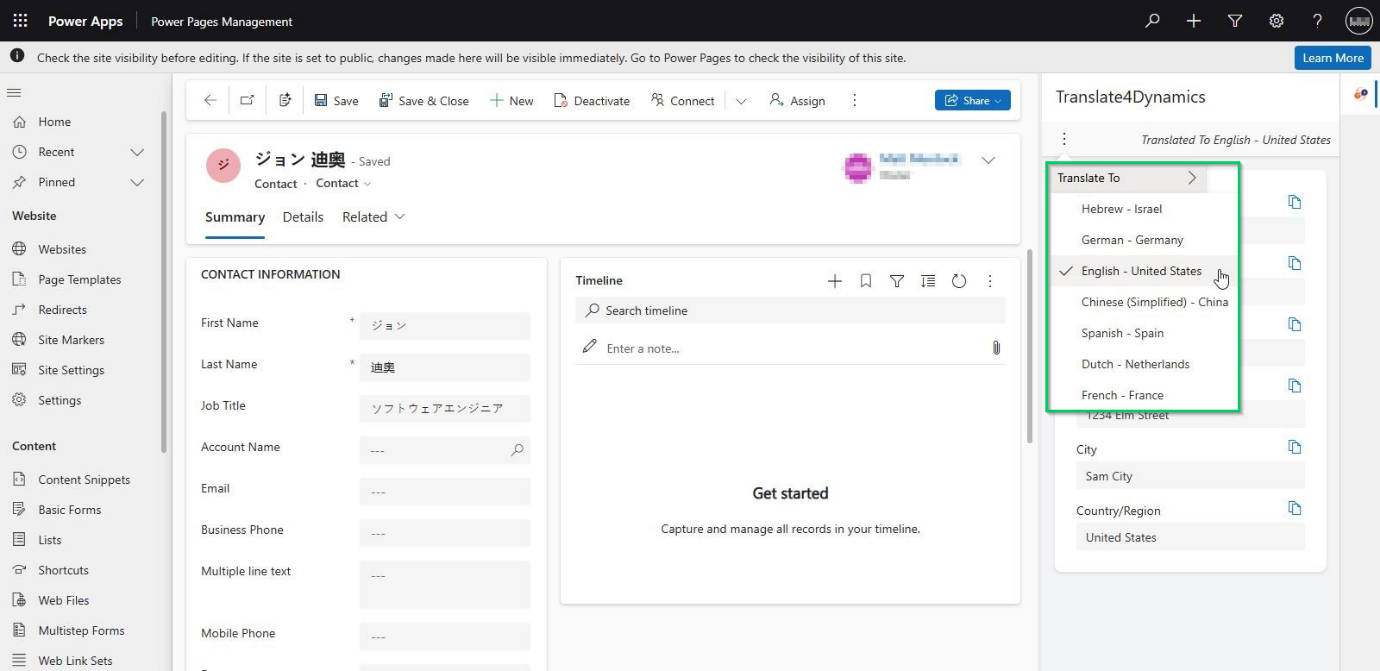
Easily translate individual fields or columns in real time using any of your CRM’s enabled languages.

Dynamics 365 CRM Needs a Translation App
Benefit:
Deliver instant, context-accurate translations exactly when and where you need them—without switching screens or slowing workflows.

  1. Side-by-Side Translation View

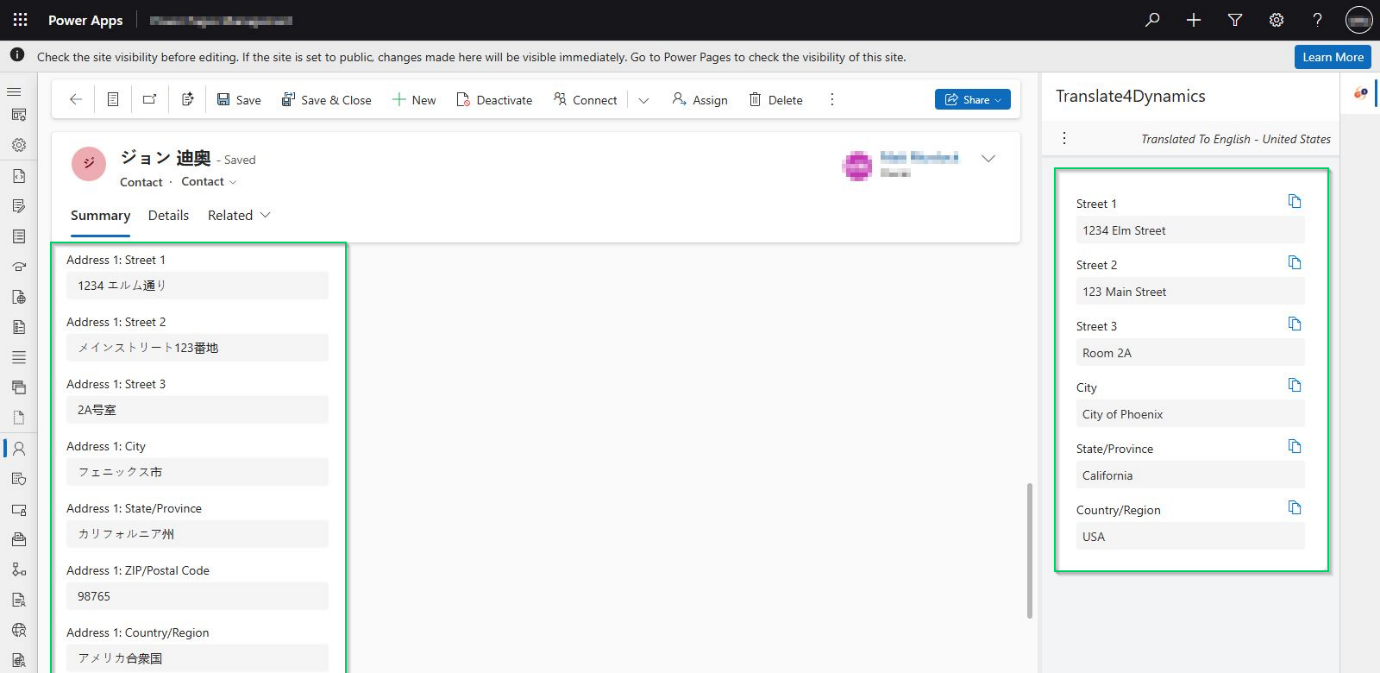
View the original text alongside its translated version in a dedicated pane right inside Dynamics 365.

Dynamics 365 CRM Needs a Translation App
Benefit:
Quickly review and verify translations without leaving your CRM screen, ensuring accuracy and context in every interaction.

  1. Rich Text Translation

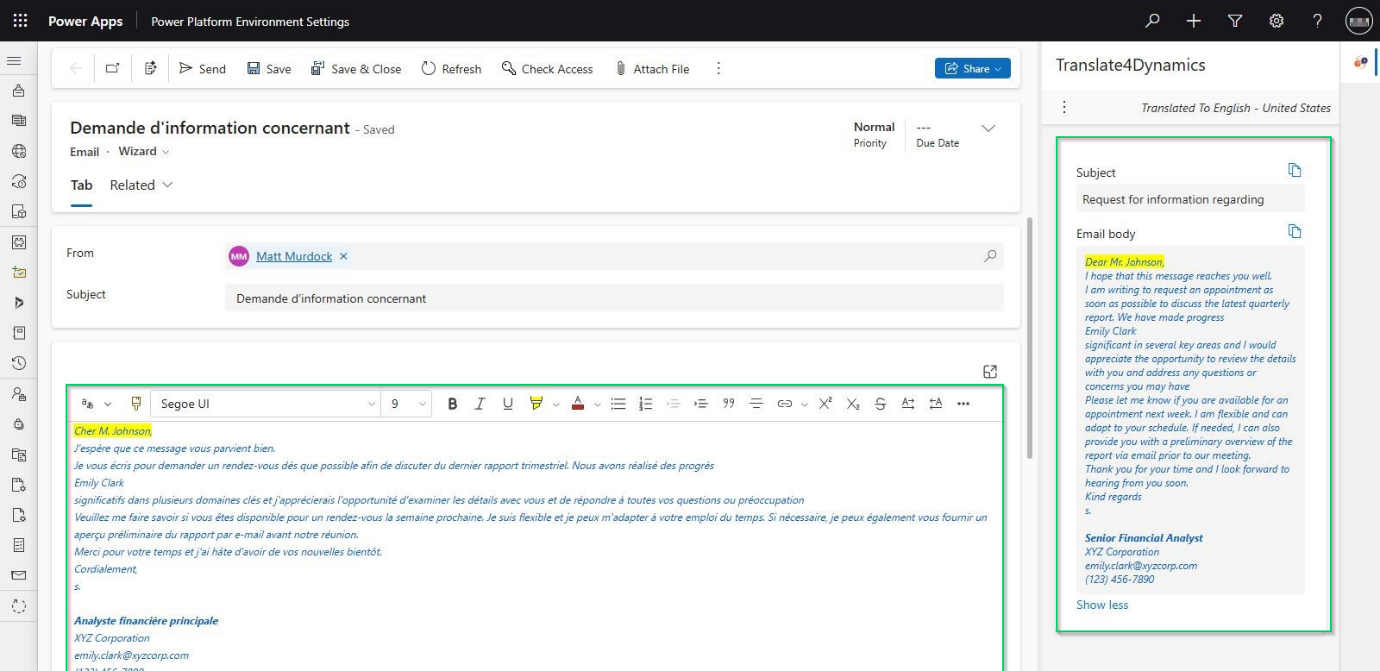
Translate rich text fields while preserving formatting – bold, colors, layout, and more.

Dynamics 365 CRM Needs a Translation App

Benefit:
Ensure professionalism and readability in all translations, even for complex or styled content.

  1. Configurable Column Translation

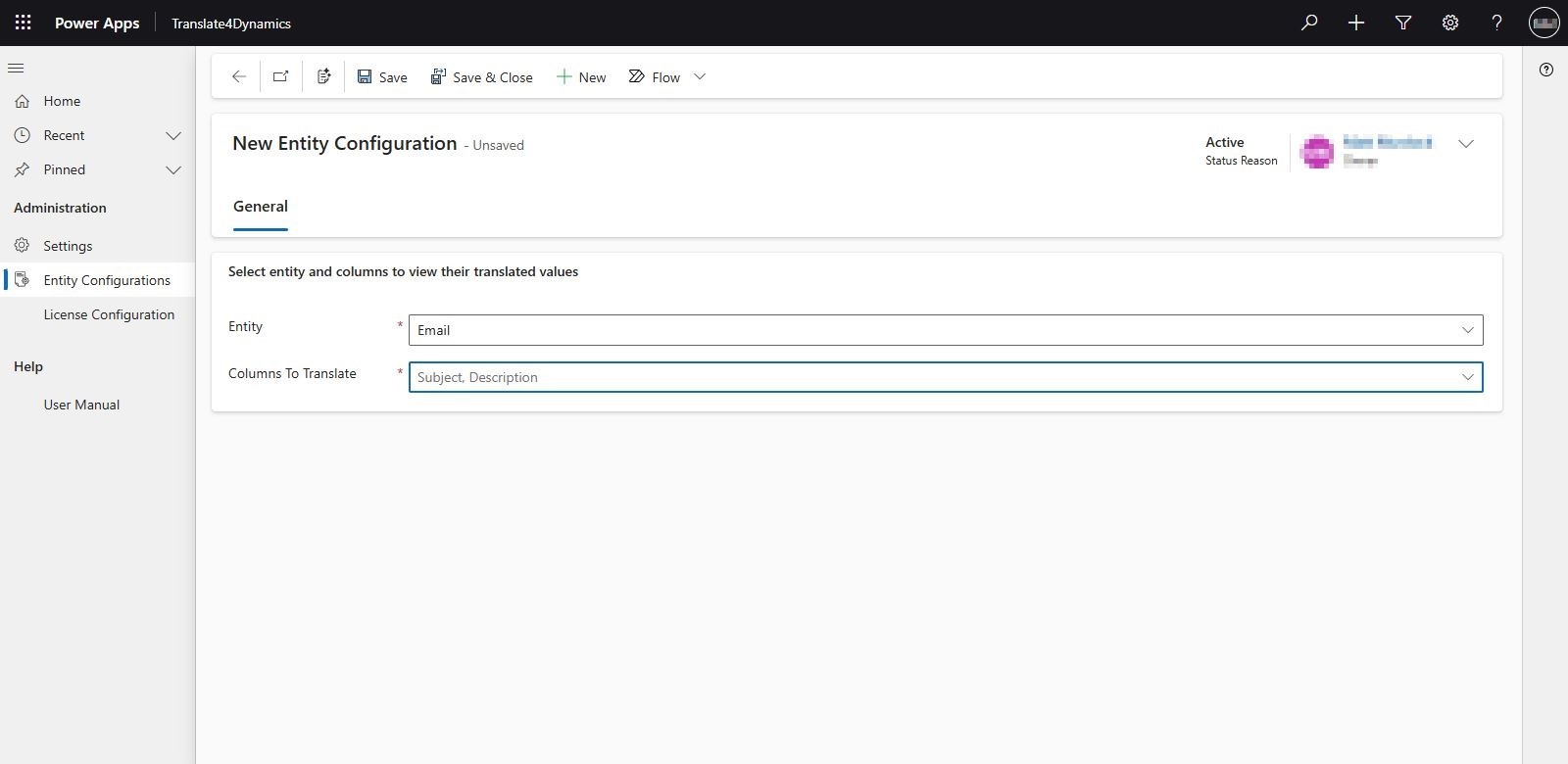
Select exactly which CRM fields to translate in real time—full control, zero guesswork.

Dynamics 365 CRM Needs a Translation App
Benefit:
Tailor translations to your business needs while avoiding unnecessary content clutter.

  1. Support for all Field Types

Translate numeric fields, strings, lookup fields, and option sets effortlessly.

Benefit: Achieve complete translation coverage across your CRM, no field left behind.

Why It Matters

  • Improve global communication
  • Serve multilingual customers effectively
  • Save time through automation
  • Enhance user experience for teams worldwide

 Join Our Webinar: Top Reasons your Dynamics 365 CRM Needs a Translation App today!

🗓 Date: Wednesday, August 20, 2025
⏰ Time: 12 PM AEST | 11 AM CET | 11 AM EDT

Register Now

Who Should Attend?

This webinar is ideal for:

  • Businesses with international clients
  • CRM administrators and consultants
  • Dynamics 365 users managing global teams
  • Customer service and support professionals
  • Anyone looking to boost CRM efficiency with automation

Dynamics 365 CRM Needs a Translation App

What You’ll See in the Webinar

  • Live demo of Translate4Dynamics in action
  • Step-by-step walkthrough of key features
  • Real-world examples of translating CRM data in real time
  • Interactive Q&A session with experts

Check out our demo video to watch real-time translation inside Dynamics 365.

If your CRM speaks only one language, it’s time for an upgrade.
Translate4Dynamics makes Microsoft Dynamics 365 truly multilingual—connecting your users and customers, no matter where they are.

Ready to Translate?

👉 Don’t miss out!
Register now for the webinar on Wednesday, August 20th, and see how Translate4Dynamics can transform your CRM experience.

Try Translate4Dynamics with a 15-day free trial from our website or Microsoft AppSource.

Prefer a guided walkthrough? Email us at crm@inogic.com

The post Webinar: Top Reasons your Dynamics 365 CRM Needs a Translation App today! first appeared on Microsoft Dynamics 365 CRM Tips and Tricks.
  • ✇Microsoft Dynamics 365 CRM Tips and Tricks
  • Webinar: Visual Planning in Dynamics 365 – Kanban and Mind Map View Explained!
    Tired of Clicking Around in CRM? If you’re a Dynamics 365 CRM user, chances are your day involves jumping between views, clicking through endless records, and manually updating fields — only to realize you’re still not getting the full picture. Actually, CRM was supposed to simplify your workflow. Instead, it often becomes a cluttered maze of disconnected data. Here are the most common pain points we hear from real CRM users every day: The Real Problems Dynamics 365 CRM Users Face Traditional
     

Webinar: Visual Planning in Dynamics 365 – Kanban and Mind Map View Explained!

Visual Planning in Dynamics 365 – Kanban and Mind Map View Explained

Tired of Clicking Around in CRM?

If you’re a Dynamics 365 CRM user, chances are your day involves jumping between views, clicking through endless records, and manually updating fields — only to realize you’re still not getting the full picture.

Actually, CRM was supposed to simplify your workflow. Instead, it often becomes a cluttered maze of disconnected data.

Here are the most common pain points we hear from real CRM users every day:

The Real Problems Dynamics 365 CRM Users Face

Traditional CRM Views with Cluttered Data

  • Flat grids make it hard to understand record status and priority
  • No real-time visibility into where deals, cases, or tasks stand
  • Manual updates slow teams down and create bottlenecks
  • Too many clicks to complete basic actions

Unclear CRM Relationship Visibility

  • Missing Hierarchical View for tree-like structure of Parent-Child relationships
  • Lack of actionable insight directly from the relationship view
  • No clear map of account-contact-opportunity relationships
  • Complex connections and N:N relationships go unnoticed
  • Difficulty navigating parent-child records

Sound familiar?

Let’s talk about the solution.

A Proven Way to Visualize CRM

Inogic’s powerful visualization apps for Dynamics 365 CRM are designed to simplify and supercharge your experience:

Kanban Board for Dynamics 365 CRM

Turn your CRM views into interactive, actionable boards

  • Visualize CRM Views – Transform standard views into Kanban-style lanes
  • Swim Lanes – Streamline task organization by displaying uniform-height rows for clearer visual alignment
  • Real-Time Pipeline Management – Drag-and-drop records through BPF stages
  • Row Grouping and Color Coding – Prioritize using row groups and colored tags
  • Quick Activities – Add calls, tasks, and appointments directly from Kanban cards
  • Persona Integration – Add images and contextual data for a personal touch
  • Aggregate Insights – Get total counts and summaries in each lane

No more guesswork. Just a clear view of what’s happening and what’s next.

Map My Relationships: The 360° CRM Record Map

Understand connections. See everything. Take action.

  • Hierarchy Control – Visualize & manage parent-child record relationships in a tree structure
  • 360° Overview – Visualize all related records around the primary one
  • Auto-Expand Relationships – Dive into N:N and custom links
  • Interactive Nodes – Email, call, or update records directly from the map
  • Spider View – See everything connected to a record in one place
  • Role-Based Colors – Highlight what matters for your job function
  • Custom Filtering – Focus your view on specific record types or relationships

Now, you can stop guessing and start connecting the dots.

Still Missing Microsoft’s Hierarchy Control? We’ve Got You Covered.

Map My Relationship steps up with a far more intuitive and actionable tree-style hierarchy view:

  • View parent-child records in a clean, expandable tree
  • Perform actions like sending emails or creating tasks directly from nodes
  • Get complete visibility across multiple modules with one click

Whether you’re in Sales, Service, or Strategy — this feature alone can save hours each week.

Want to see these visual tools in action?

Join our exclusive webinar to discover simple, effective ways to visualize your CRM records, relationships, and hierarchies — all designed to support smarter decision-making and drive better sales outcomes.

Webinar: Visual Planning in Dynamics 365 – Kanban and Mind Map View Explained!

Register Now!!

Date: Wednesday, August 6th, 2025
Timings:
2 PM AEST
11 AM CET
11 AM EDT

Discover how you can:

  • Utilize Hierarchy Control View to navigate and manage parent-child record relationships through a clear, tree-like structure
  • Improve adoption across teams with tools they enjoy using
  • Simplify record management with drag-and-drop controls
  • Visualize CRM data for better decisions

Secure your spot—register today!

⏳ Tight on time for the live session?

No worries! Just register and we’ll send you the webinar recording to watch at your convenience.

✨ Curious to test it out first?

Grab your free 15-day trial of Kanban Board and Map My Relationship from our website or Microsoft AppSource.

Have a question? Feel free to mail us at crm@inogic.com to get a personalized demo of the apps.

The post Webinar: Visual Planning in Dynamics 365 – Kanban and Mind Map View Explained! first appeared on Microsoft Dynamics 365 CRM Tips and Tricks.

  • ✇Microsoft Dynamics 365 CRM Tips and Tricks
  • Webinar: How CRM Alerts Improve Sales and Customer Service!
    Tired of Missing Important CRM Updates? If you’re using Dynamics 365 CRM, chances are you’ve experienced the frustration of missing critical updates, overdue tasks, or client follow-ups. Let’s be honest—relying on manual reminders or digging through dashboards isn’t the most efficient way to stay on top of things. The Problem: While working with Dynamics 365 CRM, every second matters. But many users struggle with: Forgetting key deadlines or approvals Not getting notified about important chang
     

Webinar: How CRM Alerts Improve Sales and Customer Service!

Alerts4Dynamics Webinar Blog Banner

Tired of Missing Important CRM Updates?

If you’re using Dynamics 365 CRM, chances are you’ve experienced the frustration of missing critical updates, overdue tasks, or client follow-ups.

Let’s be honest—relying on manual reminders or digging through dashboards isn’t the most efficient way to stay on top of things.

The Problem:

While working with Dynamics 365 CRM, every second matters. But many users struggle with:

  • Forgetting key deadlines or approvals
  • Not getting notified about important changes in real-time
  • Losing valuable time jumping between modules to monitor record statuses
  • No easy way to send alerts across teams, users, or customers

Sounds familiar?

You’re not alone.

The Solution: Alerts4Dynamics

Alerts4Dynamics by Inogic is an app built to simplify life inside Dynamics 365 CRM. It helps you create and manage alerts, reminders, email digest workflow, announcements, and snooze notifications, all within your Dynamics 365 CRM interface.

With Alerts4Dynamics, you can:

✅ Get instant pop-ups, emails, or form notifications for any CRM record
✅ Automate alerts based on conditions you set—no coding needed
✅ Send messages to specific users, teams, or even customers
✅ Set up automated recurring alerts to ensure every important update is always on your radar.

It’s like having a smart assistant inside your CRM—keeping you and your team informed and efficient.

Want to see how?

Join our upcoming webinar to discover how Alerts4Dynamics can simplify your Dynamics 365 CRM experience – one smart alert at a time!

Webinar: How CRM Alerts Improve Sales and Customer Service!

Register Now!!

Date: Wednesday, June 25th, 2025

12 PM AEST | 11 AM CET | 11 AM EDT

Why Attend Our Webinar?

We understand that getting started with new tools requires both time and a clear understanding. That’s why we’re hosting a free, live webinar to show you exactly how Alerts4Dynamics works, with real-world Dynamics 365 notifications and use cases.

You’ll learn how to:

  • Create and configure Dynamics 365 alerts quickly with minimal effort
  • Customize Dynamics 365 notifications for different departments
  • Avoid missed opportunities with proactive communication
  • Improve productivity without extra effort

Whether you’re in Sales, Service, Marketing, or Admin, Alerts4Dynamics can be the difference between chaos and control in your CRM routine.

Top Highlights of Alerts4Dynamics for Microsoft Dynamics 365 CRM

  • Multiple Alert Types: Display alerts as pop-ups, form notifications, or email messages based on your business need.
  • Flexible Alert Modes: Choose from Information, Warning, or Critical alerts to communicate urgency clearly.
  • Targeted Notifications: Send alerts to specific users, teams, roles, or all users in the organization.
  • Multi-Record Alerts: Create a single alert that applies to multiple CRM records—save time and avoid repetition.
  • Record-Based Alerts: Trigger alerts based on conditions (e.g., overdue status, specific field values, etc.).
  • Global Announcements: Share organization-wide announcements like policy updates, system downtime, or event notices.
  • Time-Based Alerts/Snooze Notification: Schedule alerts to be triggered on specific dates or times—one-time or recurring.
  • Multi-Language Support: Create alerts in multiple languages to match user preferences and regional settings.
  • User Dismiss Option: Allow users to dismiss alerts once read—great for personalizing the alert experience.
  • Alert History Tracking: Maintain a record of all alerts viewed or dismissed by users for compliance and auditing.
  • Customizable Design: Tailor alert layout, colors, and icon styles to align with your brand or priority levels.

🚨 Don’t let missed alerts slow you down!

Secure your spot—register today!

⏳ Tight on time for the live session?

No worries! Just register and we’ll send you the webinar recording to watch at your convenience.

✨ Curious to test it out first?

Grab your free 15-day trial from Microsoft AppSource or directly from our website and experience the power of Alerts4Dynamics firsthand.

📘 Want to dive deeper into the features?

Explore our comprehensive online help guide for detailed insights, or connect with our experts at crm@inogic.com for a personalized demo.

The post Webinar: How CRM Alerts Improve Sales and Customer Service! first appeared on Microsoft Dynamics 365 CRM Tips and Tricks.

Techtember Webinars: Exclusive Preview of Inogic’s Innovations at Community Summit NA!

Exclusive Preview of Inogic’s Innovations at Community Summit NA!

In the competitive landscape of sales and customer relationship management, leveraging smart business solutions is essential for gaining an edge. By streamlining sales communication through integrations with platforms like WhatsApp, SMS, and live chat, along with effective document storage and management, you can significantly enhance your Dynamics 365 CRM experience. These integrations not only improve efficiency but also create seamless interactions that resonate with customers. Moreover, utilizing geospatial tools offers valuable insights that drive strategic decision-making and foster deeper customer engagement.

To explore such transformative solutions, we invite you to an exciting week of knowledge-sharing and innovation! Inogic, a distinguished Microsoft Gold ISV Partner, is thrilled to present an exclusive webinar series from September 24th to 26th, 2024. These sessions will serve as a captivating lead-up to the highly anticipated Community Summit #MySummitNA, taking place from October 13th to 17th, 2024, in San Antonio, Texas.

Mark your calendars for this unique opportunity to gain insights and enjoy an exclusive sneak peek into our innovative apps that will be showcased at Community Summit NA, Booth No. 1017. Don’t miss out on this chance to enhance your business processes and discover what Inogic has to offer!

Join us for this exciting webinar series and take the first step toward transforming your sales strategy.

Choose your desired session and register now:

Webinar: Transform Your CRM Messaging with WhatsApp, SMS, and Live Chat Integrations

Effective communication is vital for strong customer relationships and increased sales. This webinar highlights three powerful Inogic apps for integrating Microsoft Dynamics 365 CRM with WhatsApp, SMS, and LiveChat, enabling an omnichannel approach to customer engagement. Discover how these tools streamline interactions with customers, prospects, and partners, all within the CRM ecosystem.

Uncover essential features of these apps in the webinar:

WhatsApp4Dynamics

  • Receive instant notifications for new WhatsApp messages via a chat bubble displaying unread message counts.
  • Manage WhatsApp conversations in CRM, as well as create CRM records from chats.
  • Automate WhatsApp messages for events like order confirmations or reminders.

TextSMS4Dynamics

  • Never miss a message with instant SMS notifications in CRM.
  • Save time with customizable, trigger-based automated SMS messages.
  • Engage customers with images, emojis, and multi-language support.

LiveChat4Dynamics

  • Get real-time notifications in Dynamics 365 CRM for every new live chat.
  • Manage and view all live chat conversations directly within CRM.
  • Automatically log chat interactions as leads or cases in CRM for efficient tracking.

Date: 24th Sep 2024
Register Now: 3 PM AEDT, 11 AM CET, 11 AM EDT

Webinar: Power of Maps for Field Reps in Dynamics 365 & Power Pages

Maplytics is a certified geolocation software solution available on Microsoft AppSource, designed to empower organizations using Dynamics 365 CRM across industries with location intelligence. This powerful tool helps visualize Dynamics 365 data on maps. By leveraging Maplytics, you can secure increased sales, analyze workloads based on locational data, plan meetings in advance, and save valuable travel time and costs.

Additionally, you can deploy Maplytics on Power Apps with support for Dataverse to further enrich your organization’s ability to utilize location intelligence effectively.

Join us in this webinar to uncover key features of Maplytics:

  • Optimize client activity planning with efficient routes and travel time.
  • Automate work order scheduling based on resource skills.
  • Efficiently assign and unassign records to territories.
  • Automate the scheduling of work orders according to resource skills.
  • Effectively assign and remove records from territories.

Date: 25th Sep 2024
Register Now: 3 PM AEDT, 11 AM CET, 11 AM EDT

Webinar: Save CRM Storage Space and Auto Sync Security Privileges to SharePoint!

Dynamics 365 CRM users often face storage limits and challenges with secure document transfers to SharePoint. Performance can suffer due to excessive data, and traditional solutions are costly. This webinar introduces Attach2Dynamics and SharePoint Security Sync—two Inogic apps designed to enhance document security and streamline CRM storage management.

Join us in this webinar to uncover key features of Attach2Dynamics and SharePoint Security Sync:

Attach2Dynamics

  • Move Dynamics 365 CRM email attachments and body content to Dropbox, SharePoint, and Azure Blob Storage.
  • Automate setting user permissions for various actions such as Upload, Download, Email, etc. with Security Templates.
  • Drag and Drop Email and its Attachments from Outlook to cloud storage using Attach2Dynamics UI.

SharePoint Security Sync

  • Automatically synchronize security privileges from CRM to SharePoint.
  • Customize folder structures to bypass the 5,000-item limit in SharePoint libraries.
  • Customize document organization in SharePoint with flexible metadata columns.

Date: 26th Sep 2024
Register Now: 3 PM AEDT, 11 AM CET, 11 AM EDT

If you are gearing up for a visit to Inogic’s booth at the Community Summit NA, this webinar series is just for you.

Unable to join us live? No problem! Register now to secure your spot, and we’ll send you a link to the recorded session.

Once again, we would like to invite you to connect with the Inogic team at this upcoming event: Community Summit NA in San Antonio, TX, Booth #1017, running from October 13th to 17th. There, you can explore how our innovative apps can help you maximize the returns on your CRM investments.

If you are curious to try our apps for your business needs, then you can get them for a 15-day free trial from our website or Microsoft AppSource.

If you want to know more about our solutions from our product experts, feel free to connect with us at crm@inogic.com to set up a personalized app demo.

Let’s kick off the countdown together as we anticipate #MySummitNA!

The post Techtember Webinars: Exclusive Preview of Inogic’s Innovations at Community Summit NA! first appeared on Microsoft Dynamics 365 CRM Tips and Tricks.

❌
❌