The Power of WhatsApp Marketing for Brands: A Game Changer
Today, brands constantly bombard customers with emails, calls, and social media ads. It can be hard to stand out from the noise and connect with customers in a meaningful way. But what if there was a way to reach customers directly on a platform they already use and love?
Enter WhatsApp marketing. With a staggering 85% of customers preferring to receive brand updates and communications via WhatsApp, it’s no surprise that it’s becoming a game-changer for marketers.
This blog covers how you can leverage the power of WhatsApp marketing with Dynamics 365 Customer Insights using WhatsApp4Dynamics, with a fictional example of a beauty brand called A&B Organics.
A&B Organics Leverages WhatsApp4Dynamics
A&B Organics’ marketing team wanted to leverage the growing popularity of WhatsApp and its potential to reach customers on a more personal level.
However, being a Dynamics 365 CRM user, they did not want fragmented communication channels. They wanted something that could be integrated into their existing system and did not require additional training for their users. This is where Inogic’s WhatsApp4Dynamics came into the picture.
WhatsApp4Dynamics is a WhatsApp Integration app that integrates WhatsApp Business with Dynamics 365 Sales, Customer Insights and Customer Services.
As they were using Customer Insights for marketing, this low-code, no-code ISV app became just the solution they needed.
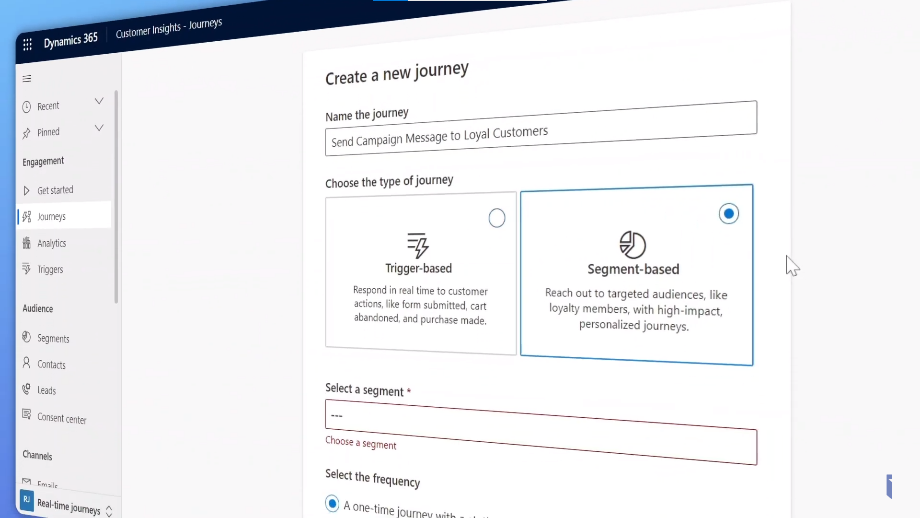
Robert, the new marketing lead at A&B Organics, wanted to let his loyal customers know about upcoming discounts and offers. He created a segment-based journey within his CRM campaign, targeting loyal customers. This strategic approach helped boost engagement rates and elevate campaign performance.
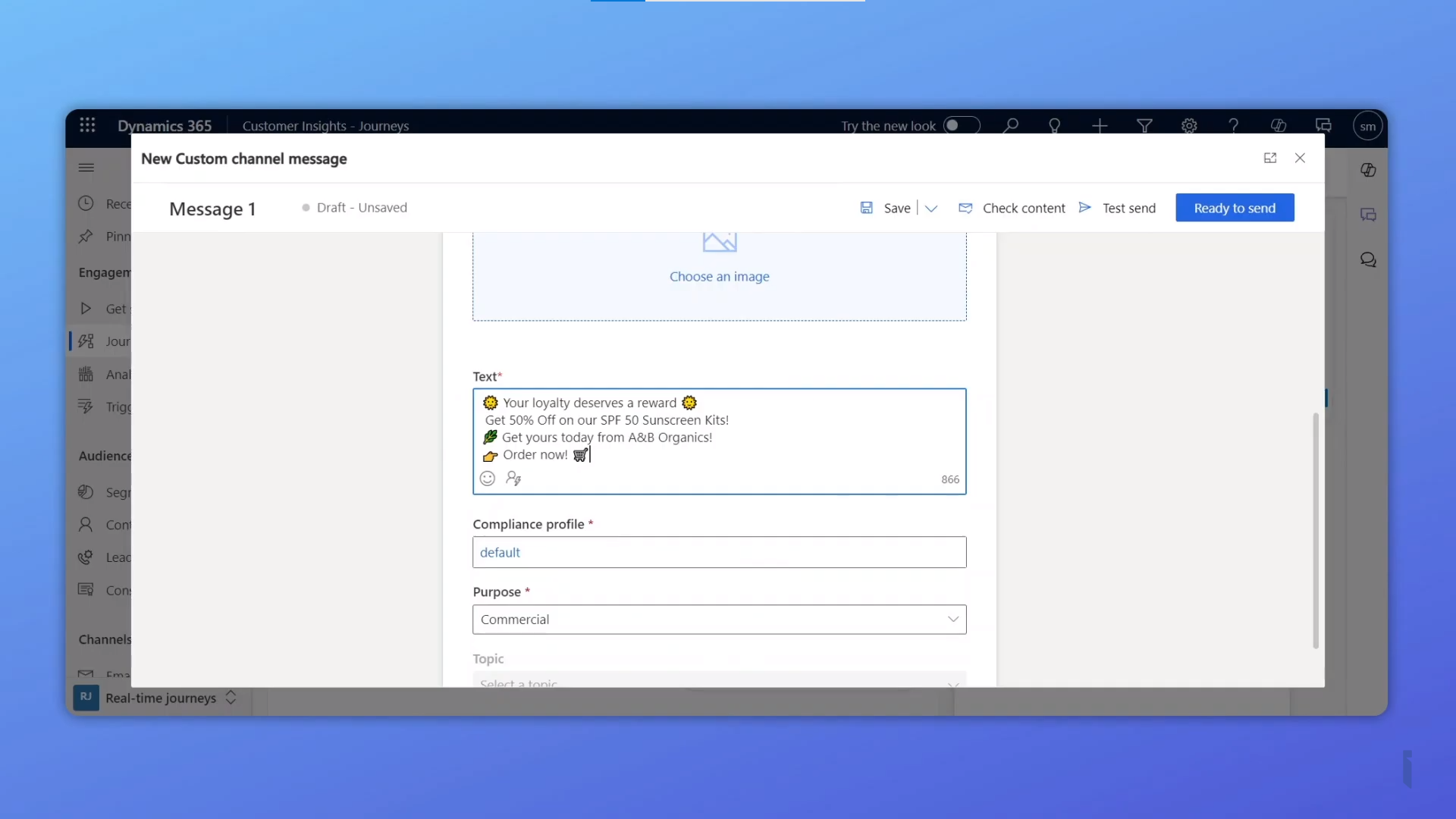
Robert strategically integrated relevant emojis throughout his bulk messaging. This helped him connect with customers on a more personal and familiar level.
Monitor Campaign Performance with WhatsApp4Dynamics Insights
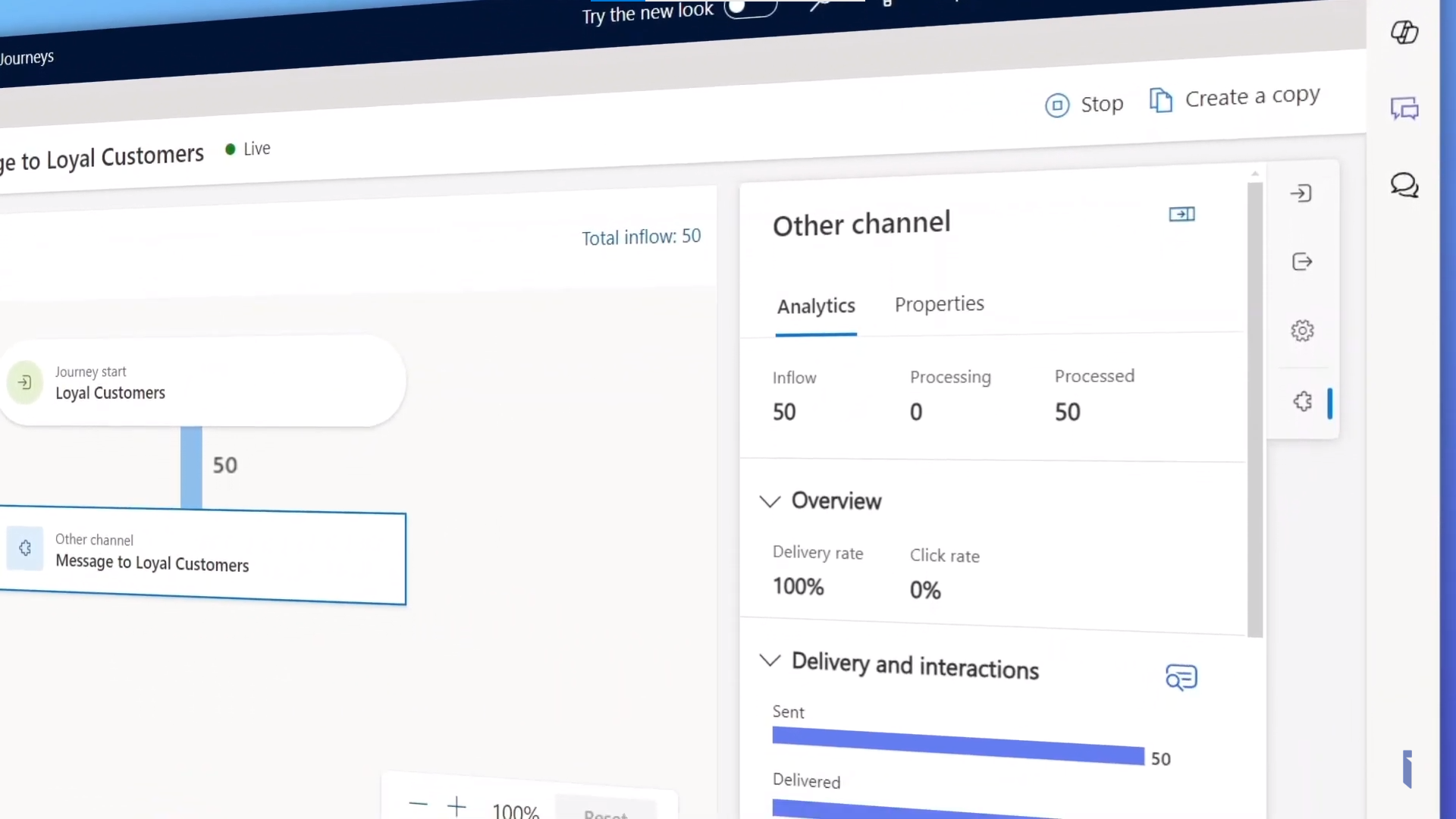
WhatsApp4Dynamics provides valuable insights that Robert could access within the journey to monitor the campaign’s success and delivery statistics. This allowed him to track important metrics and adjust as needed.
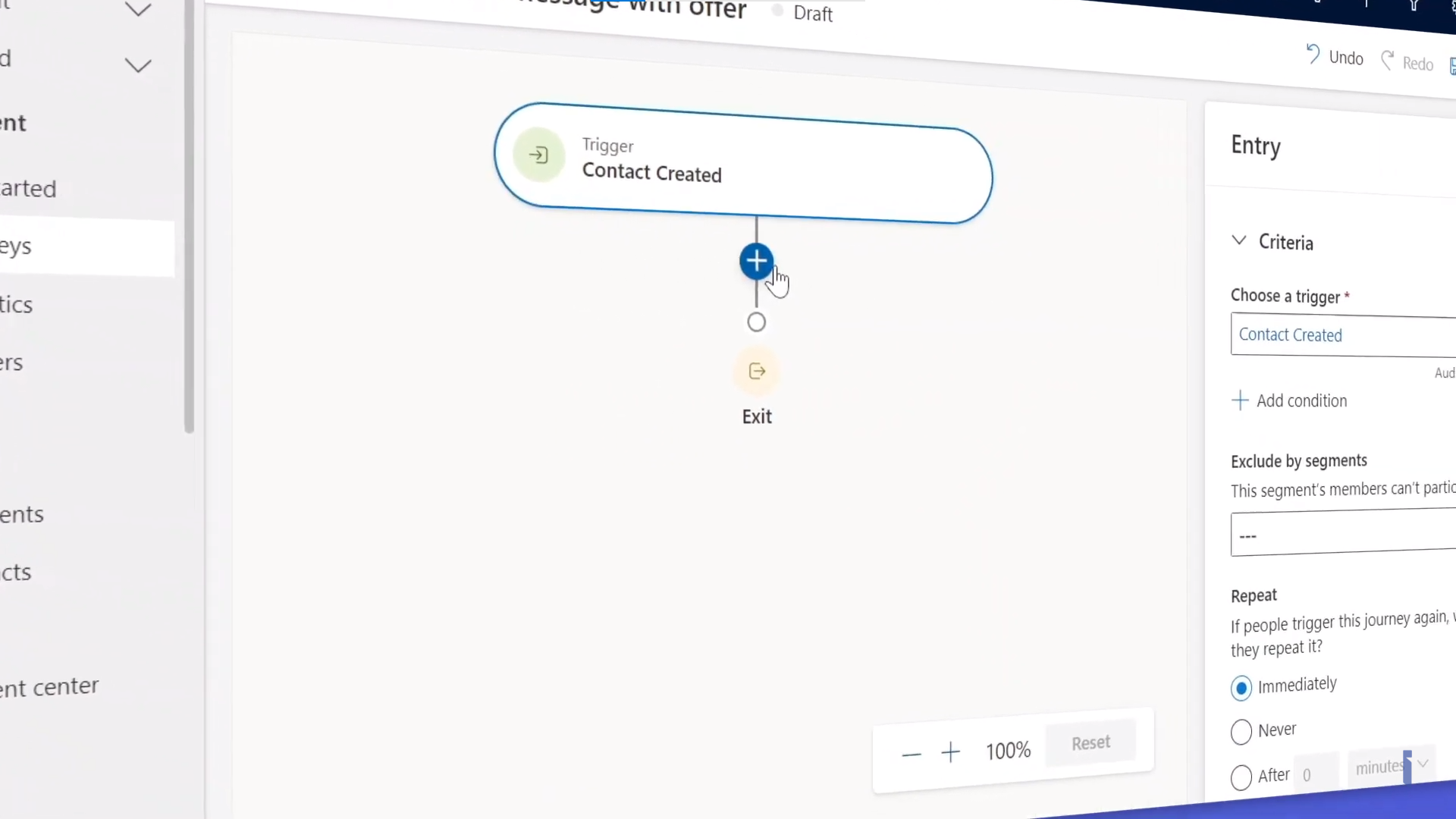
Robert also created a new trigger-based journey for WhatsApp contacts. This powerful feature made possible by WhatsApp4Dynamics ensures that whenever a new customer is added to CRM, a welcome message with a campaign update is automatically sent to them on WhatsApp. This is just one approach, there are numerous ways you can benefit from this feature.
A Resounding Success
The WhatsApp marketing campaign proved to be a resounding success for Robert and his marketing team. They achieved a significant 5x increase in product inquiries, demonstrating the power of this innovative marketing strategy.
Ready to Explore WhatsApp Marketing?
This blog post just scratched the surface of the numerous features available in WhatsApp4Dynamics.
To learn more about how you can leverage WhatsApp marketing to take your customer engagement to the next level, watch our video showcasing how A&B Organics sales team efficiently handles incoming inquiries using WhatsApp4Dynamics for Dynamics 365 Sales.
Download WhatsApp4Dynamics today from Microsoft AppSource or the Inogic website. Don’t hesitate to connect with our product experts at crm@inogic.com to discuss your specific needs and explore how WhatsApp marketing can help your brand achieve its goals.
Customers no longer wait for emails, and businesses can no longer afford delayed responses. Enterprises operating across multiple regions need a unified, real-time communication system that connects WhatsApp Business conversations directly with CRM intelligence.
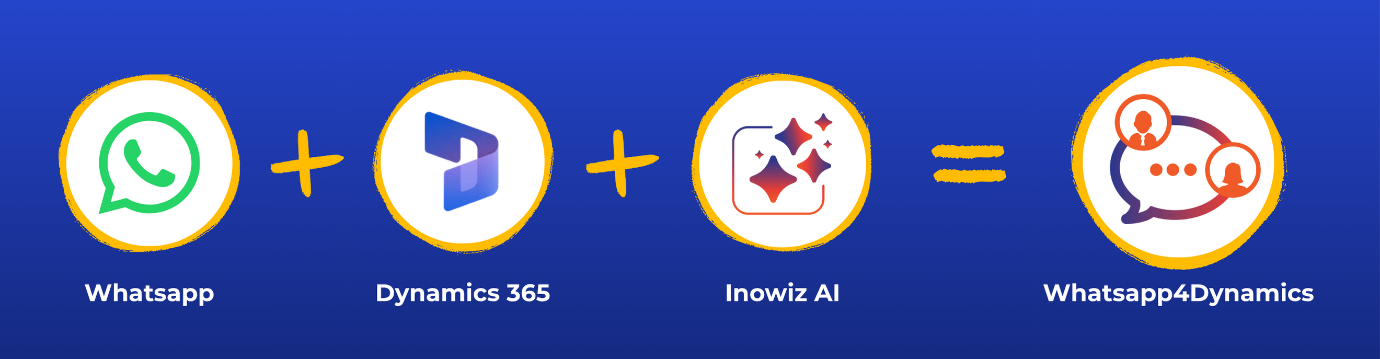
This is exactly where WhatsApp4Dynamics transforms customer engagement, by bringing WhatsApp conversations directly into Microsoft Dynamics 365 CRM, enhanced with automation, AI assistance, and structured session management for marketing and service communication.
Key Takeaways
Centralize all WhatsApp Business conversations directly inside Microsoft Dynamics 365 CRM
Improve agent productivity with AI-powered assistance, smart replies, and automated workflows
Separate marketing and utility conversations for better compliance, tracking, and analytics
Automate lead routing, campaign messaging, and customer engagement at scale
Deliver faster, more personalized customer communication across regions and teams
Improve campaign response rates while reducing manual communication effort
Manage high-volume WhatsApp operations from a unified CRM-driven communication platform
The Challenge: Scaling WhatsApp Communication Across Global Operations
Large, multi-region organizations often face a common set of communication challenges:
Global customer engagement through WhatsApp becomes difficult when:
Multiple WhatsApp Business numbers are used across regions
Conversations are scattered across tools and teams
Marketing and service messages are mixed in the same thread
High-volume campaigns overwhelm agents
Lead qualification and routing slow down conversion cycles
Compliance with WhatsApp messaging policies becomes harder to manage
Without a unified CRM-driven system, teams struggle with visibility, consistency, and speed of response.
The Solution: WhatsApp4Dynamics Inside Microsoft Dynamics 365 CRM
To overcome these challenges, the organization implemented WhatsApp4Dynamics, a powerful integration that embeds WhatsApp Business directly into Microsoft Dynamics 365 CRM, enabling end-to-end conversation management.
Instead of managing WhatsApp through disconnected applications, teams were able to handle customer conversations, automate workflows, and track engagement directly within Dynamics 365 CRM.
This transformed WhatsApp from a standalone messaging platform into a structured, CRM-driven communication channel that supported sales, marketing, and customer service operations at scale.
Key Capabilities Implemented
1. Centralized WhatsApp Conversation Hub in CRM
All WhatsApp chats were managed directly inside Dynamics 365 CRM, allowing agents to:
View complete conversation history
Respond without switching applications
Link chats to CRM records (Lead, Contact, Case, Opportunity)
Maintain full customer context in every interaction
2. AI-Powered Engagement with InoWiz Copilot
To improve response quality and speed, InoWiz Copilot AI was integrated, enabling:
Sentiment analysis (Positive, Neutral, Negative)
AI-generated chat summaries
Smart reply suggestions
Context-aware response assistance
Knowledge article recommendations
AI-driven CRM record creation suggestions
This significantly reduced agent workload while improving response accuracy and consistency.
3. Marketing vs Utility Session Separation
One of the most impactful enhancements was the ability to separate conversations into:
Utility Sessions → Customer service, support, operational communication
This ensured:
Cleaner conversation history
Better analytics on campaign performance
Compliance with WhatsApp messaging guidelines
Improved customer experience with reduced message clutter
4. Automated WhatsApp Marketing Workflows
Using Dynamics 365 Workflows and Customer Insights – Journeys, businesses were able to:
Trigger WhatsApp messages for campaigns
Send order updates and reminders automatically
Run personalized, event-based messaging at scale
Marketing messages were delivered at the right time, without manual effort.
5. Intelligent Chat Routing and Assignment
To handle high message volumes efficiently, the system introduced:
Keyword-based routing for high-intent leads
Automatic chat assignment to available agents
Team-based workload distribution
Chat reassignment and escalation workflows
This ensured faster response times and improved lead conversion rates.
6. Pre-Chat and Post-Chat Questionnaires
Structured questionnaires were deployed to:
Collect customer intent before agent interaction
Route conversations intelligently
Gather feedback after support sessions
Auto-update CRM fields for better profiling
This turned every conversation into structured, actionable CRM data.
7. Opt-In and Compliance Management
To ensure regulatory compliance and customer trust, the system supported:
Single and Double Opt-In flows
Keyword-based subscription and unsubscription handling
Consent tracking integrated with CRM and journeys
Automated opt-in/out record creation
This ensured marketing messages were sent only to opted-in users.
The Results: Measurable Impact Across Engagement and Efficiency
After implementing WhatsApp4Dynamics, the organization achieved significant improvements:
Business Outcomes
38%–50% WhatsApp campaign response rates
Faster lead qualification and routing
Improved agent productivity with centralized chat handling
Scalable WhatsApp operations across multiple regions
Better visibility into marketing vs service engagement
Operational Improvements
Reduced manual workload through automation
Faster customer response times
Improved conversation tracking and CRM alignment
Consistent messaging across global teams
Why WhatsApp4Dynamics Works for Modern Enterprises
WhatsApp4Dynamics is more than a basic messaging integration. It helps organizations turn WhatsApp Business into a connected, CRM-driven communication channel within Microsoft Dynamics 365.
By combining WhatsApp communication, automation, and AI-powered assistance inside CRM, businesses can manage customer engagement more efficiently across sales, marketing, and support operations.
With WhatsApp4Dynamics, organizations can:
Centralize WhatsApp Business communication directly inside Dynamics 365 CRM
Automate customer journeys, notifications, and campaign messaging
Improve agent productivity with AI-powered assistance and smart response suggestions
Separate marketing and customer service conversations for better organization and compliance
Manage high-volume customer communication more efficiently
Deliver faster, personalized, and context-aware customer engagement across teams and regions
Final Takeaway
In an environment where customer experience directly impacts business growth, organizations need more than standalone messaging tools. They need connected communication systems that unify customer conversations, automation, and CRM intelligence in one place.
By integrating WhatsApp Business directly with Microsoft Dynamics 365 CRM, WhatsApp4Dynamics helps organizations centralize communication, automate engagement workflows, improve response efficiency, and deliver more personalized customer experiences at scale.
Businesses looking to streamline WhatsApp communication inside Dynamics 365 CRM can explore WhatsApp4Dynamics through a 15-day free trial available on the Inogic website or Microsoft Marketplace.
In 2026, customer communication expectations have fundamentally changed. Today’s buyers demand instant, conversational, and mobile-friendly interactions, not long email threads they might open hours or even days later.
For Dynamics 365 CRM users, this shift is significant. Businesses are moving away from traditional email as the primary CRM channel and adopting WhatsApp CRM integrations like WhatsApp4Dynamics. This solution enables faster engagement, higher conversions, and stronger customer relationships, all directly within the Dynamics 365 environment.
With WhatsApp4Dynamics, teams can manage real-time conversations, leverage AI-powered assistance for quick replies and insights, automate workflows, and access CRM context while chatting, all without leaving the CRM interface.
WhatsApp vs Email for CRM Communication: Engagement and Conversion Stats
The performance difference between WhatsApp and email isn’t subtle; it’s dramatic.
Open and Response Rates
WhatsApp messages enjoy approximately 98% open rates, meaning almost every message sent gets seen.
In contrast, email open rates struggle to reach 20–25% on average.
Many WhatsApp messages are read within minutes of delivery, while emails often languish unread for hours or longer.
Click‑Through and Reply Rates
WhatsApp click-through rates (CTR) typically fall between 45–60%, far higher than the 2–5% CTR typical of email campaigns.
Messaging app response rates can be 40–60% or more, whereas email response rates languish in the single digits.
Conversion Impact
Conversations on WhatsApp have been linked to conversion rates up to 45–60%, significantly outpacing email.
In markets where WhatsApp dominates usage, such as India, Brazil, and the UAE, these engagement advantages translate into higher sales and faster lead closure.
These numbers explain why modern CRM teams are rethinking their communication strategy: WhatsApp reaches customers where they are most active and receptive.
Why Dynamics 365 Users Are Moving to WhatsApp CRM
Dynamics 365 CRM is a powerful platform for managing customer data, processes, and automation. But even the best CRM data is limited without seamless communication tools.
Integrations like WhatsApp4Dynamics make WhatsApp a natural extension of Dynamics 365, providing:
Real-Time Conversations, Not Delayed Threads
WhatsApp messages feel immediate and conversational, unlike email replies that can take hours or never arrive.
Higher Engagement for Better Conversions
With higher open and click rates, prospects are more likely to respond, whether booking appointments, confirming orders, or seeking support.
CRM Context Inside Messages
Every chat can be tied directly to CRM records, Leads, Contacts, and Cases, ensuring conversations are informed by context and history.
Automation and Personalization
Triggered messages, appointment reminders, and workflow-based follow-ups can all be automated within Dynamics 365, ensuring timely, relevant communication.
Support, Marketing, and Sales All in One Place
Conversations can be routed, assigned, and analyzed directly from the CRM, eliminating the need to juggle multiple platforms.
AI Chat Assistance
WhatsApp4Dynamics offers an AI-powered chat assistant that can summarize conversations, suggest relevant responses, and provide quick insights from CRM records, helping agents respond faster and smarter.
Where Email Still Has Value, and Where It Doesn’t
It’s important to understand that email is not dead, but its role in CRM is evolving.
Best Uses for Email
Formal documentation (contracts, invoices)
Long-form content that requires reading at the customer’s pace
Newsletters and content that may not be urgent
Where Email Falls Short
Instant engagement High conversion communication
Personalized conversational workflows
A combined strategy often works best: use email for formal or long content, and WhatsApp for real-time, high-impact interactions.
Business Impact of WhatsApp CRM Integration
Sales and Lead Conversion
Sales teams that respond within minutes on WhatsApp are far more likely to convert leads. With higher open/reply rates, messages become active conversations, not ignored notifications.
Customer Support
Real-time chats reduce support resolution time. Chat history linked to CRM records ensures agents have context for every interaction.
Marketing Campaigns
With opt-in automation, you can send promotional content that customers actually open and act upon, increasing engagement and reducing unsubscribe rates.
Operational Notifications
Order confirmations, delivery updates, and appointment reminders all get seen almost immediately on WhatsApp, reducing friction and customer follow-ups.
How to Implement WhatsApp CRM Integration in Dynamics 365
To get the most out of WhatsApp for CRM, follow these high-level steps:
Choose a WhatsApp CRM integration solution, like WhatsApp4Dynamics.
Connect your WhatsApp Business API account to Dynamics 365.
Configure consent workflows using Single or Double Opt‑In.
Set up message templates and approve them for business use.
Define automation triggers (e.g., lead creation, status updates).
Train agents to use chat assignments and CRM context during conversations.
Monitor and optimize conversion performance from WhatsApp vs email.
1. Does WhatsApp perform better than email for CRM communication?
Statistically, yes. WhatsApp messages have open rates around 98% and click-through/conversion rates of 45–60%, far surpassing email metrics. Integrations such as WhatsApp4Dynamics bring these advantages directly into Dynamics 365, making it easier for teams to engage customers effectively.
2. Can I automate messages in Dynamics 365 using WhatsApp?
Absolutely. With WhatsApp4Dynamics, you can automate triggered messages, appointment reminders, follow-ups, and workflow-based responses, all directly within the Dynamics 365 CRM environment.
3. How can I link WhatsApp chats to CRM records?
WhatsApp chats can be connected to Leads, Contacts, Cases, or custom entities in your CRM. Tools like WhatsApp4Dynamics automatically map chats to CRM records, giving agents instant context and history for every conversation.
4. What are the challenges of switching from email to WhatsApp for CRM?
Common challenges include managing consent, message template approvals, avoiding spam perception, and handling delivery at scale. WhatsApp4Dynamics helps address these by providing built-in opt-in workflows, template management, and AI-assisted suggestions for relevant messaging.
5. Can WhatsApp be used for sales, support, and marketing in one platform?
Yes. Integrations like WhatsApp4Dynamics enable businesses to route, assign, and manage all conversations, whether sales, support, or marketing, directly from Dynamics 365, ensuring a unified communication experience.
Conclusion: The Future Is Conversational CRM
Email still has its place, especially for formal communication, but WhatsApp is the future of CRM engagement in 2026 and beyond. With massive open rates, real-time interactions, and deep integration capabilities inside Dynamics 365, WhatsApp allows CRM teams to be faster, more personal, and more effective than ever.
If you want to transform your CRM communications, start with WhatsApp in Dynamics 365, informed by data, powered by automation, and aligned with customer expectations.
The 5-Minute Response Gap That’s Costing You Customers
98% of WhatsApp messages are read within 3 minutes. Compare that to emails, where only 20% are opened within the first hour and you’ll start to see why your customers are frustrated.
Your sales team sent 50 follow-up emails last week. Only 8 got responses. Meanwhile, your competitors are having real-time conversations with your prospects on WhatsApp and closing deals before you even get a reply.
The modern customer doesn’t wait. They text, they message, they expect instant responses. And if your CRM isn’t built for real-time, conversational engagement, you’re already falling behind.
That’s exactly why businesses are racing to implement WhatsApp integration in Dynamics 365, turning their CRM from a database into a dynamic conversation hub.
Why Traditional CRM Communication is Failing Your Customers
Let’s be honest: email and phone calls aren’t cutting it anymore. Here’s what your current CRM communication looks like from your customer’s perspective:
Average response time: 24-48 hours (if they’re lucky)
Open rates: Declining year over year as inboxes overflow
Customer frustration: “Why haven’t they gotten back to me?”
Your CRM sends automated email reminders that no one reads
Sales reps spend hours chasing prospects via outdated channels
Customer service tickets stall waiting for responses
The cost: 67% of customers abandon a purchase because they couldn’t get timely support
Here’s the critical stat: 75% of customers expect responses within 5 minutes for urgent queries. Your current CRM communication channels can’t deliver that. But WhatsApp can.
The problem isn’t your team’s effort; it’s that you’re using 2010 tools to meet 2025 expectations. You can integrate WhatsApp with Dynamics 365 to bridge that gap, transforming your CRM from a static record-keeper into a real-time engagement platform.
WhatsApp Integration in Dynamics 365: Your Competitive Advantage
Enter WhatsApp: the channel where your customers already spend hours every day. With over 2 billion active users globally, WhatsApp isn’t just a messaging app; it’s where modern business conversations happen.
When you integrate WhatsApp with Dynamics 365, something powerful happens: every customer chat, every query, every update flows directly into your CRM workspace. No app-switching. No copy-pasting. No information silos.
Why WhatsApp Changes the Game
Instant Connection: Meet customers where they are on the app they already trust and use daily
Rich Media Sharing: Send product catalogs, payment links, support videos, and documents directly in chat
Verified Business Presence: WhatsApp Business API provides a green checkmark that builds instant trust
Global Reach: Connect with customers across 180+ countries without worrying about SMS costs or international calling
High Engagement Rates: WhatsApp messages have a 98% open rate compared to 20% for email
Introducing WhatsApp4Dynamics: The Bridge Between Conversations and CRM
But here’s the challenge: WhatsApp and Dynamics 365 don’t talk to each other natively. That’s where WhatsApp4Dynamics comes in a purpose-built WhatsApp connector for Dynamics CRM that brings these two powerhouses together.
With WhatsApp4Dynamics, your team can:
Chat directly from Dynamics 365: No toggling between apps, WhatsApp conversations live inside your CRM interface
Link chats to records: Every WhatsApp conversation automatically connects to the relevant Contact, Lead, Account, or Case record
Share rich media: Send images, PDFs, videos, and voice notes without leaving the CRM
Use pre-approved templates: Comply with WhatsApp Business Policy while sending quick, consistent messages
Track conversation history: Complete audit trail of all customer interactions for better collaboration
Automate workflows: Trigger Dynamics 365 processes based on WhatsApp interactions
This isn’t just a messaging add-on. It’s a complete transformation of how your team engages with customers, making WhatsApp integration in Dynamics CRM the foundation of modern customer interaction.
How to Get Started: Implementing WhatsApp Integration in Dynamics 365
Ready to transform your customer engagement? Here’s your roadmap to integrate WhatsApp in Dynamics 365 using WhatsApp4Dynamics:
Step 1: Set Up Your WhatsApp Business Account
Register for a WhatsApp Business API account (not the same as WhatsApp Business app)
Verify your business with Meta (Facebook)
Get your phone number verified and approved
Configure your business profile (company name, description, logo, business hours)
Time Required: 2-3 business days for verification
Step 2: Install WhatsApp4Dynamics from AppSource
Navigate to Microsoft AppSource or Dynamics 365 admin center
Search for “WhatsApp4Dynamics” by Inogic
Click “Get it now” and follow installation prompts
Choose which Dynamics 365 environments to deploy to
Time Required: 15-20 minutes
No Coding Required: The entire installation is a click-based configuration
Step 3: Connect WhatsApp to Your Dynamics 365 Environment
Open the WhatsApp4Dynamics configuration center in Dynamics 365
Authenticate your WhatsApp Business API account
Map your WhatsApp business phone number to Dynamics 365
Set permissions for which users/teams can access WhatsApp features
Time Required: 10-15 minutes
Step 4: Configure Entity Mappings
Decide how WhatsApp conversations connect to your CRM data:
Contacts: Link WhatsApp chats to Contact records automatically
Accounts: Associate conversations with company/organization records
Leads: Enable the sales team to engage leads via WhatsApp
Cases: Allow support team to manage tickets through WhatsApp
Custom Entities: Map to your unique business processes
Time Required: 20-30 minutes, depending on complexity
Step 5: Set Up Templates and Automation
Create pre-approved WhatsApp message templates (required by WhatsApp Business Policy)
Common templates to start with:
Welcome message
Appointment confirmation/reminder
Order status update
Support ticket acknowledgment
Follow-up after purchase/meeting
Configure automatic workflows:
Auto-send template when lead is created
Trigger notification when the case is resolved
Schedule follow-up messages based on customer actions
Time Required: 1-2 hours for the initial template library
AI-Powered WhatsApp Conversations: The Future is Now
Here’s where it gets exciting. WhatsApp integration in Dynamics 365 isn’t just about connecting two platforms; it’s about unlocking AI capabilities that make every conversation smarter.
Sentiment Analysis: Know How Customers Feel
Your support agent opens a WhatsApp conversation. Before they even read the messages, Dynamics 365 AI shows them:
Customer sentiment: Frustrated, Neutral, or Satisfied
Why This Matters: Agents tailor their responses based on emotional context, not just words. A frustrated customer gets priority handling and empathetic responses. A satisfied customer gets a quick upsell opportunity.
Your sales rep gets a WhatsApp question: “What’s your pricing for enterprise plans?”
Instead of typing from scratch, they click “Draft Response” and Copilot:
Pulls relevant data from Dynamics 365: Enterprise pricing tiers, recent quotes, competitor comparison
Drafts personalized message: “Hi [Customer Name], great question! Based on your team size of [X], here are our enterprise options…”
Suggests next steps: Schedule demo, send detailed proposal, offer trial
Rep reviews, edits, sends: Total time: 30 seconds instead of 5 minutes
Why This Matters: Faster responses without sacrificing personalization. Consistency across team members. New hires sound like veterans.
Automated Conversation Summaries: Never Lose Context
Long WhatsApp conversation with multiple back-and-forths? AI automatically:
Summarizes key points: Customer’s main issue, agreed solution, next steps
Extracts action items: Tasks for your team, commitments made to the customer
Updates CRM records: No manual data entry required
Creates timeline entry: Full conversation searchable and auditable
Why This Matters: Perfect handoffs between shifts/team members. No one asks customers to repeat themselves. Managers can review hundreds of conversations in minutes.
The Bottom Line on AI: With Dynamics 365’s AI and Copilot capabilities, WhatsApp4Dynamics users can enhance their communication experience with sentiment insights, response suggestions, and automation taking WhatsApp engagement to the next level
This isn’t future-tech. It’s available today with WhatsApp4Dynamics. Install it from our website or Microsoft AppSource and get a 15-day free trial now!
Do your customers expect instant replies on WhatsApp?
They probably do! and missing that window can mean losing a lead or frustrating a loyal client.
Managing WhatsApp chats inside Dynamics 365 CRM can be overwhelming without the right tools. That’s where WhatsApp4Dynamics comes in—turning your WhatsApp conversations into an intelligent, AI-powered customer engagement hub.
With AI enhancements, every message becomes smarter, faster, and more personalized helping your team respond in seconds, automate follow-ups, and keep conversations flowing effortlessly.
Let’s explore how AI + WhatsApp4Dynamics is redefining customer interactions in Dynamics 365 CRM.
The Problem Without AI in WhatsApp CRM
Without AI, managing WhatsApp in Dynamics 365 can quickly turn into a bottleneck:
Manual Messaging – Slows down workflows and increases the chance of mistake.
Delayed Responses – Customers lose interest when replies aren’t instant.
Generic Replies – One-size-fits-all messaging fails to engage.
No Conversation Context – Agents struggle to recall past interactions.
Constant App Switching – Wastes time juggling between WhatsApp and CRM tools.
AI eliminates these roadblocks—making every chat faster, smarter, and more personal.
How AI in WhatsApp4Dynamics Solves CRM Challenges
WhatsApp4Dynamics, powered by InoWiz Copilot AI, turns WhatsApp into a smart customer engagement hub inside Dynamics 365 CRM. Here’s how AI makes the difference:
1. Sentiment Analysis
AI instantly scans incoming messages to detect tone – positive, negative, or neutral – so agents can quickly gauge customer mood and tailor their responses for maximum impact.
Example: If a customer expresses frustration, the agent is alerted and can address the issue promptly with an empathetic, solution-focused tone.
Benefit: Faster, more empathetic responses, leading to improved customer satisfaction.
2. AI Text Rephrase Panel
AI helps rephrase outgoing messages to match your company’s tone and style. It also checks grammar, clarity, and readability to ensure every interaction feels professional and on-brand.
Example: If an agent types a quick, informal response, AI can refine it into a polite, well-structured message that aligns with corporate communication standards
Benefit: Consistent, professional messaging that builds trust and strengthens brand image.
3. AI Chat Panel
This panel gives agents a real-time summary of both the ongoing WhatsApp conversation and related CRM records. AI automatically surfaces relevant customer insights like past purchases, open cases, or recent interactions – so agents don’t have to search manually.
Example: If a customer asks about an ongoing order, the panel instantly shows the order status, expected delivery date, and any related support tickets
Benefit: Faster, context-rich replies that improve efficiency and deliver a more personalized customer experience.
Fun Fact: 85% of WhatsApp users connect with brands through messaging apps at least once a month. That’s a massive opportunity for businesses to boost engagement — and with AI-powered WhatsApp in Dynamics 365, you can make every conversation faster, smarter, and more personal.
Industry Use Cases for AI-Powered WhatsApp Integration
Retail Industry Use Case: Send personalized product recommendations based on purchase history.
Benefit: Boosts sales and customer satisfaction with relevant promotions.
Healthcare Industry
Use Case: Deliver appointment reminders, follow-ups, and health tips tailored to each patient. Benefit: Enhances patient engagement and reduces no-shows.
Real Estate Industry
Use Case: Share new listings, arrange property viewings, and answer queries instantly. Benefit: Increases lead conversion and client satisfaction.
Financial Services
Use Case: Provide personalized investment advice and product suggestions based on AI analysis. Benefit: Improves customer service and drives conversions.
Education Sector
Use Case: Send updates, reminders, and personalized learning materials to students and parents. Benefit: Strengthens communication, engagement, and parent involvement.
FAQs on AI-Powered WhatsApp in Dynamics 365 CRM:
1. How does AI improve lead generation in Dynamics 365 with WhatsApp?
AI in WhatsApp4Dynamics analyzes customer behavior, identifies high-potential leads, sends personalized messages, and tracks engagement. This boosts lead conversion rates and strengthens the entire sales funnel inside Dynamics 365.
2. What are the main benefits of using AI in WhatsApp for CRM?
AI speeds up responses, ensures consistent messaging, and provides real-time insights—helping businesses deliver a more personalized, efficient customer experience.
3. Is AI in WhatsApp CRM good for sales?
Absolutely. With AI insights, sales teams can follow up faster, upsell strategically, and close deals more efficiently.
4. Can AI personalize messages?
Yes. WhatsApp4Dynamics leverages CRM data to create tailored, relevant, and context-aware messages for each customer.
5. Can AI-powered WhatsApp save agent time?
Definitely. Features like chat summaries, tone suggestions, and automated data capture streamline workflows, freeing agents to focus on meaningful customer conversations.
Wrapping Up
AI-powered WhatsApp4Dynamics is redefining how businesses connect with customers in Dynamics 365 CRM. From automated responses to personalized messaging and instant insights, it transforms WhatsApp into a smart, high-performance customer engagement tool.
Ready to see it in action? Watch our demo video to experience the new WhatsApp Chat Assistant for Dynamics 365 WhatsApp integration in real time!
Ready to watch your customer engagement soar with AI?