Power Up - Upskill Yourself...

Reading view

5 Practical Sales Strategies That Deliver Measurable Results

Sales Strategies If you’ve ever worked in sales, you know this feeling-
“A long drive for a meeting that’s canceled at the last minute, back-and-forth visits to nearby prospects on different days, or losing deals not because the product lacked value but simply because you arrived late or were overwhelmed by logistical hassles”.

Selling today is more about planning smarter, prioritizing wisely, and being in the right place at the right time.

Modern sales teams are drowning in tasks that take time away from actual selling. Research suggests that sales reps spend a large portion of their day on non-selling activities like-

  • route planning,
  • updating CRM records, and
  • deciding who to visit next

In contrast, organizations that leverage location-based insights and analytics see significant productivity and performance improvements by working smarter. This shift has transformed the definition of an effective sales strategy from what you sell to where and when you sell, and how efficiently you reach prospects and customers in the field.

Below are five sales strategies rooted in real-world experience that sales teams can implement immediately to improve efficiency, close more deals, and reduce wasted effort.

1. Think Geographically, Not Just Alphabetically

Many sales teams believe they have territories, but few actually use them effectively. In traditional sales operations, territory assignments often exist only as abstract lists in a CRM, with reps having a vague sense of which areas they are supposed to cover. This leads to internal confusion, overlapping account ownership, missed opportunities, and cannibalization, in worst cases, when teams aren’t sure who owns what.
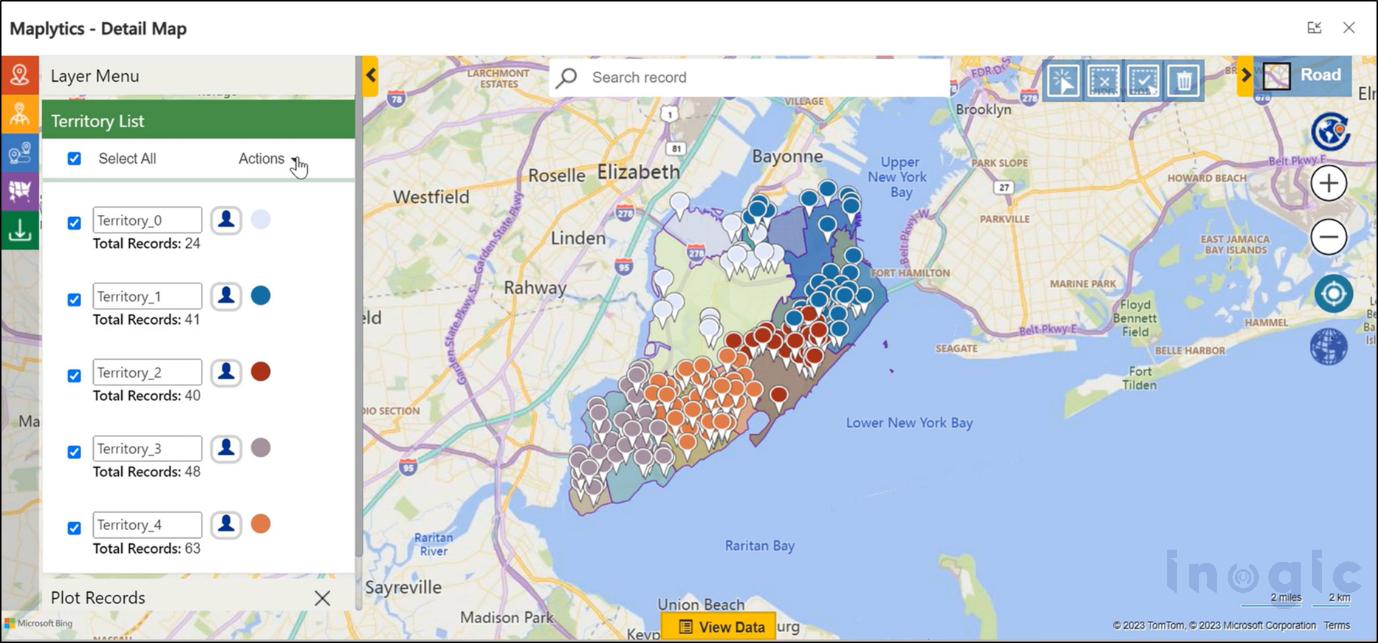
Sales Strategies When sales leaders started visualizing territories on a map instead of relying on lists, everything changed. Suddenly, it became obvious where high-value prospects were clustered, which areas were underserved, and which accounts belonged to which salesperson. Territory management transformed vague lists into clear visual boundaries, allowing sales reps and managers to instantly understand coverage without ambiguity. It resolved internal friction, ensured fair distribution of accounts, and prevented unnecessary travel or confusion over ownership. By embracing territory visualization, teams could respond to prospects more quickly, ensure coverage consistency, and reduce burnout by equalizing workloads.

You can download a 15-day free trial of Maplytics now and experience the tool in your environment!

2. Treat Route Planning as a Core Sales Skill

Route planning is often seen as a logistical problem, something sales reps have to “just deal with.” The reality is that without thoughtful planning, a rep’s schedule can become chaotic, with meetings scattered across the map in inefficient patterns. Poor routing not only wastes fuel and time but also leads to exhausted reps and fewer meaningful interactions with prospects.
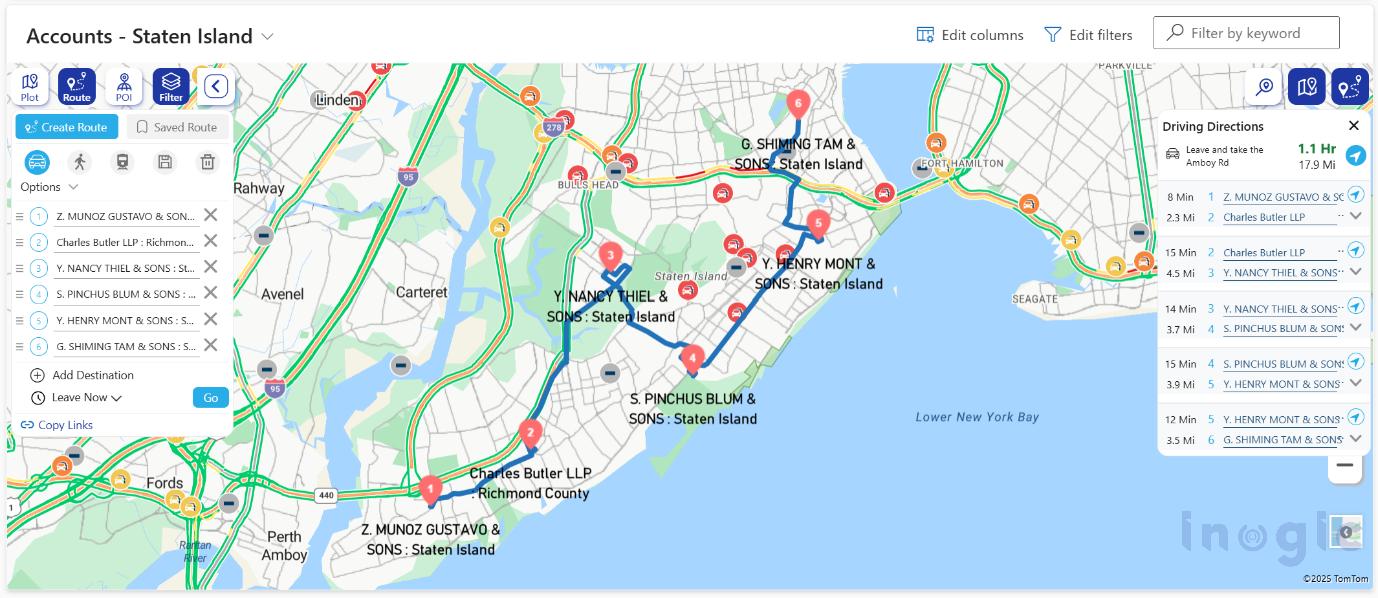
Sales Strategies In contrast, when route planning becomes a regular part of a rep’s routine, productivity naturally climbs. Optimized multi-stop routing helps reps avoid traffic bottlenecks, reduce backtracking, and compress what would be a long day of travel into a more focused and productive schedule. One real-world story illustrates this perfectly. A field rep who previously could fit only three client visits into a day was able to see five, simply by clustering appointments and planning an efficient route. Smart route planning is about enabling sales teams to focus on selling rather than navigating. Integrated route optimization also cuts fuel and travel costs, increases daily visit capacity, reduces fatigue, and boosts punctuality, leading to better sales outcomes and improved morale.

3. Prioritize What’s Close to You

It’s common for sales professionals to chase big leads that are geographically distant, overlooking potential opportunities right in their immediate vicinity. Historically, many teams filter prospects by industry, deal size, or stage, without considering the role location plays in sales efficiency and success. Ignoring geographic proximity means missed chances to build relationships quickly and efficiently.
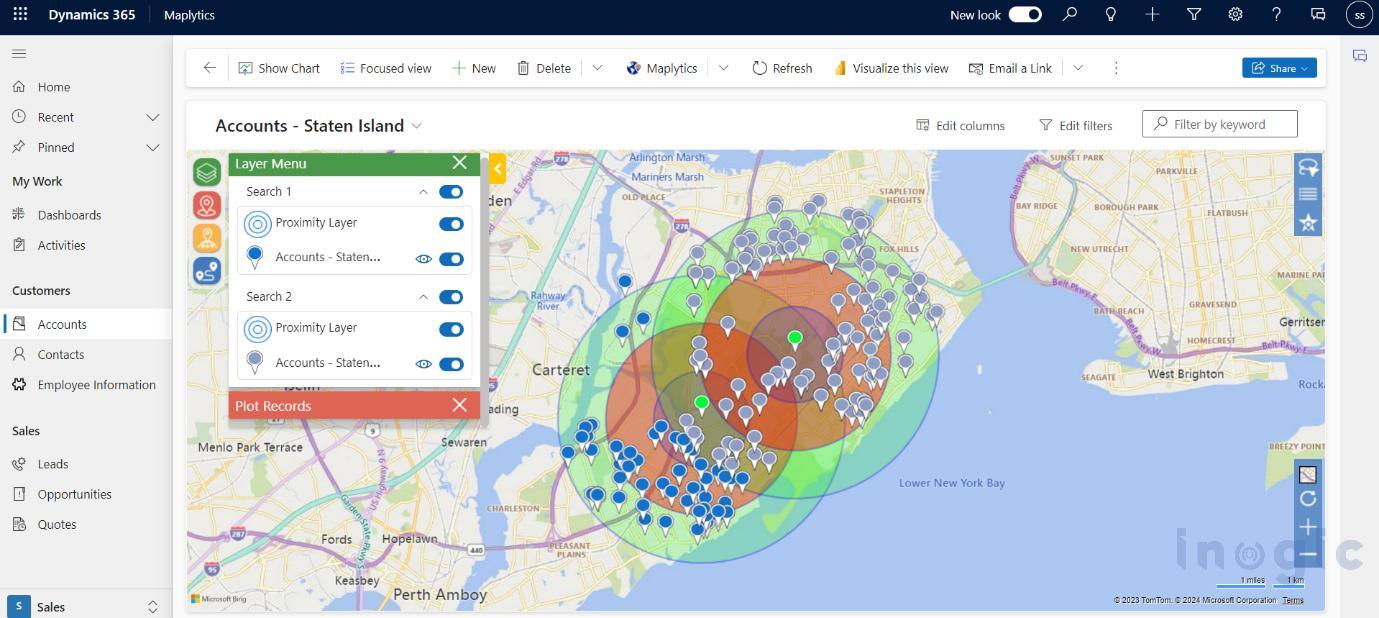
Sales Strategies Adopting a location-aware selling approach changes that. By easily identifying leads, accounts, or opportunities near the rep’s current location, teams can make better use of their time and energy. Shorter travel distances mean faster follow-ups, more face-to-face meetings, and higher meeting acceptance rates. For example, between two scheduled visits, a rep identified multiple warm leads within close range, fitting in extra visits that led to faster deal closures. Selling what’s nearby helps teams maximize productivity, make themselves more available, and build stronger relationships through frequent, timely interactions.

4. Use AI to Answer “What Should I Do Next?”

Sales reps instinctively ask themselves multiple times a day, “What should I do next?” This decision fatigue arises from constantly switching between tools, reports, and dashboards in hopes of finding the next best action. It’s inefficient and takes focus away from core selling activities.
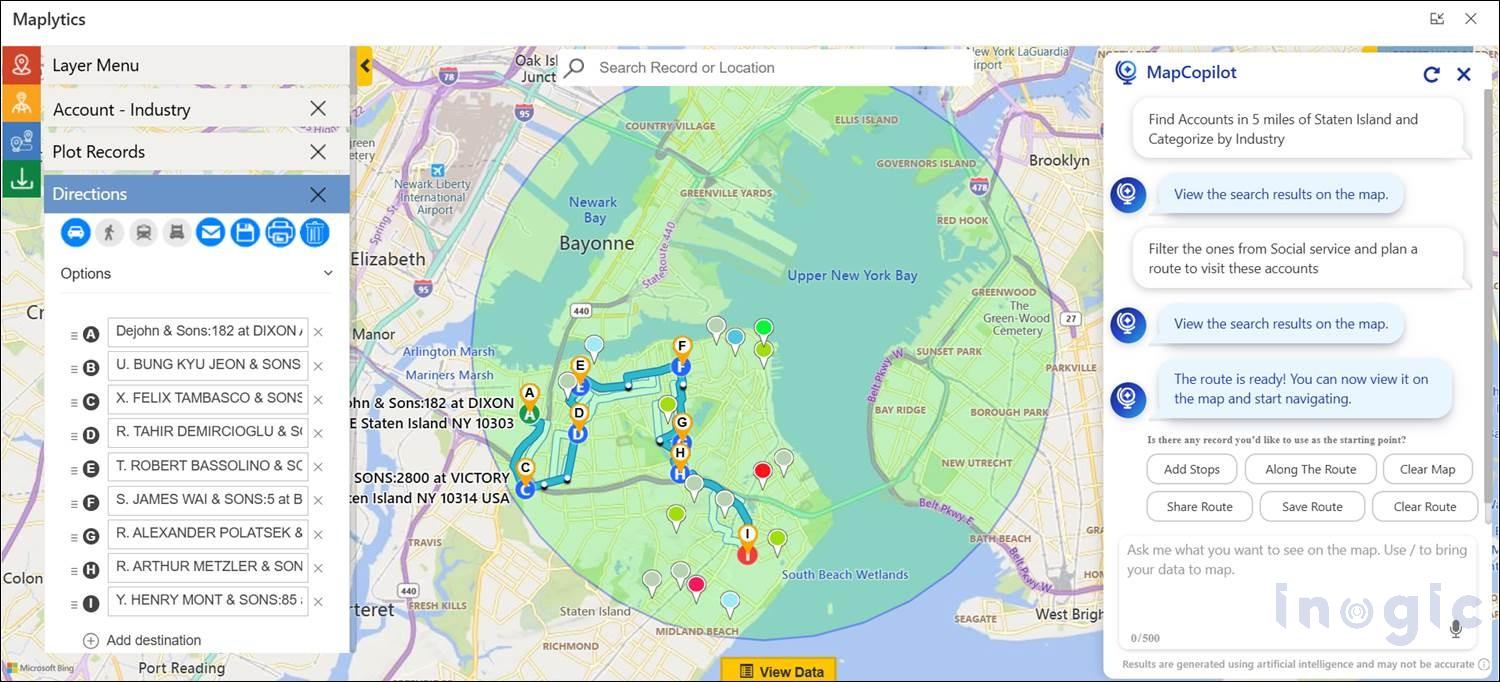
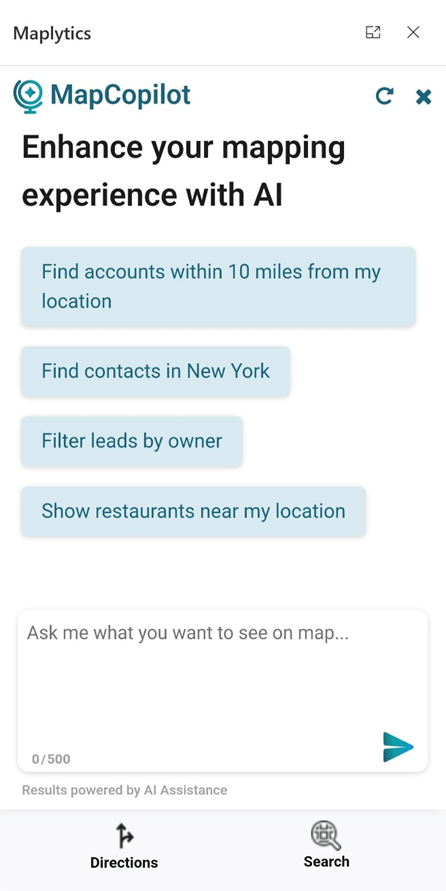
Sales Strategies That’s where AI-powered assistants come in. Instead of manually filtering through dashboards, reps can interact with smart tools that instantly surface insights based on natural language requests. For example, they might ask to “show nearby leads,” “plot today’s travel route,” or “find accounts within a 20-minute drive.” The system responds immediately with actionable results, helping reps make faster, more informed decisions in the moment. This level of automation reduces planning time significantly, keeps reps focused on selling, and makes advanced insights available to every member of the team, regardless of technical expertise. AI-driven mapping assistants help sales teams reduce manual effort, gain instant insights, and stay agile in their decision-making process.

MapCopilot is an AI-powered assistant in Maplytics that helps you instantly find nearby CRM records, plan routes, and get map insights using simple natural-language prompts.
Try MapCopilot within Maplytics’ 15-day free trial and see how easy smarter, location-based decisions can be.

5. Turn CRM Data into Visual Stories

Sales teams generate vast amounts of data in their CRM systems, but raw data rarely reveals patterns on its own. Rows of numbers and tables can tell what happened, but they don’t explain where opportunities exist or why certain trends emerge. That’s why integrating visual analytics becomes a powerful differentiator.
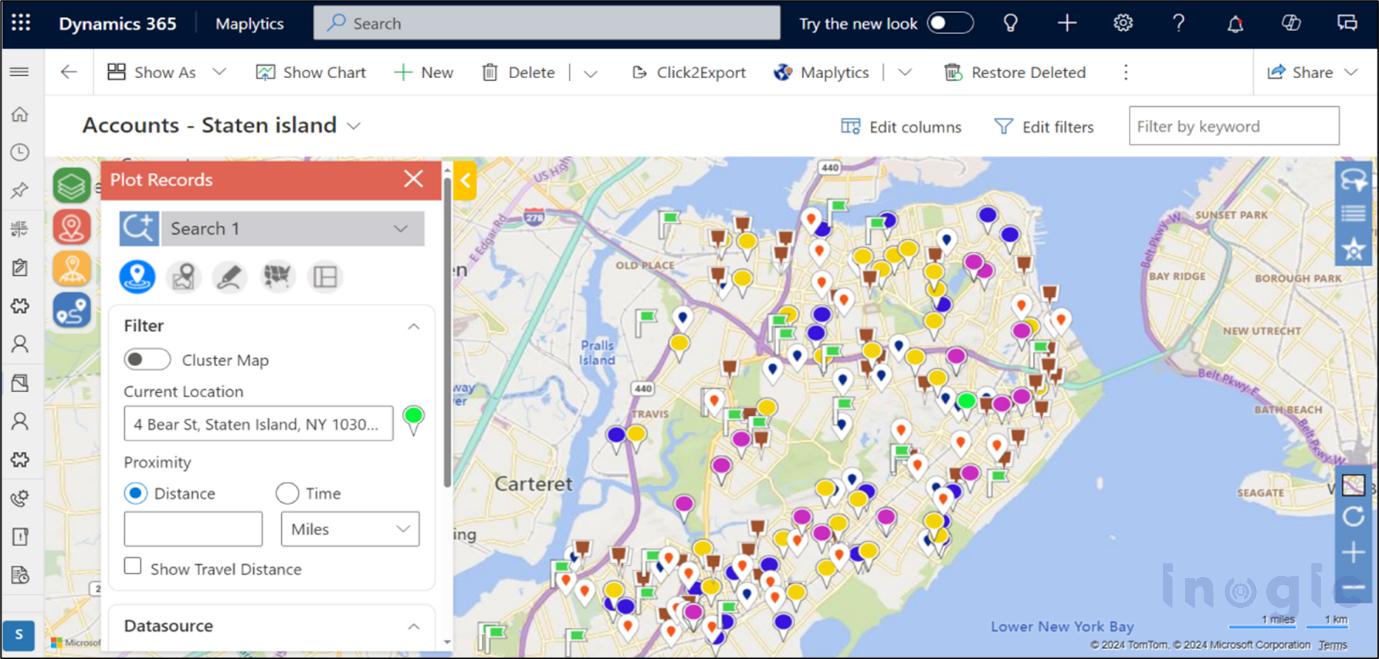
Sales Strategies Maps transform CRM data into visual stories. By plotting records geographically, sales teams can easily spot clusters of closed deals, regions with long sales cycles, or areas with high potential but low engagement. This visual context brings clarity to complex datasets and helps teams re-prioritize outreach strategies effectively. For instance, a sales rep analyzing heat maps and territory performance could identify neglected zones with significant potential and adjust their strategy accordingly, leading to a more balanced pipeline and more accurate forecasting. Visual analytics not only uncovers hidden insights but also enables more confident, data-driven decisions.

Modern Sales Success Starts with Location Strategy

Today’s most effective sales strategies combine data and context. Territory clarity, optimized routing, proximity-aware selling, AI-assisted insights, and geographic visualization are fundamental capabilities that differentiate high-performing teams from the rest. Sales organizations that adopt location intelligence are better positioned to sell smarter, move faster, and achieve consistent results with less stress. As teams move beyond traditional spreadsheets and static lists, they gain a deeper understanding of where their customers are, helping them answer the critical question of “where should I be right now?

What’s More?

Maplytics is available immediately as part of the for Dynamics 365, Power Apps, Power Pages, and Dataverse. Organizations interested in adoption, 15-day free trials, or personalized demos are encouraged to contact Maplytics’ sales team at crm@inogic.com

For more information, visit our website or Microsoft Marketplace. One can hop to the detailed BlogsClient TestimonialsSuccess StoriesIndustry Applications, and Video Library for quick query resolution. Technical docs for the working of Maplytics are also available for reference.

Kindly leave us a review or write about your experience on the Marketplace or the G2 Website.

The post 5 Practical Sales Strategies That Deliver Measurable Results first appeared on Microsoft Dynamics 365 CRM Tips and Tricks.

Maplytics 2025 RoundUp and the Road to 2026

Maplytics

2025 was a remarkable year for Maplytics. Across product innovation, AI breakthroughs, and meaningful engagement with the broader CRM community, Maplytics re-emphasized how location analytics and intelligent automation can transform everyday business operations.

As enterprises continue to embrace digital transformation and data-driven decision-making, Maplytics has positioned itself at the forefront of end-to-end geo-mapping and analytical solutions. In this yearly recap, we reflect on the major accomplishments that defined 2025 and look ahead to where 2026 could take us, especially as features like conversational AI become more central to how teams work.

Going Beyond Maps

At the start of the year, Maplytics aimed at delivering deeper functionality and features that help users extract actionable insights from their CRM data with ease. The focus was to make geo-mapping more powerful, workflows more efficient, and analytics more intuitive.

This vision came to life through several major updates and new capabilities throughout 2025, expanding what users could expect from their CRM’s location intelligence. It shifted from interactive, manual mapping to AI-driven intelligence.

You can download a 15-day free trial of Maplytics now and experience the tool in your environment!

Summer 2025 Technical Update

One of the most substantial releases of the year landed in the summer, bringing significant enhancements across the product:

  • Azure Maps Integration– By integrating Microsoft’s next-generation map platform, Maplytics improved map rendering, accuracy, and performance within Dynamics 365/PowerApps/ Power Pages/Dataverse. Users benefited from richer visuals, faster response times, and more precise geo-location data. With Bing ready to retire soon, this switch is essential.

Maplytics

  • Smarter Territory Management– The territory planning experience saw a major upgrade with new balancing, hierarchy visualization, and draft workflows. Users/ CRM Admins could manage regions more effectively, balance workloads based on key metrics like revenue or account count, and save multiple territory versions for strategic planning.
  • Expanded Bulk and Categorization Tools– To support larger datasets and more complex workflows, Maplytics introduced bulk editing and better categorization features. These changes significantly reduced manual work when updating or configuring map attributes across large record sets.
  • Live Tracking Enhancements– Support for time zone awareness and improved route waypoints made it easier for global teams to coordinate field tasks with real-time accuracy and geo context.
  • Canvas App Integration– Maplytics extended mapping capabilities into Microsoft Power Apps Canvas Apps, enabling custom application builders to embed interactive maps and visualize CRM records in unique, workflow-specific interfaces.
  • Plot data from File– With this addition, users can save CRM space as they can plot records directly from an Excel instead of adding the records to the CRM and then visualizing them on the map.

These updates helped teams visualize data in ways that were more contextually rich and more relevant to the decisions they make every day.

Introducing MapCopilot- AI that Talks Maps

Perhaps the most talked-about launch of the year was MapCopilot– a conversational AI assistant built directly into Maplytics. With the rise of AI adoption across enterprise software, MapCopilot brought a new dimension to geo-analytics by letting users interact with their data using natural-language prompts.

Rather than navigating through multiple menus and filters, users could simply type or speak requests such as:

  • “Show all leads within 10 miles of my current location.”
  • “Optimize routes for plotted sales visits.”
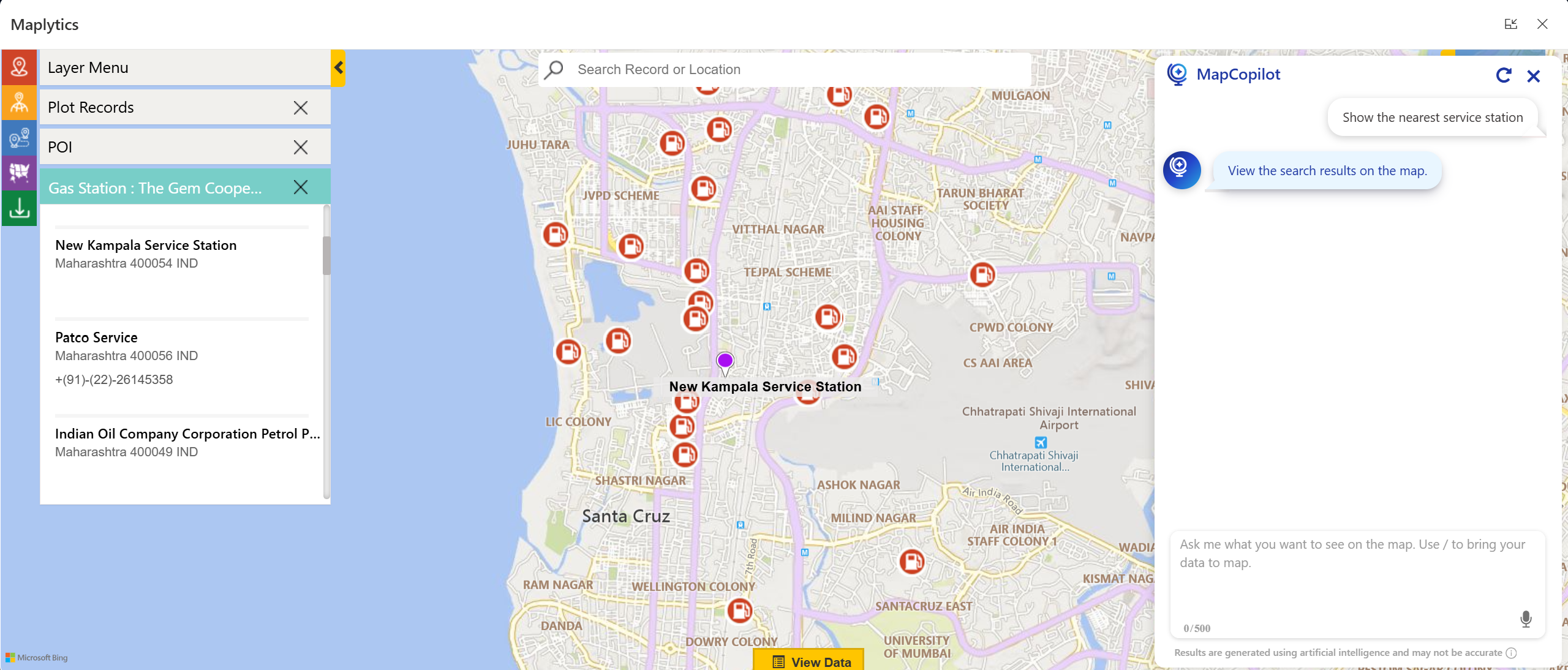
  • “Find nearby gas stations.”

Maplytics

These conversational interactions get instantly translated into visual insights on the map, proximity searches, or optimized route plans, creating a more intuitive user experience and lowering the barrier to entry for advanced location intelligence. This innovation empowers even non-technical team members to get fast, accurate spatial insights without a steep learning curve.

MapCopilot also assists users in motion, such as field reps, managers, and service personnel. They can ask questions directly from mobile devices, enabling smarter decisions on the go. The contextual understanding across prompts (viz., requesting a follow-up filter after an initial plot) further enhances its utility.

Analytics that Drive Action

The real value of Maplytics in 2025 was measured in impact as well. Organizations using Maplytics reported:

  • Faster territory planning compared to traditional methods
  • Increased field productivity due to optimized routing
  • More equitable workload distribution across sales and service teams
  • Better decision-making with visual insights that link geography and business metrics

By combining CRM data with spatial intelligence and AI assistance, Maplytics helped users focus less on data wrangling and more on driving value with decisions that matter.

Events & Community Engagement

Maplytics also made its presence felt across key industry events in 2025, engaging with customers, partners, and Dynamics 365 professionals around the globe.

In May 2025, Maplytics took the stage at DynamicsMinds- a leading event for CRM and Power Platform professionals. Attendees were introduced to the latest mapping innovations and real-world use cases, seeing firsthand how location intelligence could enhance business outcomes across industries.

At this event, the Maplytics team showcased map visualizations, territory workflows, and how CRM data could be turned into actionable insights in an interactive setting that encouraged learning and hands-on exploration.

Later in the year, Maplytics featured prominently at the Community Summit North America event, where the spotlight was on AI + Maps featuring MapCopilot. The booth demonstrated live use cases, inviting attendees to experience how natural language queries could literally transform the way they interact with maps and CRM records.

These events highlighted Maplytics’ innovation and reinforced that location intelligence is a strategic asset for modern business.

A Gist of What 2025 Taught Us

From a leadership perspective, 2025 underscored several key insights-

  • AI must be functional, not just flashy. Conversational AI features like MapCopilot demonstrated that AI is most valuable when it simplifies real workflows and delivers practical insights rather than just aesthetic enhancements.
  • Integration is critical. Deep embedding within Dynamics 365 with Azure Maps meant users could access spatial insights without context switching, making work smoother.
  • Community shapes innovation. Feedback from users, partners, and field professionals helped refine features throughout the year, ensuring enhancements met real business needs.

Eyes Ahead In 2026

As we look to 2026, the Maplytics roadmap is focused on expanding AI capabilities even further, evolving MapCopilot to provide deeper predictive insights, and creating more intelligent automation that anticipates user needs.

As organizations continue to rethink how location intelligence fits into everyday decision-making, the focus moving into 2026 remains on making mapping smarter, more intuitive, and easier to act upon. The next phase of innovation is expected to emphasize greater use of AI, improved automation, and experiences that adapt naturally to how teams work.

A Year of Progress and New Beginnings

2025 was a transformative year for Maplytics- blending smart maps, meaningful AI innovation, and strong community engagement. From Azure Maps integration and territory management improvements to the debut of MapCopilot and memorable event appearances, the trajectory was upwards.

But the story doesn’t end here. As we step into 2026, the journey continues with bigger visions, bold innovations, and ever-closer alignment to the needs of organizations that rely on Dynamics 365 for mission-critical decisions.

Here’s to another year of smarter mapping!

What’s More?

Organizations interested in adopting Maplytics, 15-day free trials, or personalized demos are encouraged to contact Maplytics’ sales team at crm@inogic.com

For more information, visit our Website or Microsoft Marketplace. One can hop onto the detailed BlogsClient TestimonialsSuccess StoriesIndustry Applications, and Video Library for a quick query resolution. Technical docs for the working of Maplytics are also available for reference.

Kindly leave us a review or write about your experience on AppSource or the G2 Website.

The post Maplytics 2025 RoundUp and the Road to 2026 first appeared on Microsoft Dynamics 365 CRM Tips and Tricks.
Meet MapCopilot — Your AI-Powered Geo-Mapping Companion for Dynamics 365

Inogic - MapCopilot Maplytics

In the modern digital landscape, data visualization and spatial intelligence are central to effective decision-making. Maps no longer just display locations, but

  • interpret business movement,
  • drive smarter workflows, and
  • enable teams to act faster

Introducing MapCopilot, the latest innovation from the glorious Maplytics suite, designed for users of Microsoft Dynamics 365 and Dataverse who want to enjoy intelligent geo-mapping without the manual setup.

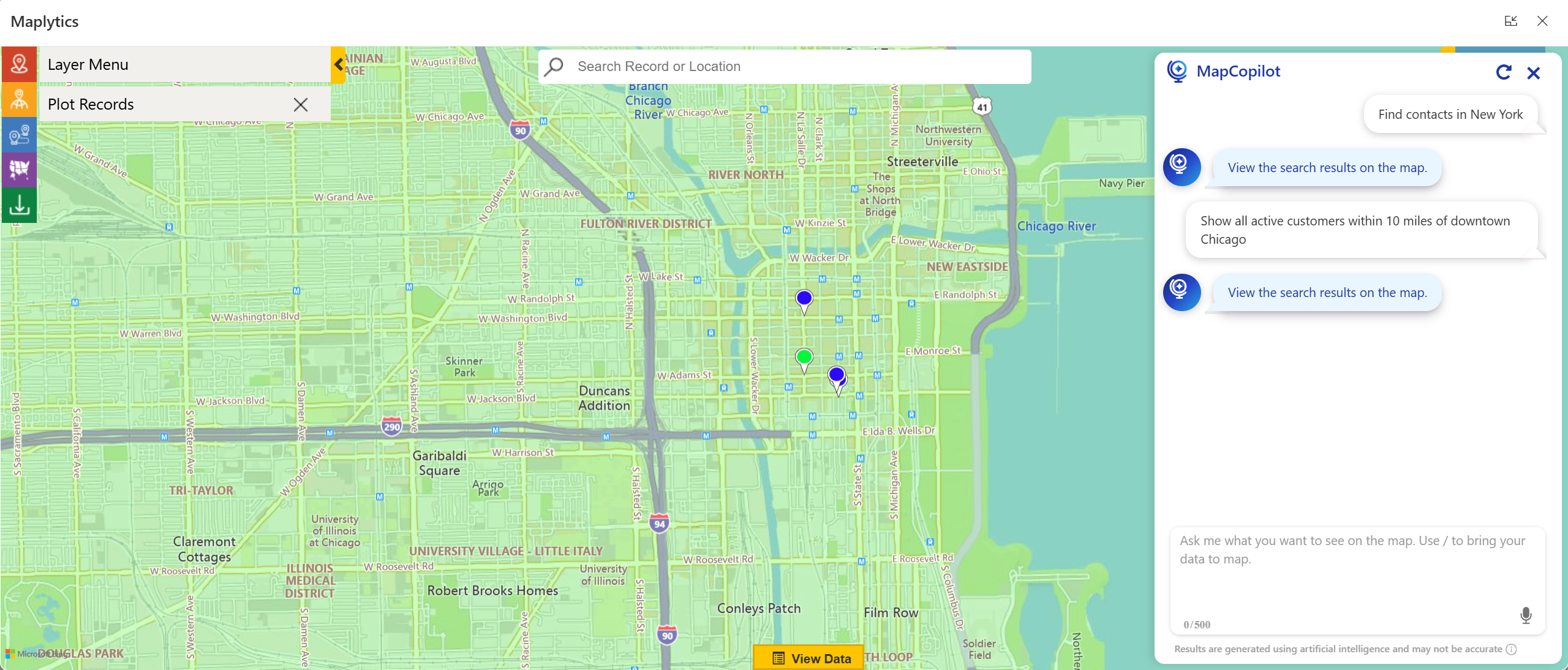
With MapCopilot, users no longer need to work with complex filters, remember specific map configurations, or toggle between tools. Instead, they can type or speak natural-language queries, such as:

“Show all active customers within 10 miles of downtown Chicago.”

AI-Powered Geo-Mapping Companion for Dynamics 365

Within seconds, MapCopilot interprets the prompt, applies the right filters, and displays a fully interactive map or optimized route, all within Dynamics 365.

Whether it’s plotting locations, performing proximity analysis, or designing efficient travel routes, MapCopilot transforms spatial data into actionable intelligence, making CRM navigation simpler, faster, and conversational.

Why MapCopilot Matters?

For most CRM users, performing spatial tasks, such as identifying nearby clients, analyzing data classifications, or optimizing routes, can involve multiple steps and configurations. Even with the powerful capabilities of Maplytics, some users prefer a more intuitive, quick, “ask-and-act” experience.

That’s where MapCopilot steps in. It eliminates manual input, reducing the effort to a single, human-like interaction.

Here’s how it transforms the experience:

  • Fewer clicks, faster output: Ask “Find open opportunities within 15 km of my location” and get results instantly plotted.
  • AI-powered understanding: Natural-language queries are converted into accurate mapping instructions without technical know-how.
  • Integrated within Dynamics 365: No third-party navigation or switching of apps is required. MapCopilot works natively inside your CRM.

As a result, teams spend less time configuring and more time analyzing, planning, and executing.

Key Capabilities of MapCopilot

  1. Conversational Mapping via Natural Language

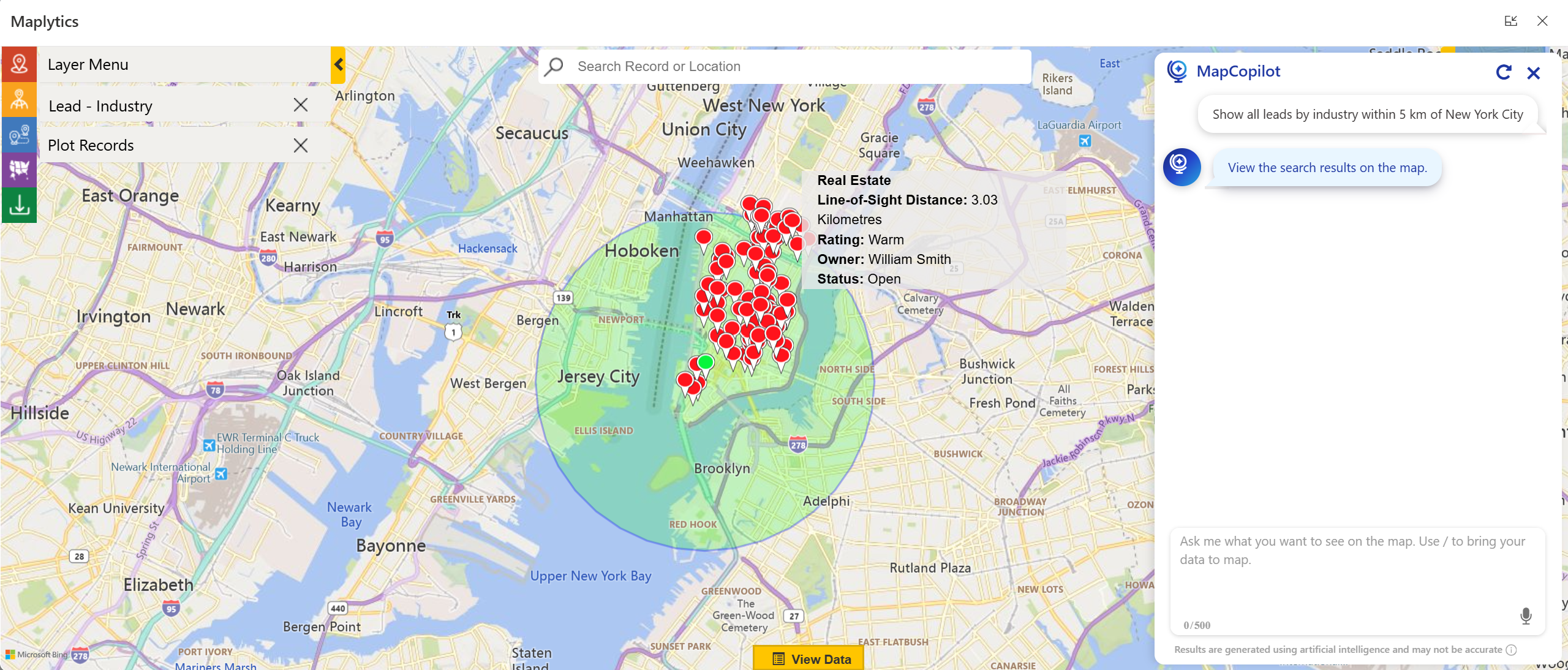
With MapCopilot, maps become conversational. There’s no need to remember commands, syntax, or settings. You can simply type or speak what you need, and the AI interprets your intent.

Example commands:

  • “Show all leads by industry within 5 km of New York City.”

AI-Powered Geo-Mapping Companion for Dynamics 365

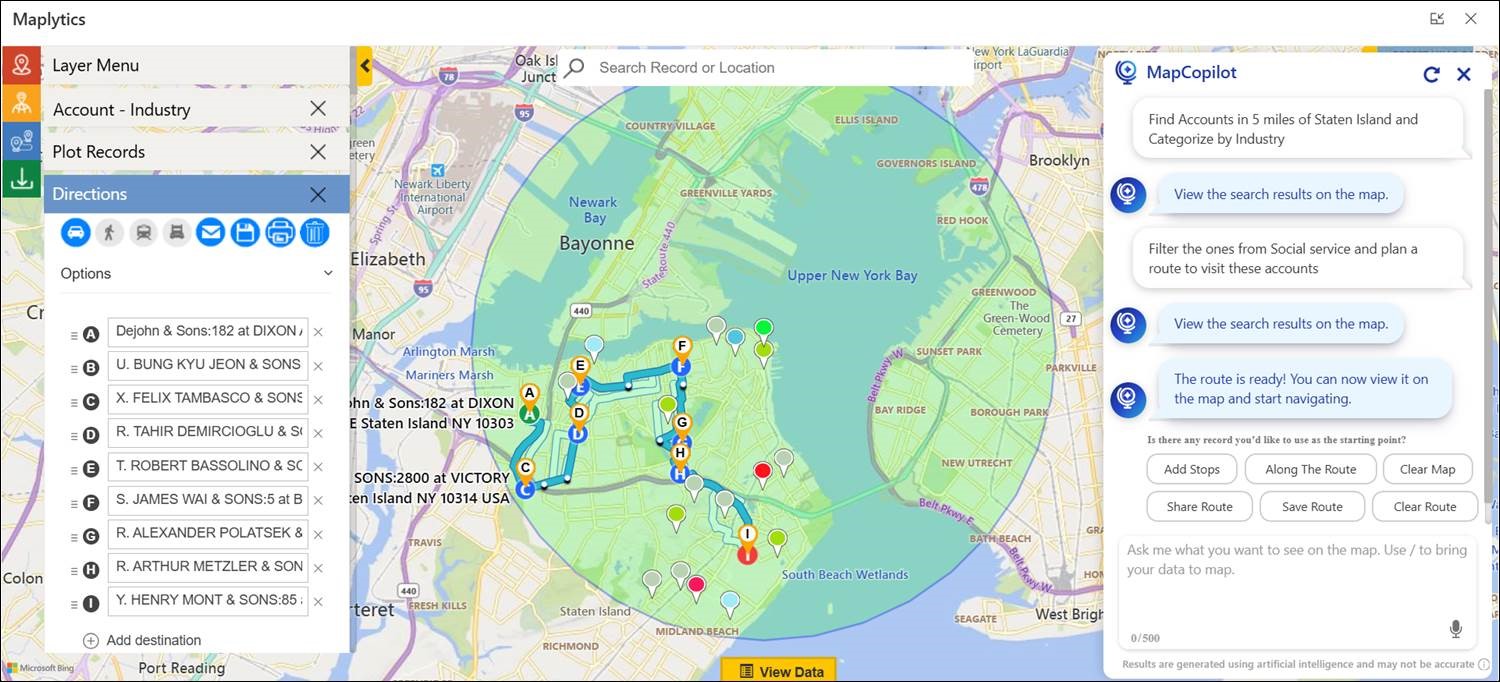
  • “Plan an optimized route for these five accounts.”
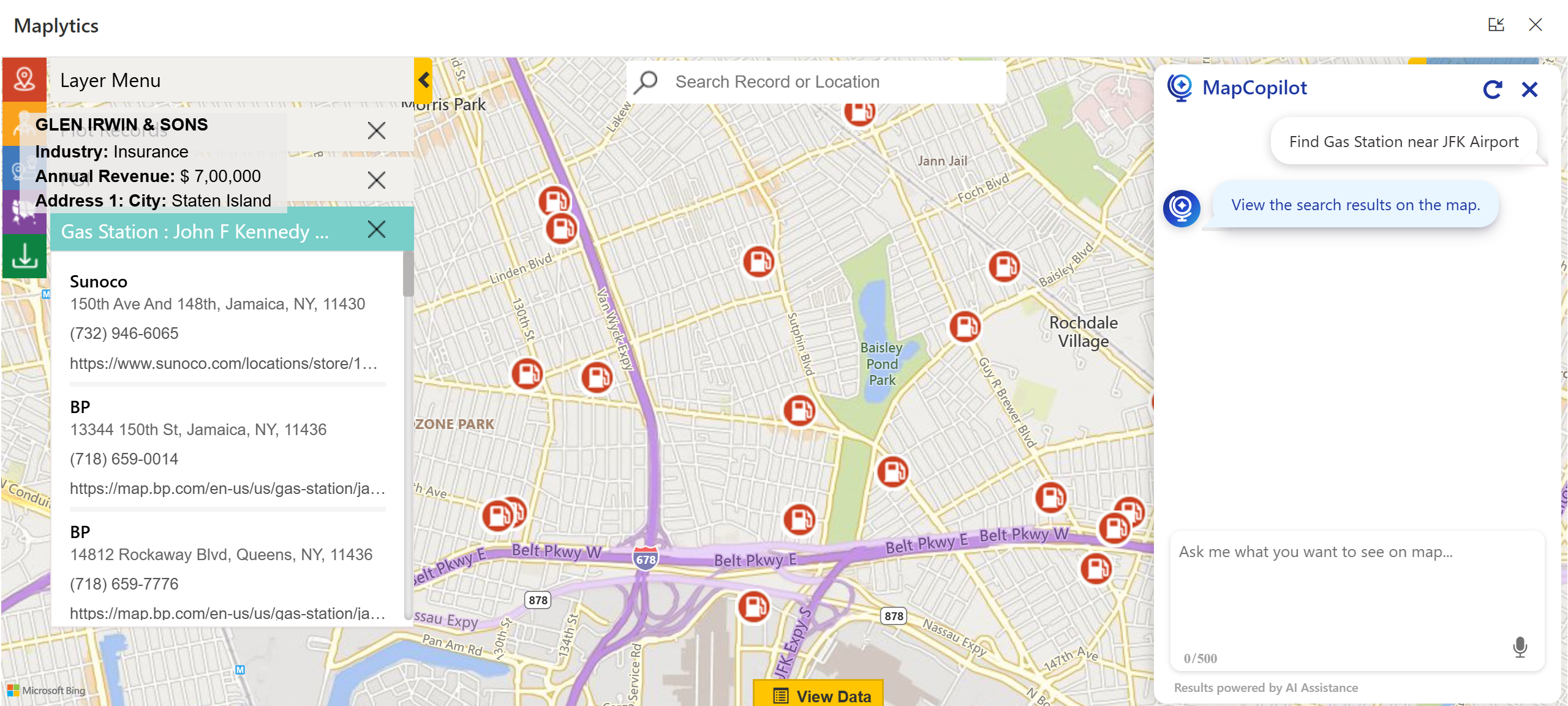
  • “Find gas stations near ABC Corporation.”

This conversational design ensures every team member, regardless of technical background, can instantly gain spatial insight without relying on a GIS expert or admin.

  1. Simplified Proximity and Radius Search

Forget manual setup for proximity analysis. You can now ask questions like:

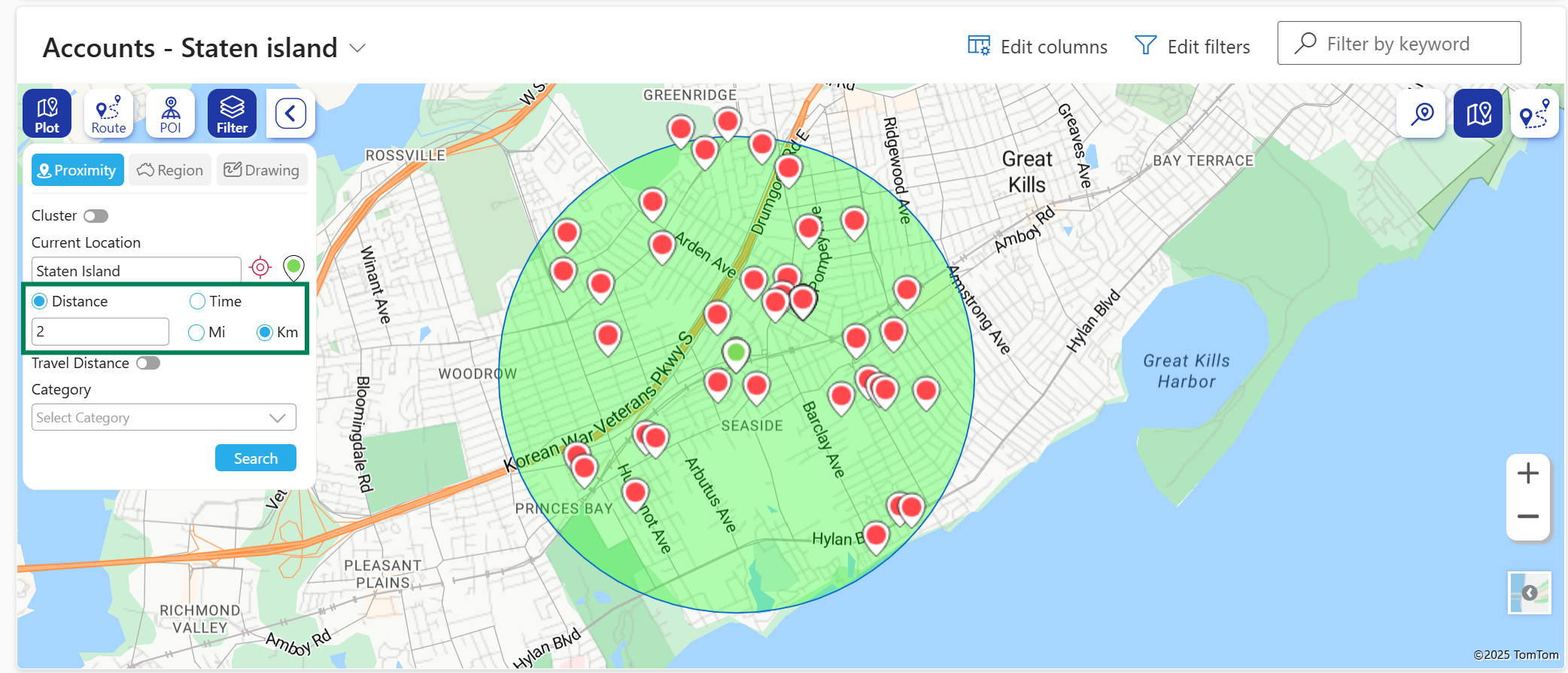
“Show accounts within 5 miles of Nancy Thiel & Sons.”

MapCopilot automatically identifies the location, calculates distance, and displays relevant records complete with radius visualization and travel time estimates.

This capability is especially valuable for sales and service teams who frequently look for nearby leads, prospects, or assets to maximize daily coverage.

  1. Route Optimization That Saves Time & Cost

Efficient travel planning is at the heart of field operations. MapCopilot makes this effortless.

Simply specify your destinations, or just ask, and the assistant builds the shortest, most efficient route, considering real-world factors like travel distance, stop sequence, and accessibility.

AI-Powered Geo-Mapping Companion for Dynamics 365

Resulting benefits include:

  • Reduced travel time and fuel expenses
  • Increased customer visits per day
  • Improved productivity for every field rep
  1. Points of Interest (POI) Location

MapCopilot goes beyond CRM data. It helps users identify Points of Interest (POI) Locations like airports, restaurants, repair shops, or gas stations around any given area, enhancing travel convenience and opportunity identification.

AI-Powered Geo-Mapping Companion for Dynamics 365

  1. Work from Anywhere, Anytime

With distributed teams becoming the norm, MapCopilot ensures that location intelligence stays with you on the move.
Its native integration with Microsoft Dynamics 365 allows users to access mapping data, optimized routes, and analytical insights from any device, anytime.

AI-Powered Geo-Mapping Companion for Dynamics 365

  1. Context-Aware Conversations

Unlike standard assistants that reset after each query, MapCopilot maintains context awareness.

Start with:

“Plot all opportunities in California.”
Then continue with:
“Now show only those with revenue greater than $10,000.”

MapCopilot remembers your previous query, applies filters dynamically, and refines the visualization, ensuring a smooth, conversational workflow.

Technical Framework and Integration

MapCopilot is built on the Maplytics framework, powered by Azure OpenAI and tightly integrated with Microsoft Dynamics 365 and Dataverse.

Key integration highlights:

  • Embedded directly inside the Maplytics interface in Dynamics 365.
  • No need for third-party apps or extensions.
  • Fully compatible with web, tablet, and mobile experiences.
  • Optimized for fast rendering using Dynamics 365 map panels.

From installation to execution, the setup process is streamlined and ready to use. Once Maplytics is deployed, MapCopilot becomes immediately accessible to all licensed users.

Real-World Application Scenarios

Field Sales Optimization

A regional sales manager can quickly ask:

“Show all open service leads within 50 kilometers of our warehouse.”
“Now optimize the route for visiting them.”

MapCopilot instantly visualizes the results, color-codes them by priority, and generates the most efficient travel path.

This eliminates manual scheduling and lets teams focus on closing deals, not plotting maps.

Results organizations have seen:

  • Up to 20% reduction in transportation costs
  • 30% shorter travel routes
  • 40% faster decision-making through map visualizations

Customer Service & Field Support

Service dispatchers can instantly locate nearby technicians or customer sites by asking:

“Find available engineers within 10 miles of the reported service location.”

MapCopilot identifies suitable resources and even helps auto-schedule the task through Maplytics’ routing and scheduling modules.

Marketing & Campaign Targeting

Marketers can use MapCopilot to locate clusters of leads or customers within a defined region:

“Show contacts within 20 miles of Boston categorized by campaign type.”

These insights help tailor campaigns to regional audiences, improving ROI and engagement.

Enterprise Benefits of MapCopilot

By making location intelligence conversational, MapCopilot empowers every employee, from sales and marketing to logistics and support, to make smarter, location-driven decisions without any friction.

Why MapCopilot is a Game-Changer

  1. Brings AI to Mapping – Makes spatial queries intelligent, quick, and contextual.
  2. Democratizes Data Access – Anyone, regardless of tech skill, can extract location insights.
  3. Simplifies CRM Workflows – Reduces dependency on admins for map configuration.
  4. Enhances Field Efficiency – Optimizes travel and service operations seamlessly.
  5. Adapts to Your Business – Supports varied industries and user roles out of the box.

Getting Started with MapCopilot

MapCopilot is available as part of the Maplytics suite for Dynamics 365 and Dataverse.

You can get started in three easy steps:

  1. Install or update Maplytics from Microsoft AppSource.
  2. Access the MapCopilot feature within your Maplytics interface.
  3. Start typing or speaking your mapping queries directly.

You’ll instantly experience the ease of AI-powered navigation inside your CRM.

Frequently Asked Questions (FAQs)

  1. Do I need technical training to use MapCopilot?
    No. MapCopilot is designed for ease of use. If you can type or speak your request, you can use it, no GIS or CRM admin experience required.
  2. Is MapCopilot a separate application?
    No. It’s fully integrated within Maplytics, which runs inside Dynamics 365 and Dataverse environments.
  3. Can it handle voice input?
    Yes, users can either type or use voice commands for queries.
  4. How does it differ from standard Maplytics features?
    Traditional Maplytics workflows are menu-based, while MapCopilot uses AI-driven natural language to interpret user intent, reducing time and complexity.
  5. Does MapCopilot support route optimization and proximity search?
    Absolutely. These are built-in capabilities, powered by robust routing algorithms.
  6. Is my data secure?
    Yes. MapCopilot operates entirely within Dynamics 365 and adheres to Microsoft’s security and compliance frameworks.

Experience MapCopilot in Action

If you’re ready to make your CRM mapping effortless and intelligent, it’s time to try MapCopilot.

Start a 15-day free trial or request a personalized demo tailored to your business needs.

Write to crm@inogic.com to schedule your session.
Visit the Maplytics Website or explore it on Microsoft AppSource.
For more insights, browse our blogs, case studies, and success stories.

With MapCopilot, mapping isn’t just visual, it’s conversational, smart, and built for the future of AI-powered CRM. For applied knowledge, you can hop onto the detailed BlogsClient TestimonialsSuccess StoriesIndustry Applications, and Video Library for a quick query resolution. Technical docs for the working of Maplytics are also available for reference.

Kindly leave us a review or write about your experience on AppSource or the G2 Website.

The post Meet MapCopilot — Your AI-Powered Geo-Mapping Companion for Dynamics 365 first appeared on Microsoft Dynamics 365 CRM Tips and Tricks.
❌