Power Up - Upskill Yourself...

Normal view

Before yesterdayMain stream
  • ✇Microsoft Dynamics 365 CRM Tips and Tricks
  • WhatsApp Messaging in CRM: Why It Outperforms Email in 2026
    In 2026, customer communication expectations have fundamentally changed. Today’s buyers demand instant, conversational, and mobile-friendly interactions, not long email threads they might open hours or even days later. For Dynamics 365 CRM users, this shift is significant. Businesses are moving away from traditional email as the primary CRM channel and adopting WhatsApp CRM integrations like WhatsApp4Dynamics. This solution enables faster engagement, higher conversions, and stronger customer re
     

WhatsApp Messaging in CRM: Why It Outperforms Email in 2026

WhatsApp CRM integrations

In 2026, customer communication expectations have fundamentally changed. Today’s buyers demand instant, conversational, and mobile-friendly interactions, not long email threads they might open hours or even days later.

For Dynamics 365 CRM users, this shift is significant. Businesses are moving away from traditional email as the primary CRM channel and adopting WhatsApp CRM integrations like WhatsApp4Dynamics. This solution enables faster engagement, higher conversions, and stronger customer relationships, all directly within the Dynamics 365 environment.

With WhatsApp4Dynamics, teams can manage real-time conversations, leverage AI-powered assistance for quick replies and insights, automate workflows, and access CRM context while chatting, all without leaving the CRM interface.

WhatsApp CRM integrations

WhatsApp vs Email for CRM Communication: Engagement and Conversion Stats

The performance difference between WhatsApp and email isn’t subtle; it’s dramatic.

Open and Response Rates

  • WhatsApp messages enjoy approximately 98% open rates, meaning almost every message sent gets seen.
  • In contrast, email open rates struggle to reach 20–25% on average.
  • Many WhatsApp messages are read within minutes of delivery, while emails often languish unread for hours or longer.

Click‑Through and Reply Rates

  • WhatsApp click-through rates (CTR) typically fall between 45–60%, far higher than the 2–5% CTR typical of email campaigns.
  • Messaging app response rates can be 40–60% or more, whereas email response rates languish in the single digits.

Conversion Impact

  • Conversations on WhatsApp have been linked to conversion rates up to 45–60%, significantly outpacing email.
  • In markets where WhatsApp dominates usage, such as India, Brazil, and the UAE, these engagement advantages translate into higher sales and faster lead closure.

These numbers explain why modern CRM teams are rethinking their communication strategy: WhatsApp reaches customers where they are most active and receptive.

Why Dynamics 365 Users Are Moving to WhatsApp CRM

Dynamics 365 CRM is a powerful platform for managing customer data, processes, and automation. But even the best CRM data is limited without seamless communication tools.

Integrations like WhatsApp4Dynamics make WhatsApp a natural extension of Dynamics 365, providing:

Real-Time Conversations, Not Delayed Threads

  • WhatsApp messages feel immediate and conversational, unlike email replies that can take hours or never arrive.

Higher Engagement for Better Conversions

  • With higher open and click rates, prospects are more likely to respond, whether booking appointments, confirming orders, or seeking support.

CRM Context Inside Messages

  • Every chat can be tied directly to CRM records, Leads, Contacts, and Cases, ensuring conversations are informed by context and history.

Automation and Personalization

  • Triggered messages, appointment reminders, and workflow-based follow-ups can all be automated within Dynamics 365, ensuring timely, relevant communication.

Support, Marketing, and Sales All in One Place

  • Conversations can be routed, assigned, and analyzed directly from the CRM, eliminating the need to juggle multiple platforms.

AI Chat Assistance

  • WhatsApp4Dynamics offers an AI-powered chat assistant that can summarize conversations, suggest relevant responses, and provide quick insights from CRM records, helping agents respond faster and smarter.

Where Email Still Has Value, and Where It Doesn’t

It’s important to understand that email is not dead, but its role in CRM is evolving.

Best Uses for Email

  • Formal documentation (contracts, invoices)
  • Long-form content that requires reading at the customer’s pace
  • Newsletters and content that may not be urgent

Where Email Falls Short

  • Instant engagement High conversion communication
  • Personalized conversational workflows

A combined strategy often works best: use email for formal or long content, and WhatsApp for real-time, high-impact interactions.

Business Impact of WhatsApp CRM Integration

Sales and Lead Conversion

Sales teams that respond within minutes on WhatsApp are far more likely to convert leads. With higher open/reply rates, messages become active conversations, not ignored notifications.

Customer Support

Real-time chats reduce support resolution time. Chat history linked to CRM records ensures agents have context for every interaction.

Marketing Campaigns

With opt-in automation, you can send promotional content that customers actually open and act upon, increasing engagement and reducing unsubscribe rates.

Operational Notifications

Order confirmations, delivery updates, and appointment reminders all get seen almost immediately on WhatsApp, reducing friction and customer follow-ups.

How to Implement WhatsApp CRM Integration in Dynamics 365

To get the most out of WhatsApp for CRM, follow these high-level steps:

  1. Choose a WhatsApp CRM integration solution, like WhatsApp4Dynamics.
  2. Connect your WhatsApp Business API account to Dynamics 365.
  3. Configure consent workflows using Single or Double Opt‑In.
  4. Set up message templates and approve them for business use.
  5. Define automation triggers (e.g., lead creation, status updates).
  6. Train agents to use chat assignments and CRM context during conversations.
  7. Monitor and optimize conversion performance from WhatsApp vs email.

For a detailed step-by-step guide on setting up WhatsApp with Dynamics 365 using the Meta or Twilio APIs, check out this blog:
👉 https://www.inogic.com/blog/2025/05/how-to-integrate-whatsapp-with-dynamics-365-crm-using-meta-or-twilio-apis/

FAQs

1. Does WhatsApp perform better than email for CRM communication?

Statistically, yes. WhatsApp messages have open rates around 98% and click-through/conversion rates of 45–60%, far surpassing email metrics. Integrations such as WhatsApp4Dynamics bring these advantages directly into Dynamics 365, making it easier for teams to engage customers effectively.

2. Can I automate messages in Dynamics 365 using WhatsApp?

Absolutely. With WhatsApp4Dynamics, you can automate triggered messages, appointment reminders, follow-ups, and workflow-based responses, all directly within the Dynamics 365 CRM environment.

3. How can I link WhatsApp chats to CRM records?

WhatsApp chats can be connected to Leads, Contacts, Cases, or custom entities in your CRM. Tools like WhatsApp4Dynamics automatically map chats to CRM records, giving agents instant context and history for every conversation.

4. What are the challenges of switching from email to WhatsApp for CRM?

Common challenges include managing consent, message template approvals, avoiding spam perception, and handling delivery at scale. WhatsApp4Dynamics helps address these by providing built-in opt-in workflows, template management, and AI-assisted suggestions for relevant messaging.

5. Can WhatsApp be used for sales, support, and marketing in one platform?

Yes. Integrations like WhatsApp4Dynamics enable businesses to route, assign, and manage all conversations, whether sales, support, or marketing, directly from Dynamics 365, ensuring a unified communication experience.

Conclusion: The Future Is Conversational CRM

Email still has its place, especially for formal communication, but WhatsApp is the future of CRM engagement in 2026 and beyond. With massive open rates, real-time interactions, and deep integration capabilities inside Dynamics 365, WhatsApp allows CRM teams to be faster, more personal, and more effective than ever.

If you want to transform your CRM communications, start with WhatsApp in Dynamics 365, informed by data, powered by automation, and aligned with customer expectations.

Try WhatsApp4Dynamics today with a 15-day free trial from Inogic or Microsoft Marketplace.

Request a personalized demo: crm@inogic.com

The post WhatsApp Messaging in CRM: Why It Outperforms Email in 2026 first appeared on Microsoft Dynamics 365 CRM Tips and Tricks.
  • ✇Microsoft Dynamics 365 CRM Tips and Tricks
  • Boost Customer Interaction Using WhatsApp in CRM: A Complete Integration Guide!
    The 5-Minute Response Gap That’s Costing You Customers 98% of WhatsApp messages are read within 3 minutes. Compare that to emails, where only 20% are opened within the first hour and you’ll start to see why your customers are frustrated. Your sales team sent 50 follow-up emails last week. Only 8 got responses. Meanwhile, your competitors are having real-time conversations with your prospects on WhatsApp and closing deals before you even get a reply. The modern customer doesn’t wait. They text,
     

Boost Customer Interaction Using WhatsApp in CRM: A Complete Integration Guide!

WhatsApp CRM

The 5-Minute Response Gap That’s Costing You Customers

98% of WhatsApp messages are read within 3 minutes. Compare that to emails, where only 20% are opened within the first hour and you’ll start to see why your customers are frustrated.

Your sales team sent 50 follow-up emails last week. Only 8 got responses. Meanwhile, your competitors are having real-time conversations with your prospects on WhatsApp and closing deals before you even get a reply.

The modern customer doesn’t wait. They text, they message, they expect instant responses. And if your CRM isn’t built for real-time, conversational engagement, you’re already falling behind.

That’s exactly why businesses are racing to implement WhatsApp integration in Dynamics 365, turning their CRM from a database into a dynamic conversation hub.

Why Traditional CRM Communication is Failing Your Customers

Let’s be honest: email and phone calls aren’t cutting it anymore. Here’s what your current CRM communication looks like from your customer’s perspective:

  • Average response time: 24-48 hours (if they’re lucky)
  • Open rates: Declining year over year as inboxes overflow
  • Customer frustration: “Why haven’t they gotten back to me?”
  • Your CRM sends automated email reminders that no one reads
  • Sales reps spend hours chasing prospects via outdated channels
  • Customer service tickets stall waiting for responses
  • The cost: 67% of customers abandon a purchase because they couldn’t get timely support

Here’s the critical stat: 75% of customers expect responses within 5 minutes for urgent queries. Your current CRM communication channels can’t deliver that. But WhatsApp can.

The problem isn’t your team’s effort; it’s that you’re using 2010 tools to meet 2025 expectations. You can integrate WhatsApp with Dynamics 365 to bridge that gap, transforming your CRM from a static record-keeper into a real-time engagement platform.

WhatsApp Integration in Dynamics 365: Your Competitive Advantage

Enter WhatsApp: the channel where your customers already spend hours every day. With over 2 billion active users globally, WhatsApp isn’t just a messaging app; it’s where modern business conversations happen.

When you integrate WhatsApp with Dynamics 365, something powerful happens: every customer chat, every query, every update flows directly into your CRM workspace. No app-switching. No copy-pasting. No information silos.

Why WhatsApp Changes the Game

  • Instant Connection: Meet customers where they are on the app they already trust and use daily
  • Rich Media Sharing: Send product catalogs, payment links, support videos, and documents directly in chat
  • Verified Business Presence: WhatsApp Business API provides a green checkmark that builds instant trust
  • Global Reach: Connect with customers across 180+ countries without worrying about SMS costs or international calling
  • High Engagement Rates: WhatsApp messages have a 98% open rate compared to 20% for email

Introducing WhatsApp4Dynamics: The Bridge Between Conversations and CRM

But here’s the challenge: WhatsApp and Dynamics 365 don’t talk to each other natively. That’s where WhatsApp4Dynamics comes in a purpose-built WhatsApp connector for Dynamics CRM that brings these two powerhouses together.

With WhatsApp4Dynamics, your team can:

✅ Chat directly from Dynamics 365: No toggling between apps, WhatsApp conversations live inside your CRM interface

✅ Link chats to records: Every WhatsApp conversation automatically connects to the relevant Contact, Lead, Account, or Case record

✅ Share rich media: Send images, PDFs, videos, and voice notes without leaving the CRM

✅ Use pre-approved templates: Comply with WhatsApp Business Policy while sending quick, consistent messages

✅ Track conversation history: Complete audit trail of all customer interactions for better collaboration

✅ Automate workflows: Trigger Dynamics 365 processes based on WhatsApp interactions

This isn’t just a messaging add-on. It’s a complete transformation of how your team engages with customers, making WhatsApp integration in Dynamics CRM the foundation of modern customer interaction.

How to Get Started: Implementing WhatsApp Integration in Dynamics 365

Ready to transform your customer engagement? Here’s your roadmap to integrate WhatsApp in Dynamics 365 using WhatsApp4Dynamics:

Step 1: Set Up Your WhatsApp Business Account

  • Register for a WhatsApp Business API account (not the same as WhatsApp Business app)
  • Verify your business with Meta (Facebook)
  • Get your phone number verified and approved
  • Configure your business profile (company name, description, logo, business hours)

Time Required: 2-3 business days for verification

Step 2: Install WhatsApp4Dynamics from AppSource

  • Navigate to Microsoft AppSource or Dynamics 365 admin center
  • Search for “WhatsApp4Dynamics” by Inogic
  • Click “Get it now” and follow installation prompts
  • Choose which Dynamics 365 environments to deploy to

Time Required: 15-20 minutes

No Coding Required: The entire installation is a click-based configuration

Step 3: Connect WhatsApp to Your Dynamics 365 Environment

  • Open the WhatsApp4Dynamics configuration center in Dynamics 365
  • Authenticate your WhatsApp Business API account
  • Map your WhatsApp business phone number to Dynamics 365
  • Set permissions for which users/teams can access WhatsApp features

Time Required: 10-15 minutes

Step 4: Configure Entity Mappings

Decide how WhatsApp conversations connect to your CRM data:

  • Contacts: Link WhatsApp chats to Contact records automatically
  • Accounts: Associate conversations with company/organization records
  • Leads: Enable the sales team to engage leads via WhatsApp
  • Cases: Allow support team to manage tickets through WhatsApp
  • Custom Entities: Map to your unique business processes

Time Required: 20-30 minutes, depending on complexity

Step 5: Set Up Templates and Automation

  • Create pre-approved WhatsApp message templates (required by WhatsApp Business Policy)
  • Common templates to start with:
  • Welcome message
  • Appointment confirmation/reminder
  • Order status update
  • Support ticket acknowledgment
  • Follow-up after purchase/meeting
  • Configure automatic workflows:
    • Auto-send template when lead is created
    • Trigger notification when the case is resolved
    • Schedule follow-up messages based on customer actions

Time Required: 1-2 hours for the initial template library

AI-Powered WhatsApp Conversations: The Future is Now

Here’s where it gets exciting. WhatsApp integration in Dynamics 365 isn’t just about connecting two platforms; it’s about unlocking AI capabilities that make every conversation smarter.

Sentiment Analysis: Know How Customers Feel

Your support agent opens a WhatsApp conversation. Before they even read the messages, Dynamics 365 AI shows them:

  • Customer sentiment: Frustrated, Neutral, or Satisfied
  • Urgency indicators: Keywords suggesting high-priority issues
  • Conversation tone: Formal, casual, or emotional

Why This Matters: Agents tailor their responses based on emotional context, not just words. A frustrated customer gets priority handling and empathetic responses. A satisfied customer gets a quick upsell opportunity.

Copilot-Assisted Responses: Draft Messages Instantly

Your sales rep gets a WhatsApp question: “What’s your pricing for enterprise plans?”

Instead of typing from scratch, they click “Draft Response” and Copilot:

  1. Pulls relevant data from Dynamics 365: Enterprise pricing tiers, recent quotes, competitor comparison
  2. Drafts personalized message: “Hi [Customer Name], great question! Based on your team size of [X], here are our enterprise options…”
  3. Suggests next steps: Schedule demo, send detailed proposal, offer trial
  4. Rep reviews, edits, sends: Total time: 30 seconds instead of 5 minutes

Why This Matters: Faster responses without sacrificing personalization. Consistency across team members. New hires sound like veterans.

Automated Conversation Summaries: Never Lose Context

Long WhatsApp conversation with multiple back-and-forths? AI automatically:

  • Summarizes key points: Customer’s main issue, agreed solution, next steps
  • Extracts action items: Tasks for your team, commitments made to the customer
  • Updates CRM records: No manual data entry required
  • Creates timeline entry: Full conversation searchable and auditable

Why This Matters: Perfect handoffs between shifts/team members. No one asks customers to repeat themselves. Managers can review hundreds of conversations in minutes.

The Bottom Line on AI: With Dynamics 365’s AI and Copilot capabilities, WhatsApp4Dynamics users can enhance their communication experience with sentiment insights, response suggestions, and automation taking WhatsApp engagement to the next level

This isn’t future-tech. It’s available today with WhatsApp4Dynamics. Install it from our website or Microsoft AppSource and get a 15-day free trial now!

The post Boost Customer Interaction Using WhatsApp in CRM: A Complete Integration Guide! first appeared on Microsoft Dynamics 365 CRM Tips and Tricks.
  • ✇Microsoft Dynamics 365 CRM Tips and Tricks
  • AI-Powered WhatsApp Messaging in Dynamics 365 CRM: The Future of Customer Engagement!
    Do your customers expect instant replies on WhatsApp? They probably do! and missing that window can mean losing a lead or frustrating a loyal client. Managing WhatsApp chats inside Dynamics 365 CRM can be overwhelming without the right tools. That’s where WhatsApp4Dynamics comes in—turning your WhatsApp conversations into an intelligent, AI-powered customer engagement hub. With AI enhancements, every message becomes smarter, faster, and more personalized helping your team respond in seconds, au
     

AI-Powered WhatsApp Messaging in Dynamics 365 CRM: The Future of Customer Engagement!

AI-Powered WhatsApp Messaging in Dynamics 365 CRM

Do your customers expect instant replies on WhatsApp?

They probably do! and missing that window can mean losing a lead or frustrating a loyal client.

Managing WhatsApp chats inside Dynamics 365 CRM can be overwhelming without the right tools. That’s where WhatsApp4Dynamics comes in—turning your WhatsApp conversations into an intelligent, AI-powered customer engagement hub.

With AI enhancements, every message becomes smarter, faster, and more personalized helping your team respond in seconds, automate follow-ups, and keep conversations flowing effortlessly.

Let’s explore how AI + WhatsApp4Dynamics is redefining customer interactions in Dynamics 365 CRM.

WhatsApp Messaging in Dynamics 365 CRM

The Problem Without AI in WhatsApp CRM

Without AI, managing WhatsApp in Dynamics 365 can quickly turn into a bottleneck:

  • Manual Messaging – Slows down workflows and increases the chance of mistake.
  • Delayed Responses – Customers lose interest when replies aren’t instant.
  • Generic Replies – One-size-fits-all messaging fails to engage.
  • No Conversation Context – Agents struggle to recall past interactions.
  • Constant App Switching – Wastes time juggling between WhatsApp and CRM tools.

AI eliminates these roadblocks—making every chat faster, smarter, and more personal.

How AI in WhatsApp4Dynamics Solves CRM Challenges

WhatsApp4Dynamics, powered by InoWiz Copilot AI, turns WhatsApp into a smart customer engagement hub inside Dynamics 365 CRM. Here’s how AI makes the difference:

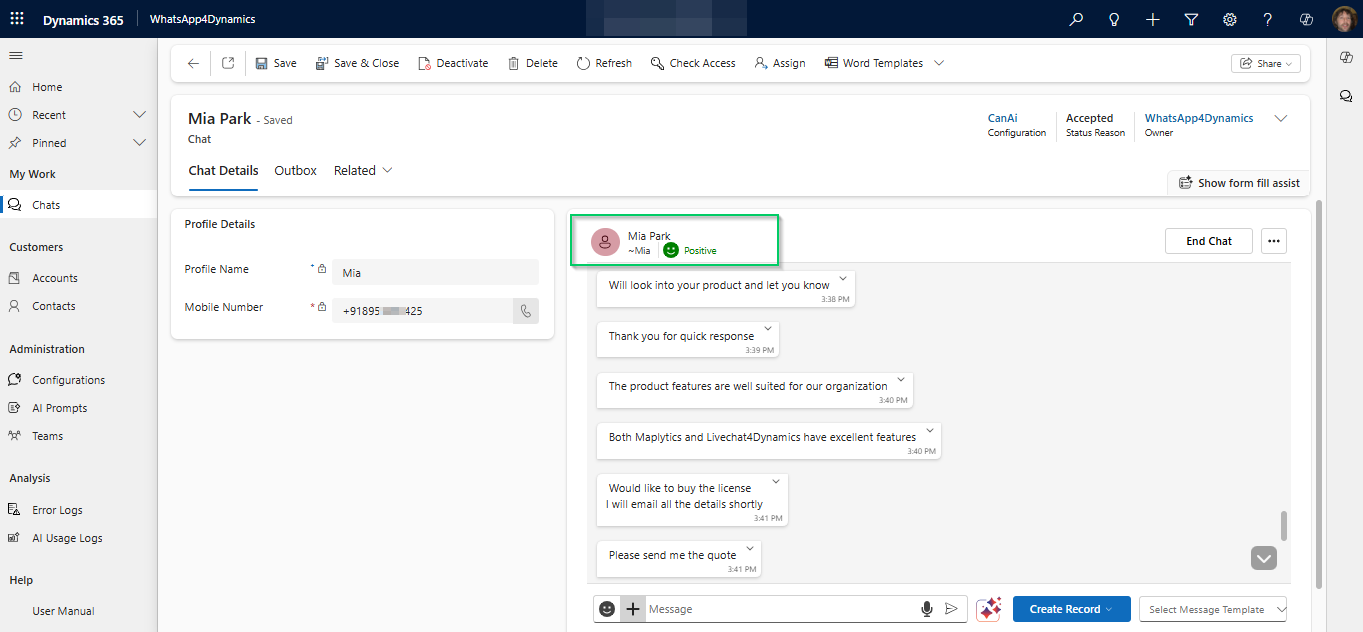
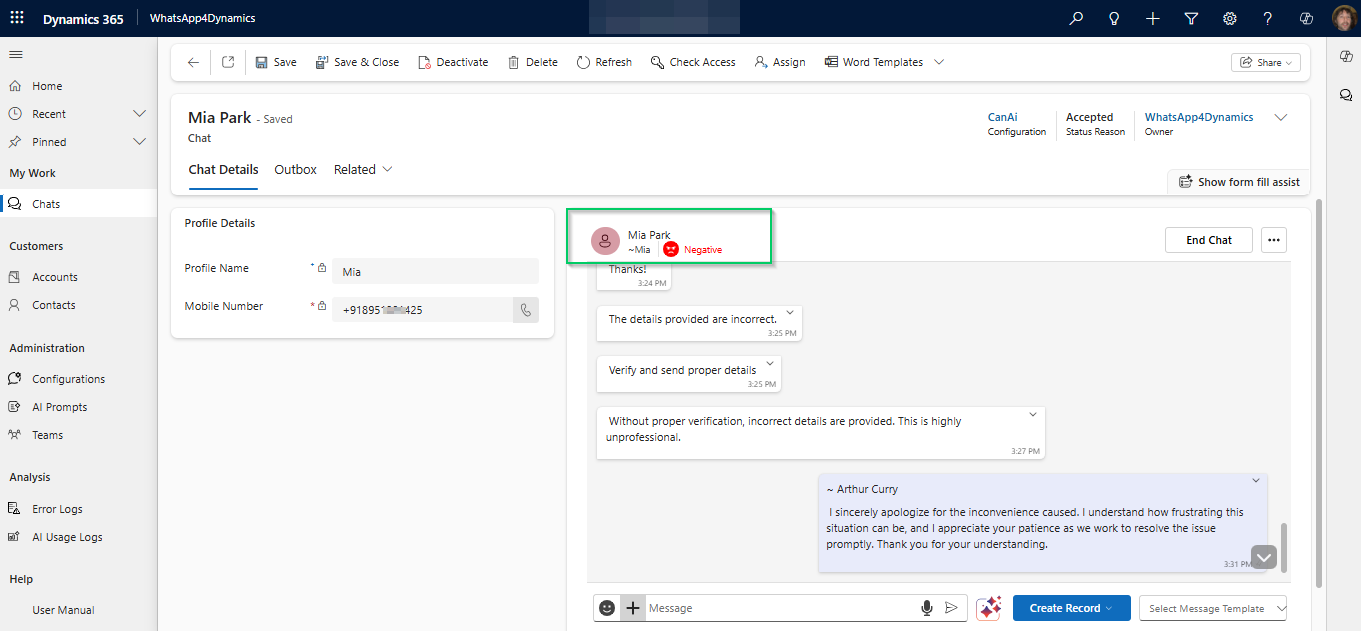
1. Sentiment Analysis

AI instantly scans incoming messages to detect tone – positive, negative, or neutral – so agents can quickly gauge customer mood and tailor their responses for maximum impact.

WhatsApp Messaging in Dynamics 365 CRM

Example: If a customer expresses frustration, the agent is alerted and can address the issue promptly with an empathetic, solution-focused tone.

WhatsApp Messaging in Dynamics 365 CRM

Benefit: Faster, more empathetic responses, leading to improved customer satisfaction.

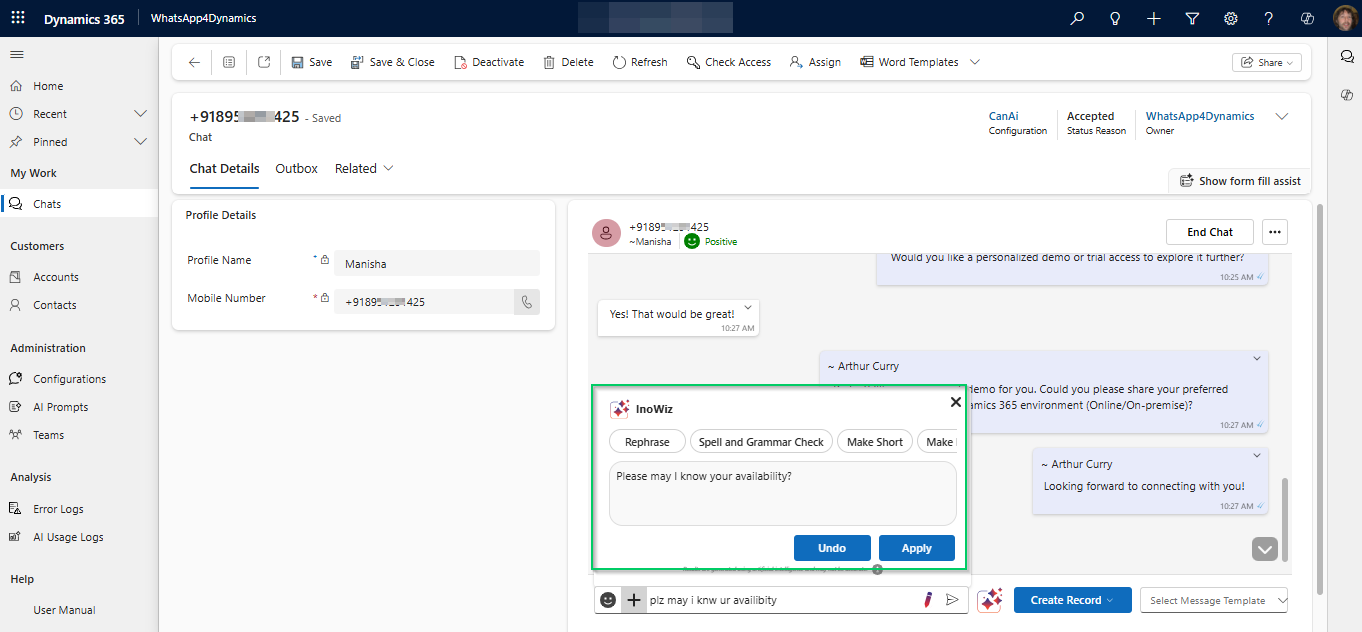
2. AI Text Rephrase Panel

AI helps rephrase outgoing messages to match your company’s tone and style. It also checks grammar, clarity, and readability to ensure every interaction feels professional and on-brand.

WhatsApp Messaging in Dynamics 365 CRM

Example: If an agent types a quick, informal response, AI can refine it into a polite, well-structured message that aligns with corporate communication standards

Benefit: Consistent, professional messaging that builds trust and strengthens brand image.

3. AI Chat Panel

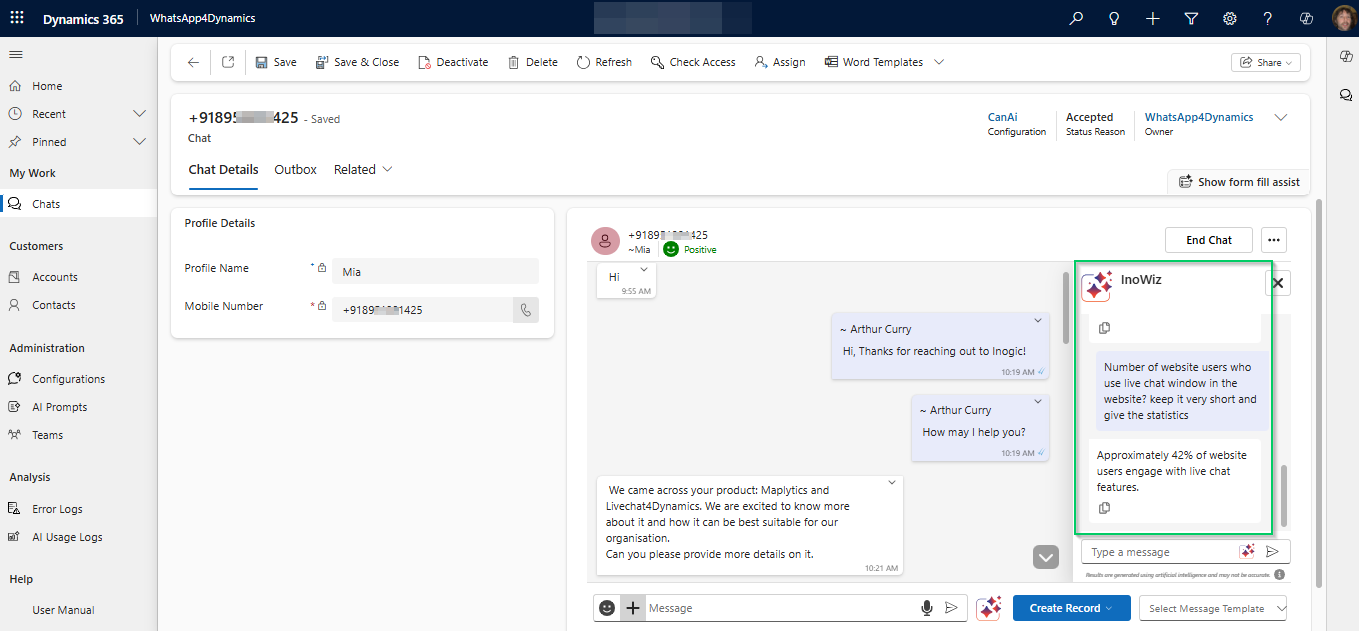
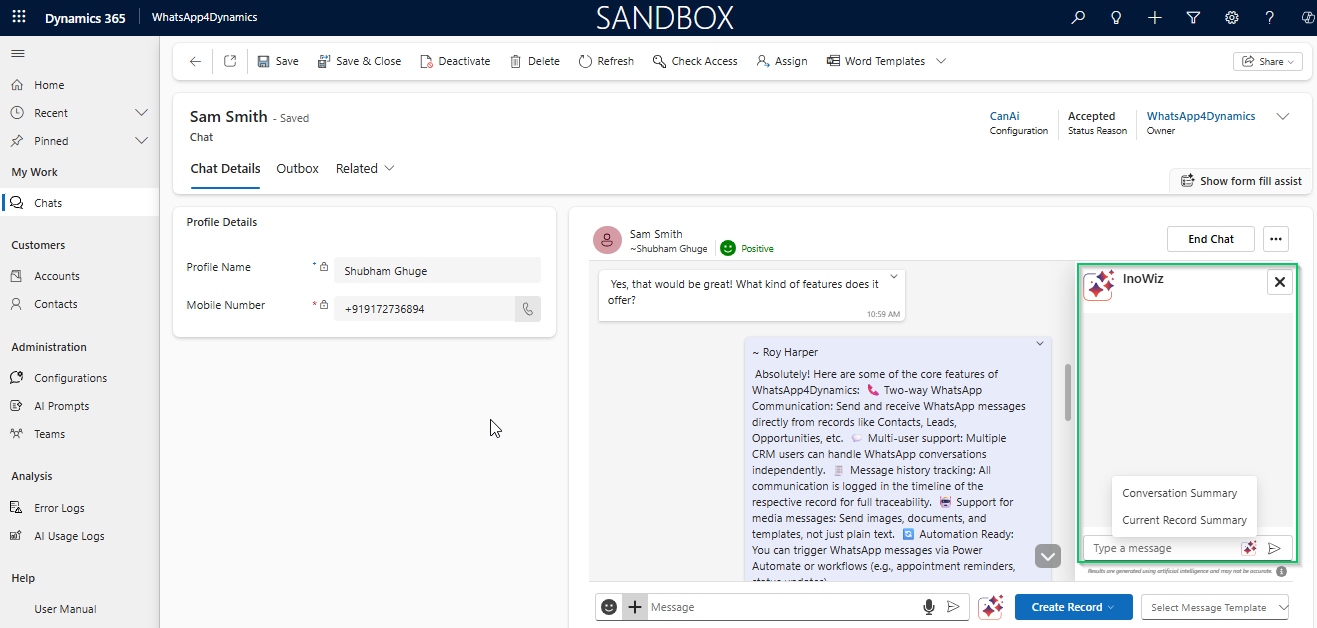
This panel gives agents a real-time summary of both the ongoing WhatsApp conversation and related CRM records. AI automatically surfaces relevant customer insights like past purchases, open cases, or recent interactions – so agents don’t have to search manually.

WhatsApp Messaging in Dynamics 365 CRM

Example: If a customer asks about an ongoing order, the panel instantly shows the order status, expected delivery date, and any related support tickets

WhatsApp Messaging in Dynamics 365 CRM

Benefit: Faster, context-rich replies that improve efficiency and deliver a more personalized customer experience.

Fun Fact: 85% of WhatsApp users connect with brands through messaging apps at least once a month. That’s a massive opportunity for businesses to boost engagement — and with AI-powered WhatsApp in Dynamics 365, you can make every conversation faster, smarter, and more personal.

Industry Use Cases for AI-Powered WhatsApp Integration

  1. Retail Industry
    Use Case: Send personalized product recommendations based on purchase history.
    Benefit:
    Boosts sales and customer satisfaction with relevant promotions.
  2. Healthcare Industry
    Use Case
    : Deliver appointment reminders, follow-ups, and health tips tailored to each patient.
    Benefit: Enhances patient engagement and reduces no-shows.
  3. Real Estate Industry
    Use Case
    : Share new listings, arrange property viewings, and answer queries instantly.
    Benefit: Increases lead conversion and client satisfaction.
  4. Financial Services
    Use Case
    : Provide personalized investment advice and product suggestions based on AI analysis.
    Benefit: Improves customer service and drives conversions.
  5. Education Sector
    Use Case
    : Send updates, reminders, and personalized learning materials to students and parents.
    Benefit: Strengthens communication, engagement, and parent involvement.

WhatsApp Messaging in Dynamics 365 CRM

FAQs on AI-Powered WhatsApp in Dynamics 365 CRM:

1. How does AI improve lead generation in Dynamics 365 with WhatsApp?

AI in WhatsApp4Dynamics analyzes customer behavior, identifies high-potential leads, sends personalized messages, and tracks engagement. This boosts lead conversion rates and strengthens the entire sales funnel inside Dynamics 365.

2. What are the main benefits of using AI in WhatsApp for CRM?

AI speeds up responses, ensures consistent messaging, and provides real-time insights—helping businesses deliver a more personalized, efficient customer experience.

3. Is AI in WhatsApp CRM good for sales?

Absolutely. With AI insights, sales teams can follow up faster, upsell strategically, and close deals more efficiently.

4. Can AI personalize messages?

Yes. WhatsApp4Dynamics leverages CRM data to create tailored, relevant, and context-aware messages for each customer.

5. Can AI-powered WhatsApp save agent time?

Definitely. Features like chat summaries, tone suggestions, and automated data capture streamline workflows, freeing agents to focus on meaningful customer conversations.

Wrapping Up

AI-powered WhatsApp4Dynamics is redefining how businesses connect with customers in Dynamics 365 CRM. From automated responses to personalized messaging and instant insights, it transforms WhatsApp into a smart, high-performance customer engagement tool.

🚀 Ready to see it in action?
Watch our demo video to experience the new WhatsApp Chat Assistant for Dynamics 365 WhatsApp integration in real time!

Ready to watch your customer engagement soar with AI?

Try WhatsApp4Dynamics with a 15-day free trial from our website or Microsoft AppSource.

Prefer a live demo? Email us at crm@inogic.com – we’ll walk you through it!

The post AI-Powered WhatsApp Messaging in Dynamics 365 CRM: The Future of Customer Engagement! first appeared on Microsoft Dynamics 365 CRM Tips and Tricks.
❌
❌